Comprehensive server security "Trend Vision One - Endpoint Security"

About Trend Vision One - Endpoint Security
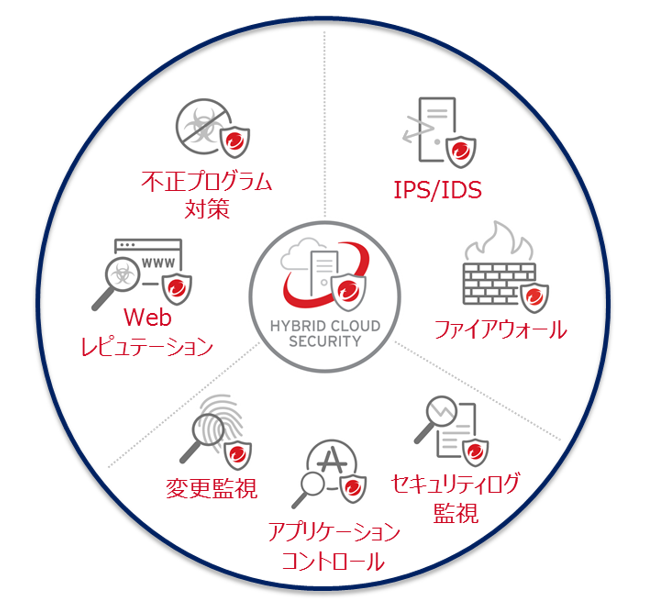 Trend Vision One - Endpoint Security provides the security functions required for server security at the operating system, network layer, and application layer through centralized management, achieving multi-layered defense for servers
In addition, the management server is provided by Trend Micro as a cloud-based (SaaS) service, so customers do not need to build their own management server, reducing the burden and costs of daily operational tasks
Seven security features provided
① Countermeasures against malware
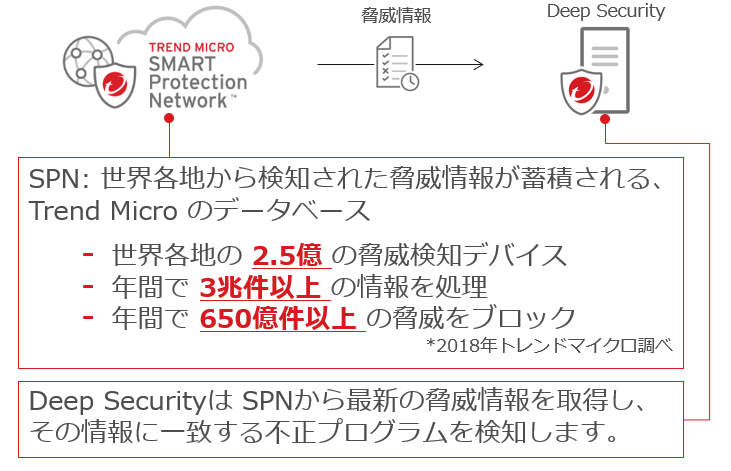
It protects against malware attacks and blocks access to malicious URLs. By utilizing Trend Micro's Smart Protection Network (SPN), it is possible to detect and defend against malicious programs using the latest threat information
② Web Reputation
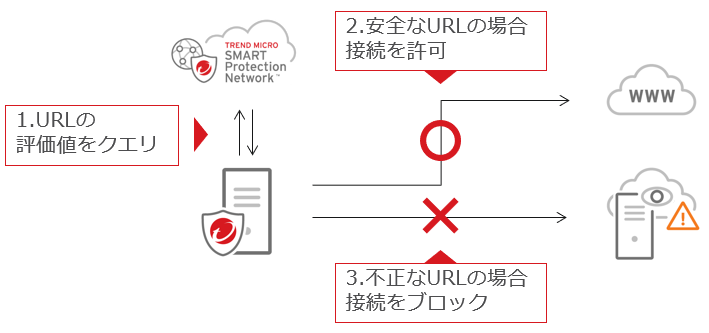
This feature blocks connections to malicious URLs. When a server attempts to access a web page, it checks the security of the URL and
blocks the connection if it is deemed malicious.
Normally, users do not intentionally connect to the Internet from their servers, but there are cases where malicious programs connect to C&C servers, etc. In such cases, it is necessary to use the web reputation function to block unauthorized connections
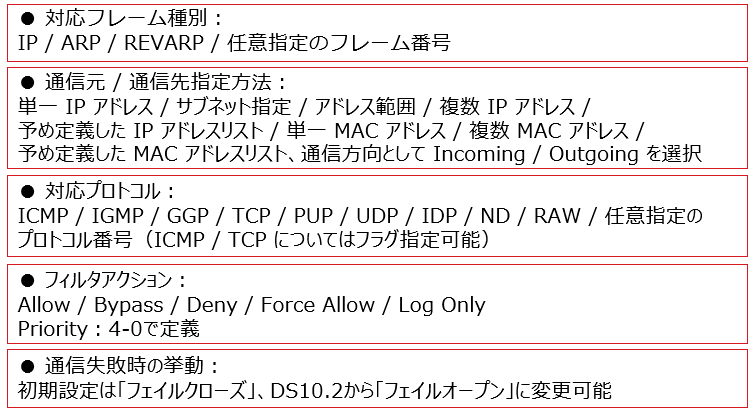
③ Host-based firewall
It reduces the chances of external attacks and allows for detailed policy settings covering layers 2 to 4. Because it is a host-based solution, it can not only protect against attacks from outside the network, but also from communications from infected devices from the internal network to the server
In addition, policies can be set for TCP/UDP/ICMP using the stateful inspection function
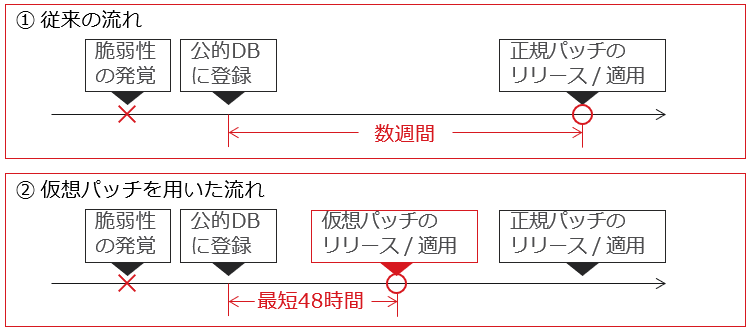
④ IDS/IPS (Intrusion Detection/Intrusion Prevention)
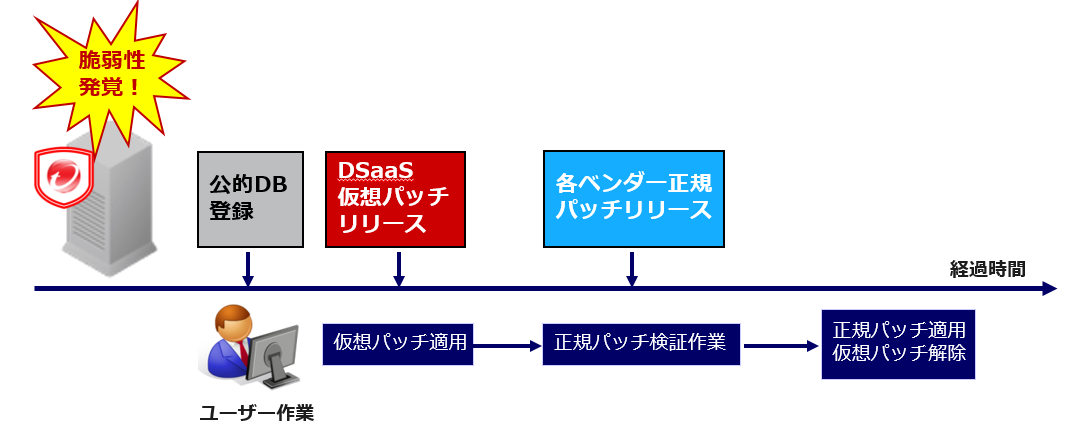
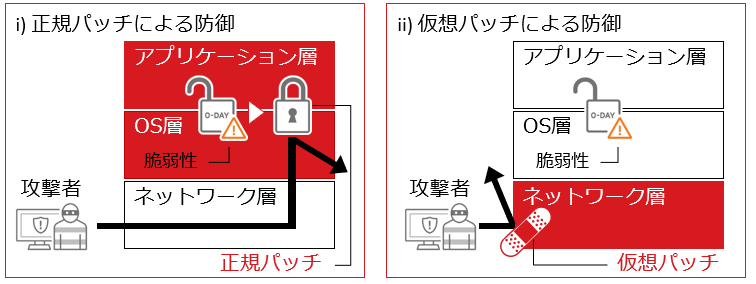
Virtual patching technology (see below) is used to protect servers from attacks that exploit vulnerabilities. Between the time a vulnerability is discovered and the time a regular patch is released, virtual patching technology can reduce the risk of zero-day attacks that exploit this vulnerability
Normally, it takes several weeks from the discovery of a vulnerability until an official patch is released, leaving the system vulnerable to attacks exploiting that vulnerability. We provide a virtual patch to address such attacks in as little as 48 hours from the discovery of the vulnerability.
*The response time will vary depending on the scoring results (vulnerability severity, etc.).
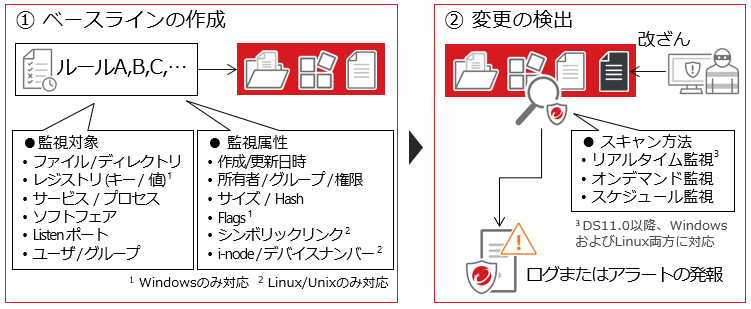
⑤ Monitoring changes on the system
It monitors files, directories, registries, etc., and quickly detects any unauthorized changes or tampering. Select rules that define "where (monitoring target) and what (monitoring attribute) to monitor" and create a list of monitoring targets called a baseline. Any changes are detected, and administrators can check the details from the log
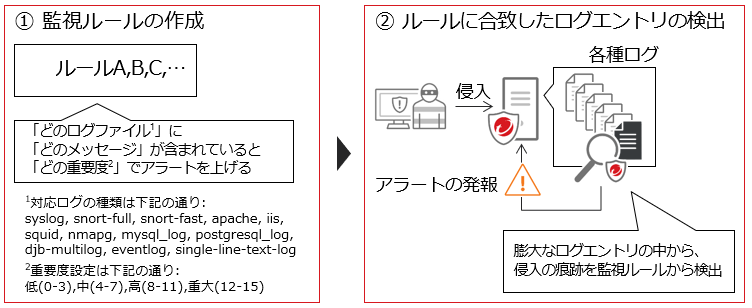
⑥ Security log monitoring
Early detection of critical security events. Efficiently detect critical security incidents that are often overlooked due to the vast number of log entries from the OS and applications
You can create rules to monitor specific log entries and configure what level of alert is triggered when log entries matching the rules are found. It's also possible to automatically apply appropriate rules to each server through recommended searches.
*Note: Parameter settings for each rule may be required separately.
⑦ Application Control
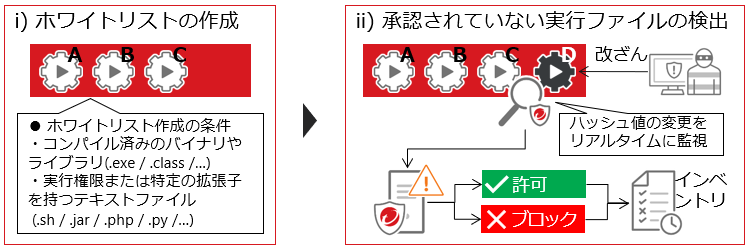
It whitelists applications installed on the server and detects and blocks unauthorized programs when they are executed. It can monitor software, detect unauthorized software, and allow or block the execution of that software
When this feature is enabled, it will create a list of all executable files on the target server and register them as a whitelist. If an executable file that is not on the whitelist is detected, the administrator can choose to allow or block the execution of that file. Executable files that are allowed or blocked are added to the inventory and will be referenced if the same file is detected again
Protecting against vulnerabilities with virtual patching
A virtual patch is like a bandage that you put on a wound
Applying emergency patches is an operational burden and a challenge for users, but by using virtual patching technology to block attack code that targets vulnerabilities at the network level, it supports over 100 applications, including major server operating systems such as Windows and Linux, as well as Apache, BIND, Microsoft SQL, and Oracle. This reduces the number of emergency patch applications and the operational burden before vulnerabilities are exploited
Advantages of Virtual Patching
To apply virtual patches, we will apply the "Recommended Scan" function, which is a function in which the agent automatically scans the system information within the server and finds vulnerabilities on the server
By automatically applying the necessary signatures (virtual patches), the server can automatically receive only the necessary protection. Because signature application can be automated, it is possible to receive optimal protection with minimal operational load
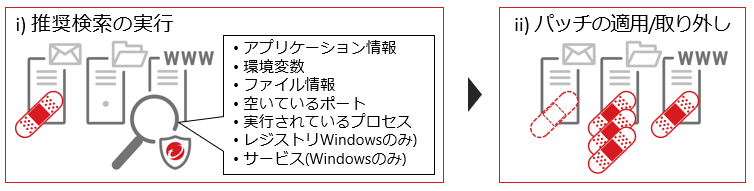
The agent obtains various information on the server OS, such as startup services, installed modules, and configuration information. Based on this information, it finds vulnerabilities within the server and sends this information to the management server (manager)
The management server (manager) distributes a list of "virtual patches" to the agent, which are signatures that are applied to vulnerabilities found on the target server. As a result, the server vulnerabilities can be protected using the necessary virtual patches
Benefits of Virtual Patching
Even if the vendor's official patch release is delayed, you can prevent vulnerabilities before they occur, allowing you to flexibly control the schedule for applying official patches. This means that even if a vulnerability is discovered, you can carry out verification work without panicking