

Memo on installing ModSecurity and applying it to Apache (Ubuntu 24.04 LTS)

Hello,
this is Kawa from the System Solutions Department, and
my brain is already at EOL (End of Life)
This happened a little while ago, but in June I participated in Micro Hardening , a smaller version of the Hardening Project , which is a team competition focused on security hardening
The exercise was held on Awaji Island and was quite hard, but the weather was good and we were able to work in nature, surrounded by the sea and mountains, so we had a very fulfilling time
(The sunset was beautiful)

The exercise lasts for 45 minutes per set (6 sets in total), and participants must protect an e-commerce site from attacks. In the event that the site goes down, the SLA score is also calculated, and teams compete for final sales + score
We're constantly facing some kind of attack, but this time our team was particularly troubled by SQL injection
▼For more details, please refer to our company's Ikki article▼
While I was thinking about how to prevent this, I decided to try using ModSecurity, which turned out to be a great success and helped me get a high score
This time, I'll leave a memo about how to install ModSecurity and how to implement its associated CRS rules
What is ModSecurity anyway?
(Those who already know can skip this!)
ModSecurity isan open-source Web Application Firewall (WAF) engine owned by OWASPthat protects websites and other content provided using various CMSs from attacks.
It is used in combination with a rule set (similar to a definition file) called CRS rules, and is compatible with major CMS such as WordPress and Drupal, as well as middleware such as Apache, Nginx, and IIS. After installation, it can be used with a little configuration, so it can be easily introduced in a standalone environment
However, tuning for false positives is somewhat difficult, so it will likely take some time to implement and operate in a production environment
Additionally, in environments where a cloud WAF such as AWS WAF or WAFCharm is deployed in front of the WAF, the scope of coverage overlaps, so there is little benefit to introducing it
environment
Ubuntu 24.04 LTS Apache/2.4.58
Installation and Initial Setup
sudo apt update sudo apt install libapache2-mod-security2 sudo a2enmod security2 # Enable the module
The following are the basic settings after installation.
A sample configuration file will be created, so rename it and make some edits.
cd /etc/modsecurity/ sudo mv modsecurity.conf-recommended modsecurity.conf sudo nano /etc/modsecurity/modsecurity.conf SecRuleEngine DetectionOnly #The default is detection only, so enable it ↓ SecRuleEngine On SecAuditLogParts ABIJDEFHZ # D means "intermediate response header", but it seems to be a reserved word and not yet implemented ↓ SecAuditLogParts ABCEFHJKZ # Delete I, change D to C (request body) sudo systemctl restart apache2
The initial setup is now complete.
Next, we will download the CRS rules.
Download the ruleset (v4.3.0)
* While this article was being written, version 4.4.0 was released, but the procedure is basically the same for other versions. Please refer to the following link for the latest version:
https://github.com/coreruleset/coreruleset/releases
Download the file from GitHub, unzip it, and then move it to the Apache directory
cd /tmp/ sudo wget -p /tmp/ https://github.com/coreruleset/coreruleset/archive/refs/tags/v4.3.0.tar.gz tar xvf v4.3.0.tar.gz sudo mkdir /etc/apache2/modsecurity-crs/ sudo mv coreruleset-4.3.0/ /etc/apache2/modsecurity-crs/ cd /etc/apache2/modsecurity-crs/coreruleset-4.3.0/ sudo mv crs-setup.conf.example crs-setup.conf
Include to recognize the core ruleset
/etc/apache2/mods-enabled/security2.conf … # Include OWASP ModSecurity CRS rules if installed #IncludeOptional /usr/share/modsecurity-crs/*.load IncludeOptional /etc/apache2/modsecurity-crs/coreruleset-4.3.0/crs-setup.conf IncludeOptional /etc/apache2/modsecurity-crs/coreruleset-4.3.0/rules/*.conf … sudo apache2ctl -t # The syntax check will probably result in an error. AH00526: Syntax error on line 818 of /etc/apache2/modsecurity-crs/coreruleset-4.3.0/crs-setup.conf: ModSecurity: Found another rule with the same id /etc/apache2/modsecurity-crs/coreruleset-4.3.0/rules # → The error is occurring in the rule REQUEST-922-MULTIPART-ATTACK.conf, so delete the three relevant entries or rename 922 to avoid this
Regarding the error in the latter half, it seems to be dependent on the ModSecurity version.
As reported in this closed issue:
https://github.com/coreruleset/coreruleset/issues/3129
, upgrading the ModSecurity version should resolve the issue, but since it's from an unofficial repository, we won't cover it in this article.
Before going live...
As mentioned above, WAF, IPS, and endpoint security products can generate false positives
Therefore, the first step would be to run it in IDS mode (detection only) before implementation and collect logs
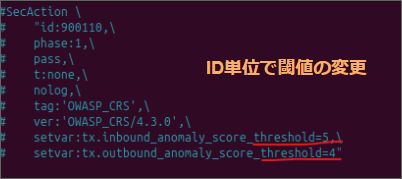
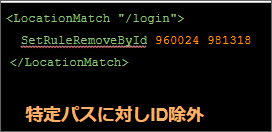
In the case of ModSecurity, you need to check the error.log to find out what was detected and consider relaxing any exclusion rules or thresholds that are set.
summary
WAFs, including cloud-based ones, are useful, but they can affect the actual environment, so tuning is required before they can be put into production
Although it is a little difficult to operate, if you can overcome this issue, you can strengthen security even when operating in standalone mode, so if you also add endpoint products, it will lead to multiple defenses and further increase robustness
complete




The person who wrote this article
About the author









