

[AWS/Athena] How to create a table using partition projection for WAF log analysis

Introduction
Hi everyone!
It's already been a year since I started working as an infrastructure engineer in July, and four months ago I officially became a second-year employee. Now I can see the door to my third year in sight.
This time, I've written an article about my recent experience analyzing WAF logs with Athena , where I struggled mainly with creating tables using partition projection
*Please note that this article is not suitable for those who are unfamiliar with how to use Athena or what a table is
What is Amazon Athena?
This isn't about the Greek goddess of wisdom and war!
Amazon Athena is a query service that allows you to directly analyze data stored in S3 .
For example, even if you have enabled log output to S3 using Elastic Load Balancer, Cloud Front, WAF, etc., when you want to identify the number of requests per minute or a specific access source IP address from a huge amount of logs, it can be a hassle to download a text file and analyze it locally, right?
In such situations, Amazon Athena allows you to analyze logs simply by executing queries on the console
For more details, please read the documentation
About the execution environment
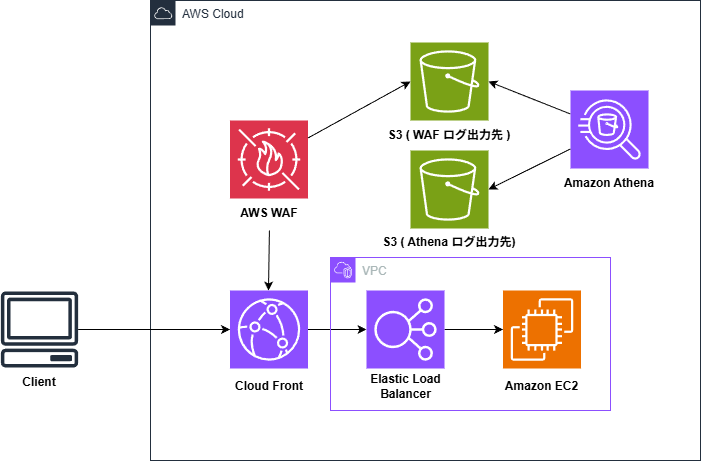
In this example, the query is executed using the following configuration.
Please note that the S3 path specified later may change depending on your configuration
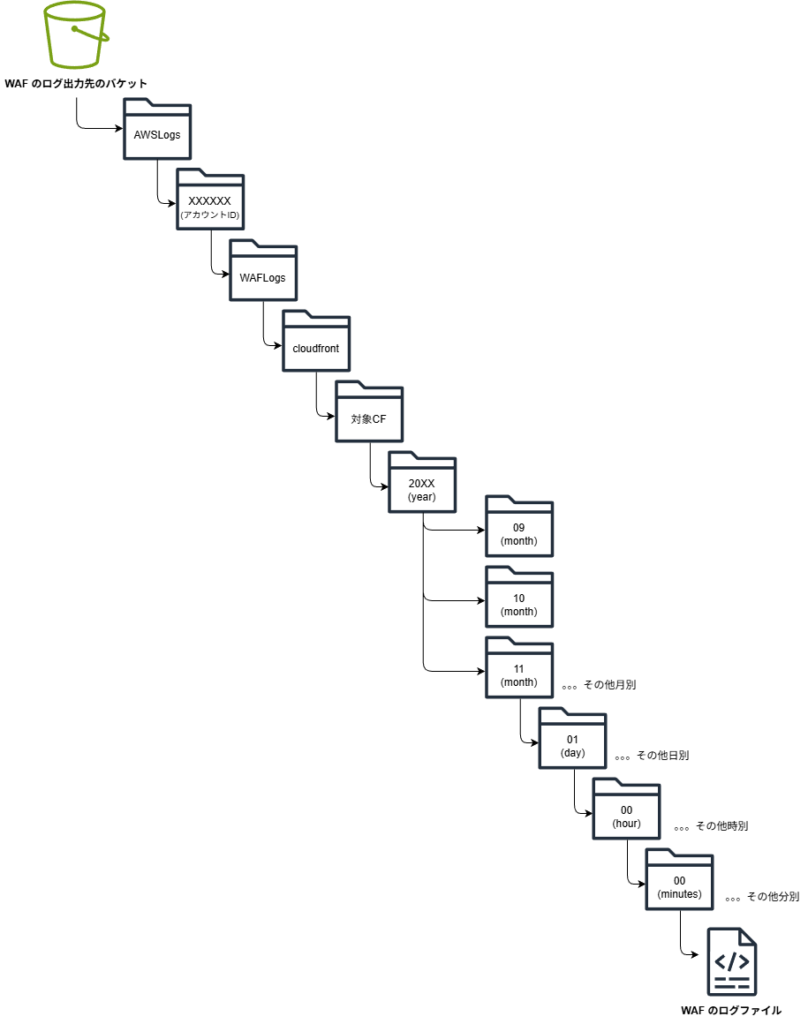
The S3 hierarchy used is as follows:
Creating a table
This time , we will create the table using this
As mentioned earlier, CloudFront is at the forefront, so the S3 path will include /cloudfront.
CREATE EXTERNAL TABLE `waf_logs_partition_projection`( `timestamp` bigint, `formatversion` int, `webaclid` string, `terminatingruleid` string, `terminatingruletype` string, `action` string, `terminatingrulematchdetails` array<struct<conditiontype:string,sensitivitylevel:string,location:string,matcheddata:array<string>>>, `httpsourcename` string, `httpsourceid` string, `rulegrouplist` array<struct<rulegroupid:string,terminatingrule:struct<ruleid:string,action:string,rulematchdetails:array<struct<conditiontype:string,sensitivitylevel:string,location:string,matcheddata:array<string>>>>,nonterminatingmatchingrules:array<struct<ruleid:string,action:string,overriddenactio n:string,rulematchdetails:array<struct<conditiontype:string,sensitivitylevel:string,location:string,matcheddata:array<string>>>,challengeresponse:struct<responsecode:string,solvetimestamp:string>,captcharesponse:struct<responsecode:string,solvetimestamp:string>>>,excludedrules:string>>, `ratebasedrulelist` array<struct<ratebasedruleid:string,limitkey:string,maxrateallowed:int>>, `nonterminatingmatchingrules` array<struct<ruleid:string,action:string,rulematchdetails:array<struct<conditiontype:string,sensitivitylevel:string,location:string,matcheddata:array<string>>>,challengeresponse:struct<responsecode:string,solvetimestamp:string>,captcharesponse:struct<responsecode:string,solvetimestamp:string>>>, `requestheadersinserted` array<struct<name:string,value:string>>, `responsecodesent` string, `httprequest` struct<clientip:string,country:string,headers:array<struct<name:string,value:string>>,uri:string,args:string,httpversion:string,httpmethod:string,requestid:string,fragment:string,scheme:string,host:string>, `labels` array<struct<name:string>>, `captcharesponse` struct<responsecode:string,solvetimestamp:string,failurereason:string>, `challengeresponse` struct<responsecode:string,solvetimestamp:string,failurereason:string>, `ja3fingerprint` string, `ja4fingerprint` string, `oversizefields` string, `requestbodysize` int, `requestbodysizeinspectedbywaf` int) PARTITIONED BY ( `log_time` string ) ROW FORMAT SERDE 'org.openx.data.jsonserde.JsonSerDe' STORED AS INPUTFORMAT 'org.apache.hadoop.mapred.TextInputFormat' OUTPUTFORMAT 'org.apache.hadoop.hive.ql.io.HiveIgnoreKeyTextOutputFormat' LOCATION 's3://{WAF TBLPROPERTIES( 'projection.enabled' = 'true', 'projection.log_time.type' = 'date', 'projection.log_time.range' = '2025/11/01/00/00,NOW', 'projection.log_time.format' = 'yyyy/MM/dd/HH/mm', 'projection.log_time.interval' = '1', 'projection.log_time.interval.unit' = 'minutes', 'storage.location.template' = 's3://{WAF log output bucket}/AWSLogs/{account ID}/WAFLogs/cloudfront/{target CF}/${log_time}')
*Note that if you are applying this to a regional resource such as ALB, this will be the region name, such as /ap-northeast-1/ (for the Tokyo region).
* In this structure, it is yyyy/MM/dd/HH/mm , but this may need to be changed depending on your S3 tier structure. If it is yyyy/MM/dd/HH , you will need to change projection.log_time.interval.unit to hours
About Partition Projection
The main topicpartition projection, is a feature that automates partition management to improve query performance.
(^ω^) <Japanese is OK
Please don't make that face.
I'll explain now.
The following is a perfect example of this within a table creation query.
This query specifies logs from 2025/11/01 to the present.
PARTITIONED BY ( `log_time` string ) ~Omitted~ TBLPROPERTIES( 'projection.enabled' = 'true', 'projection.log_time.type' = 'date', 'projection.log_time.range' = '2025/11/01/00/00,NOW', 'projection.log_time.format' = 'yyyy/MM/dd/HH/mm', 'projection.log_time.interval' = '1', 'projection.log_time.interval.unit' = 'minutes', 'storage.location.template' = 's3://{WAF log output destination bucket}/AWSLogs/{account ID}/WAFLogs/cloudfront/{target CF}/${log_time}')
Log files within an S3 bucket are arranged in a hierarchical structure, such as year/month/day/hour/minute, right? This is referred to as being partitioned
Typically, you need to periodically run a command to register the location of each partition with AWS Glue Data Catalog
┌[ ∵]┐ <New data added? Where is it located?
You have to go through this process with Glue every time
By providing Athena with the partition's hierarchical structure in advance, Athenacan automatically calculate where the log data is located.
By doing so,newly added partitions are automatically recognized, eliminating the need to manually read the AWS Glue Data Catalog every time the range of log data to be analyzed increases.
└[ ∵]┘ <If the data is stored in this hierarchical structure, new logs will come here
It's something like that.
This is called partition projection
How to write
Next, assuming you understand the actual process, how should you go about writing the code?
I will explain that point.
PARTITIONED BY ( `log_time` string ) ~Omitted~ TBLPROPERTIES( 'projection.enabled' = 'true', 'projection.log_time.type' = 'date', 'projection.log_time.range' = '2025/11/01/00/00,NOW', 'projection.log_time.format' = 'yyyy/MM/dd/HH/mm', 'projection.log_time.interval' = '1', 'projection.log_time.interval.unit' = 'minutes', 'storage.location.template' = 's3://{WAF log output destination bucket}/AWSLogs/{account ID}/WAFLogs/cloudfront/{target CF}/${log_time}')
As mentioned earlier, this primarily uses two phrases: PARTITIONED and TBLPROPERTIES
PARTITIONED:
Specifies the partition key.
Here, we are using a key named log_time, but other keys can also be set.
If the name conflicts with an existing column name, Athena may get confused and throw an error, sogenerallyset a name that does not exist in the original log data.
TBLPROPERTIES:
Specifies the enable/disable setting for partition projection and detailed formatting settings for the specified key.
In this case, it seems to be organizing the information contained in log_time and providing it to Athena.
projection.enabled: A declaration that "partition projection will be used!"type: Data type (in this case, date)Range: The range of the data, from start to end. Using NOW is very convenient because it sets the range to include the moment the query is executed.Format: What format are the S3 folder names in (e.g., yyyy/MM/dd)?interval: The interval at which data is added (e.g., 1 if every minute).storage.location.template: Specifies where in the S3 path to apply the calculated value. Replace ${log_time} with the date calculated by Athena.
One important point to note here is that ifPARTITIONED and TBLPROPERTIES are different, the following error will occur, so be sure to write them to match.
INVALID_TABLE_PROPERTY: Table {{database name}}.{{table name}} is configured for partition projection, but the following partition columns are missing from the projection configuration: [year, month, day, hour]
This query was executed against the '{{database name}}' database unless qualified in the query. Please post the error message in our forum or contact Customer Support with the query ID: XXXX
*At the time, I hadn't studied enough, so I wrote different values and got stuck
Also, in this article, storage.location.template is the path used when using CloudFront.
Please note that if a WAF is associated with the load balancer, the path will be as follows.
LOCATION 's3://{WAF log output destination bucket}/AWSLogs/{account ID}/WAFLogs/ap-northeast-1(region)/{target WAF}/' ~Omitted~ 'storage.location.template' = 's3://{WAF log output destination bucket}/AWSLogs/{account ID}/WAFLogs/${region}/{target WAF}/${log_time}')
Execute the query
That concludes our explanation of creating tables. Finally, let's try using the table we just created!
We'll scan the data using the partition key `log_time` that we specified earlier.
SELECT from_unixtime(timestamp/1000, 'Asia/Tokyo') AS JST, * FROM waf_logs_partition_projection WHERE log_time BETWEEN '2025/11/16/00/00' AND '2025/11/16/00/59';
* If using the yyyy/MM/dd/HH/ format, please change it to something like 2025/11/16/00/.
If log data is output here, the setup is complete 🎉🎉
If you were unable to obtain values during this execution, please check the following!
- Is the partition key set correctly?
- Check if there are any errors in the path specified in
storage.location.template.
Conclusion
So, what did you think?
There was nothing wrong with the query for log analysis itself, but I had a lot of trouble with the table creation stage, so I studied it more thoroughly and decided to write an article about it.
I learned a lot by slowly reading the documentation and writing down the parts I was doing while asking my seniors and the AI for advice on how to do it on my blog!!
I hope this article is helpful to you.
Thank you for your continued support!
reference
This diagram illustrates how to understand Athena's partition projection. It covers
: partitioning,
using partition projection in Amazon Athena
, creating a table for AWS WAF S3 logs using partition projection, and
how to select a partition key.




The person who wrote this article
About the author









