

IDCF Cloud Settings [Firewall Edition]
2016.09.13





Thank you for visiting
I'm Fukuoka, in my second year on the infrastructure team!
because setting up the firewall on IDCF Cloud
took a little while.
the setup procedure
, we will proceed with the setup process for when you want to be able to ping from our company, Beyond's office!
1. Log in to IDCFCloud
2. Operation by IP address
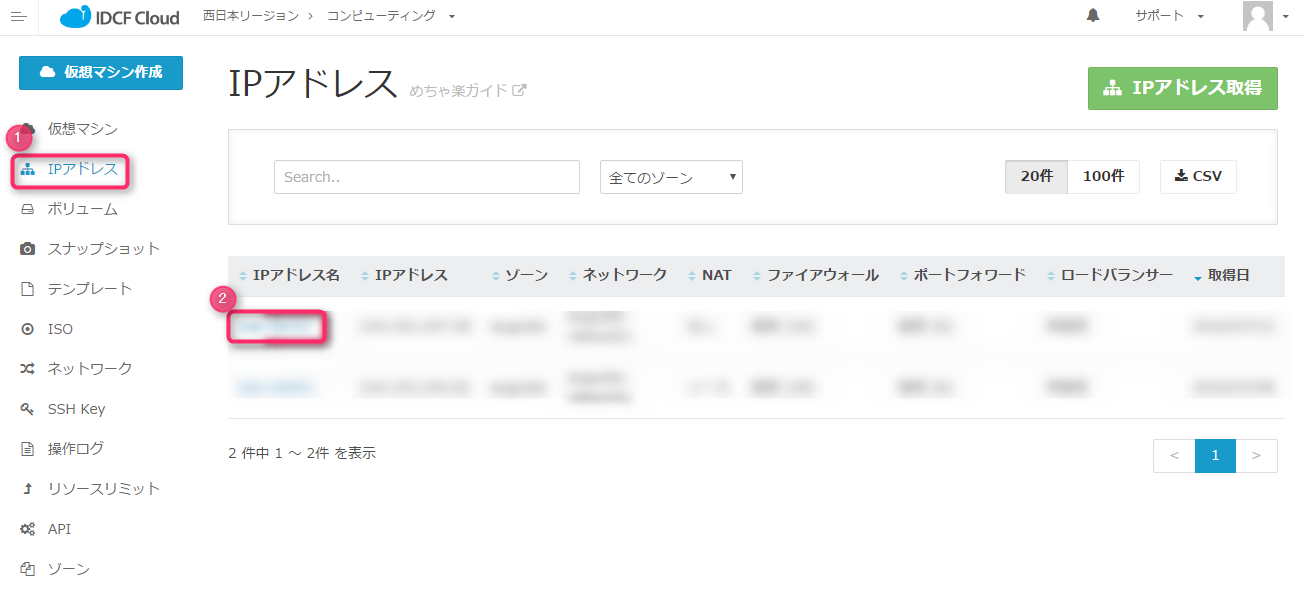
① Click "IP Address"
② Click the target server in the "IP Address Name" column
3. Firewall operations
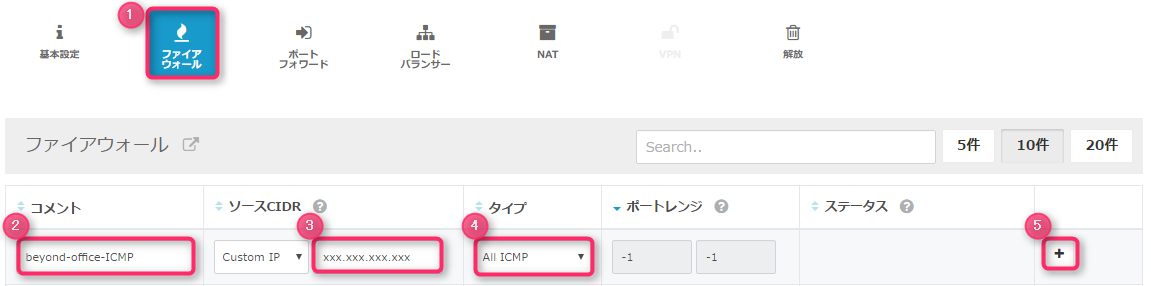
① Select "Firewall"
② Enter a comment
(example): "beyond-office-ICMP"
③ Enter the IP address you want to allow.
Example: Beyond's office IP address (xxx.xxx.xxx.xxx)
④ Select the type.
Example: Select "ALL ICMP"
. *The port range will be automatically entered.
⑤Click "+" to add
If the status is "Active" after configuration, then it's OK.
Continue configuring "HTTP," "HTTPS," "SSH," "FTP," etc. in the same way.
Below is a minimal template I created
| comment | Source CIDR | type | Port Range |
| beyond-office-ICMP | xxx.xxx.xxx.xxx | ICMP | type: -1 code: -1 |
| beyond-office-HTTP | xxx.xxx.xxx.xxx | TCP | 80 |
| beyond-office-HTTPS | xxx.xxx.xxx.xxx | TCP | 443 |
| beyond-office-SSH | xxx.xxx.xxx.xxx | TCP | 22 |
| beyond-office-FTP | xxx.xxx.xxx.xxx | TCP | 21 |
| beyond-office-FTP_PASSIVE | xxx.xxx.xxx.xxx | TCP | 60000-60030 |
Please give it a try!!
The person who wrote this article
About the author









