

[Must-see for beginners] Just look at this! Easy-to-understand illustrated explanation of the basics of servers
Hello.
This is Kita from Beyond Inc. The other day, I tried to explain my job to a friend, but they didn't understand it at all and gave me a strange look.
Servers have become indispensable for using web services these days, but
many people probably feel intimidated by them, thinking, "They seem complicated," or "I don't really understand them even when I ask about them."
This time, I will explain it in an easy-to-understand manner with diagrams so that even beginners can understand it well
What is a Server?
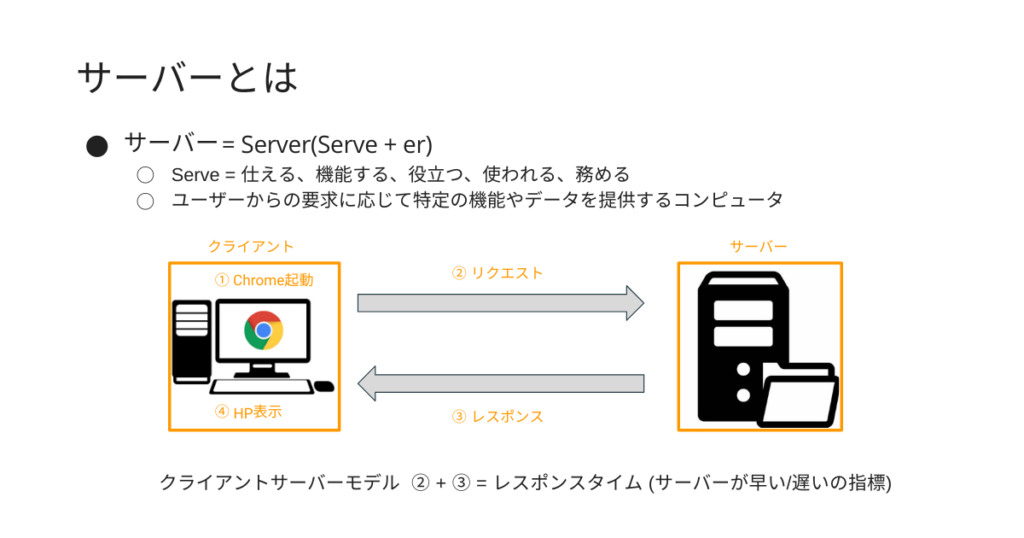
The word "server" comes from the English word "Server," which literally translates to "the provider."
A computer that receives requests from clients (users) and provides the corresponding data is called a "server."
The party using the service is called a "client," and
the act of sending a request from the client to the server is called a "request."
The response from the server to the client in response to the request is called a "response."
For example, when you click on a page title using a search engine like Google,
the page, including text and images, is provided by the server that stores the website's data. This is an example ofthe client-server model.
In other words,behind the scenes of a website display, there is a computer called a server, and the browser abstracts away the complex interactions with the server.
How the server works
Servers are computers, just like PCs and smartphones, so they run on components that process information and record data
The main components that make up a server are:
- Motherboard: The main electronic circuit board used in electronic devices (the base of a computer)
- CPU: Central Processing Unit (the brain of the computer)
- Memory: Main storage device (working space for the CPU)
- Disk (HDD/SSD): Auxiliary storage device for saving data
- Graphics card: A component that outputs images to a computer screen
- Sound card: A component that outputs sound to a computer
- power supply
It is composed of the following:
Also, on the server machine
- Tower server: A tall, deep server similar to a desktop computer (for small systems and individuals)
- Rack server: A server that stores multiple units together on a dedicated rack (shelf) (for businesses)
- Blade server: A compact server that fits into a small, slim chassis (for medium-sized and large companies)
There are many types such as:
Just like with PCs, it's important to understand that the type and specifications of a server will vary depending on how it will be used
Server Type
| Physical Server | Virtual Server | |
|---|---|---|
| environment | Use one server | Multiple servers within one server |
| cost | △ | ◯ |
| performance | ◎ | ◯ |
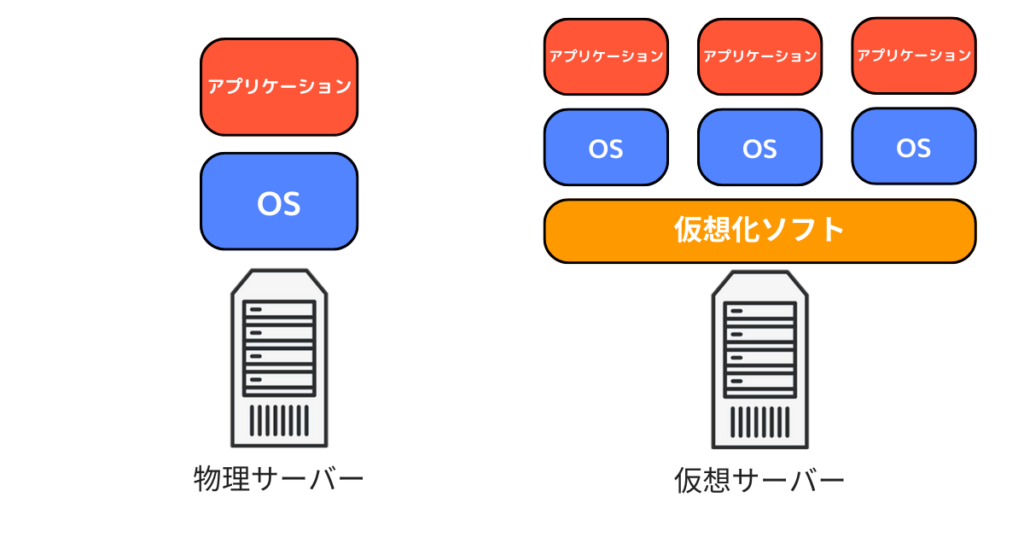
There are two main types of servers:
There are two main types, but each server has different options, so it's important to understand the types of servers beforehand
Physical Server
A physical server is a server that physically exists
There are two types of physical servers:
- In-house server (dedicated server):
Using a single physical server within your own company. While you have the freedom to use any OS or applications, the disadvantage is that it is more expensive. - Shared hosting (rental server)
: This involves multiple users sharing a single physical server. While it reduces costs, it has disadvantages such as difficulty in freely configuring settings.
Virtual Server
A virtual server is a technology that allows multiple operating systems to run on a single physical server, making it appear as if it were multiple physical servers
Virtual servers are being actively adopted these days because they offer the benefits of allowing a single server to be used efficiently and reducing operational costs
There are two types of physical servers:
- VPS (Virtual Private Server)
A VPS is a system that allows you to use your own dedicated server virtually. It is characterized by being cheaper than a dedicated server and offering more flexibility than a shared hosting service. - Cloud computing (IaaS)
is a technology that combines multiple servers into a single virtual server. Like a VPS, it allows you to use your own dedicated server.
Compared to a VPS, it offers even greater flexibility.
The table below shows the breakdown of each feature:
| In-house server | Rental server | VPS | Cloud | |
|---|---|---|---|---|
| Usage form | exclusive | shared | exclusive | exclusive |
| Pricing structure | Pay-as-you-go | Fixed price | Fixed price | Pay-as-you-go |
| Construction expertise | need | Unnecessary | need | need |
| Customizability | ◬ | × | 〇 | ◎ |
By understanding and using the features, you may be able to reduce the costs incurred during operation and construction, so please choose one that suits your needs
Server Roles
To reiterate, a server is a computer that provides specific functions and data in response to user requests. However,
since user requests vary, the name of the server changes depending on its purpose.
Want to browse a website = Web server
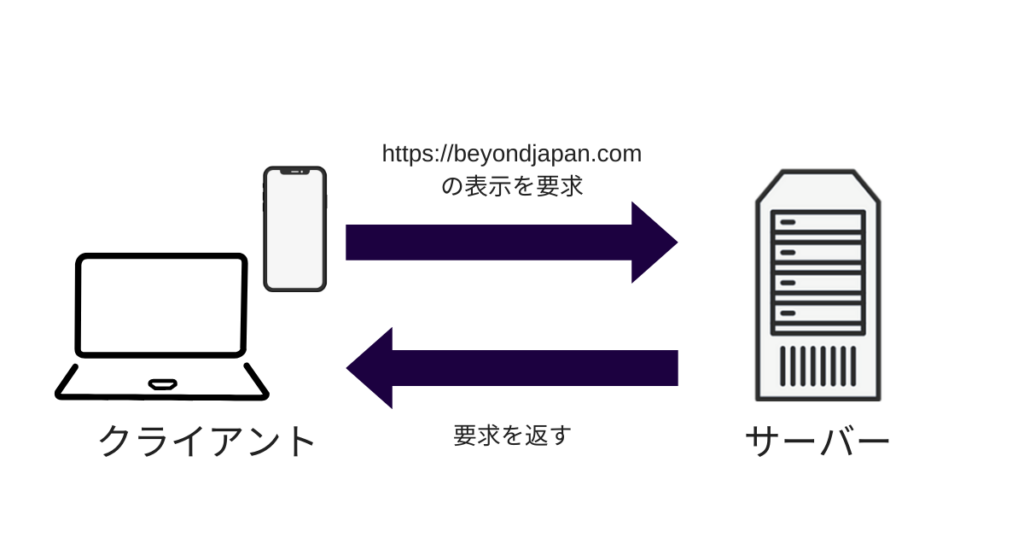
A web server is a server that receives requests from a client's web browser and sends data such as text and images to the client's web browser. It is
essential for displaying web pages on the web, making it indispensable for anyone running a website.
Send and receive emails = Email server
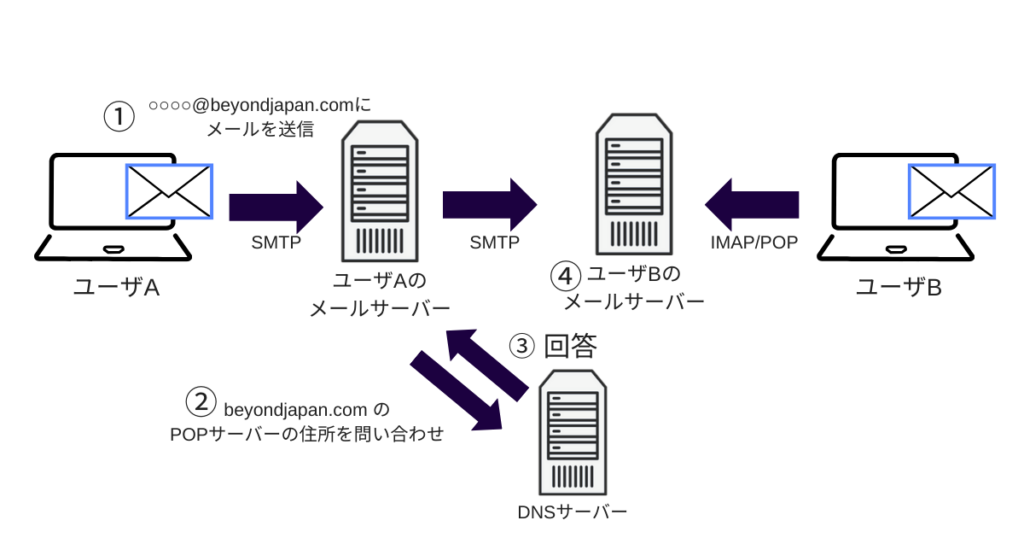
A mail server is a server that provides a service for sending and receiving emails.
Separate servers are used for sending and receiving emails, and multiple servers work together in coordination.
| SMTP server | Send emails |
|---|---|
| POP Server | Receive emails. *Unlike IMAP, emails are not stored on the server. |
| IMAP Server | This method allows you to receive emails. *Unlike POP, emails are stored on the server. |
| DNS Server | Matching destinations |
Specifically, there are four servers mentioned above, and each of them is running to send and receive emails, so keep that in mind
To store the data required for the site = Database server (DB)
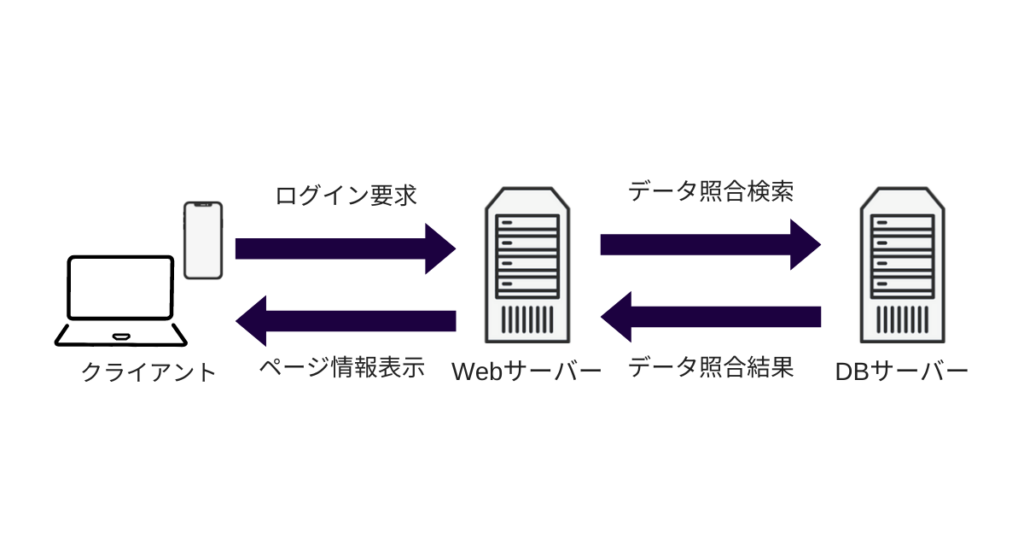
A database server is a server that manages and provides databases. It
can centrally manage data such as user information and product data, and can also handle data storage, updates, and backups.
There are a variety of servers for different purposes
In addition, each server can have one role, or it can have multiple roles
Difference between multi-machine configuration and single-machine configuration (multiple roles on only one machine)
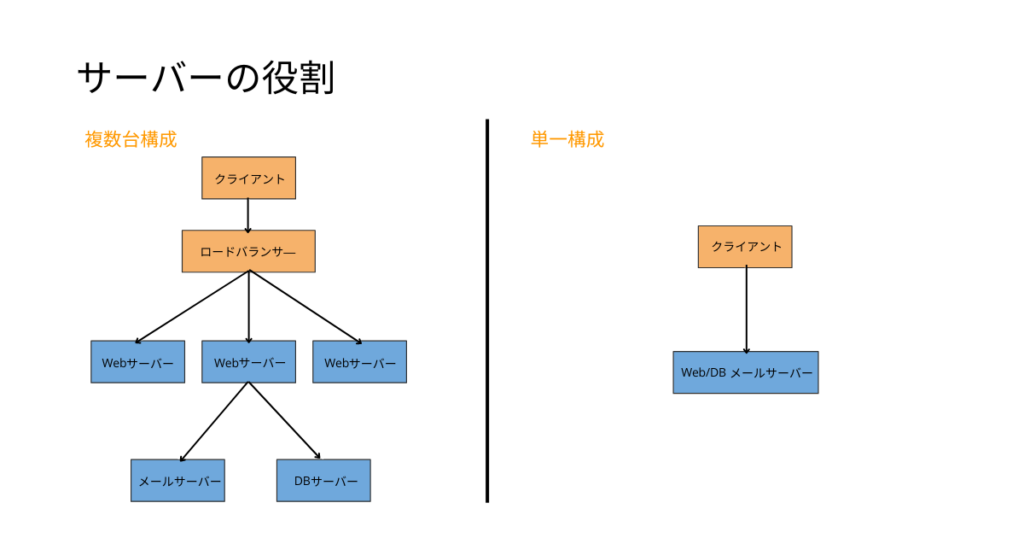
*Load balancer = A device that distributes access evenly (load distribution device)
The general advantages and disadvantages of each configuration
| Multiple unit configuration | Single Configuration | |
| merit |
|
|
| Disadvantages |
|
|
As such, when it comes to server configuration, it is necessary to decide flexibly on the configuration in consideration of the scale of the service and budget
summary
So far, we have provided detailed explanations about the structure, types, and roles of servers
A server is a computer that receives requests from clients and provides the corresponding data. There are various types of servers depending on their purpose, and they have become an indispensable part of our lives
I hope this article will help you understand the basics of servers
This article was created with reference to videos from the "Nezumi-san's Infrastructure Engineer Dojo" channel, which is operated by our company
It's a fantastic channel where you can learn about infrastructure from scratch, so if you're interested, please subscribe and give it a thumbs up!




The person who wrote this article
About the author









