[Case Study] How we reduced training workload by creating a new employee PC setup manual using generation AI

Hello. I'm Kitada from the Human Resources Department, Training Section at Beyond Co., Ltd.
Normally, as an engineer, I'm responsible for coordinating training for existing and new employees, as well as planning and creating IT training programs for corporate clients.
At Beyond, there is a team that manages devices (commonly known as "Debachi"), and
until now, they have been supporting new employees with the initial PC (device) setup on their first day of work by following the bullet points outlined by the device team.
This time, we used Claude, our company-wide AI generator, to create a web-based manual where users simply select their department and operating system, and the necessary steps are automatically generated. As a result, we were able to create a working manual in just a few days without writing a single line of code
This article summarizes the prompts and AI errors I actually encountered, as well as tips for creating manuals using generative AI that I learned through experience
background
As more companies utilize generative AI across society, many IT system administrators are likely wondering, "Can AI make our internal operations easier?"
Among the tasks of an IT department, setting up PCs for new employees is a recurring job that occurs every time someone joins the company. This includes
issuing accounts, providing tool guidance, updating procedure manuals, and handling inquiries on their first day.
Moreover, the necessary procedures differ depending on the department and OS, so the procedure manuals can quickly become outdated or only exist in the minds of the person in charge.
At Beyond, we managed with bullet points from Debachi and support from senior colleagues, but detailed procedures for each department were not compiled, and we had to repeat the same explanations every time someone joined the company
So this time, we decided to let the AI generate the procedure manual itself.
We've included specific steps and prompts so that IT system administrators who are struggling with PC setup for new employees and manual preparation can try it out directly.
In reality, to what extent can manual creation be done using generative AI?
This time, we provided the manual procedures and requirements in writing, and had the AI create the manual's structure, main text, and even the screenshots
While it's generally introduced as an aid for drafting, in this example, it was able to handle everything from screen transitions to web manuals (HTML files) including copy buttons
On the other hand, AI cannot determine whether internal company procedures are correct
| work | Things that can be entrusted to AI | Things that people do |
|---|---|---|
| Composition and screen design | It can create everything from HTML and design to screen transitions | Communicate any discomfort you feel while touching it and make corrections |
| Documenting the procedure | Organize bullet points and notes into a procedure manual format | Provide the original procedure and notes. *Do not provide any confidential information. |
| Detailed instructions for external tools | Research and incorporate official information | Actually operate it yourself to check if there are any errors |
| Internal procedures, URLs, and rules | I can't make it because I don't know how | We interviewed the device team to organize the process |
| Operation check | Screen transitions can be tested automatically | Try it out and see for yourself |
| The final judgment of what is right | I can't | Confirmed through on-site review |
The most practical way to divide the work, as we discovered through actual production, is
to let AI handle the actual manufacturing process, while humans provide the materials and check the finished product.
5 Steps to Creating a Manual with Generator AI
The procedure for creating a manual using the generation AI is as follows:
- Define the target users and the desired outcome: Determine who will use it and what needs to be achieved for it to be considered complete.
In this example, the goal was for new employees to be able to complete PC setup on their own on their first day.
Since the procedure varies depending on the department they join and the PC's operating system, the web manual is designed to branch accordingly. - Gather the source procedures: Collect existing bullet points, internal wikis, and notes from each department.
The material for the examples will be the bullet points from the device team and the results of interviews with each department. - Having AI create a prototype: We convey the desired final product in a single sentence and have it create something that works first.
In one example, the initial request for the initial setup screen was, "I want it to feel like you're pressing buttons to transition between screens." - Touch the product and give specific feedback on what feels wrong: communicate in terms of symptoms, not preferences.
Providing feedback like "It's too faint and hard to see" or "The screen moves when I check the box" will lead to faster and more accurate corrections. - Verify with official information and on-site reviews: External tool procedures are compared with official documentation, and internal procedures are reviewed by on-site personnel. In a real-world example, a temporary version was placed on the company server and updated by overwriting it while maintaining the same URL.
*Note: When creating a similar system, please check your company's AI usage rules before inputting internal company information into the AI.
This time, we did not input authentication information such as passwords or confidential information, and the procedure uses a Wiki URL that can only be viewed from within the company.
Records of actual prompts (requests) used and revisions
The most effective prompts when creating manuals weren't long specification documents, but short requests that conveyed the purpose and any concerns.
Based on this experience, I've included a template for prompts that you can use the first time around. Please rewrite the brackets [ ] to use them.
Please create a manual for new employees, titled [Manual Name], as a single HTML file that can be opened in a browser. • Target audience: [e.g., new graduates/mid-career hires] • Completion status: [e.g., able to complete initial PC setup independently on the first day] • When the [Department/OS] is selected first, only the necessary steps should be displayed, one step at a time. • Each step should include a numbered procedure, a copy button for URLs or commands, and a completion criterion ("OK if this is done")
Points to note when creating manuals with generation AI: Mistakes that occurred in real-world examples and countermeasures
When creating manuals using AI, there are three main points to be aware of: the AI may misinterpret the assumptions, it may not be aware of company-specific circumstances, and outdated procedures from external tools may be mixed in.
We have organized examples of mistakes that occurred in real-world cases, categorized by the method used to identify them.
| Mistakes that occurred | The method I found | countermeasure |
|---|---|---|
| I created a version where the screen doesn't move by writing parentheses twice around the procedure data | AI automated testing | I have the AI perform operational tests with each revision |
| The development department's procedures were displayed even when other departments were selected | Human operation to verify | Confirm prerequisites such as "which departments use this common practice" as early as possible on-site |
| Even when I selected Mac, the Windows-only "BitLocker" was displayed | Human operation to verify | Different wording is displayed for each OS |
| The PhpStorm instructions I received from my department didn't match the current screen | AI compares with official documentation | Verify the procedures for using external tools with official information |
| Backlog did not allow access to the procedure wiki without logging in | On-site review | Have the on-site staff operate the prototype |
| An unnecessary caveat (assuming the user would take over the previous person's PC) remained | On-site review | Confirm the company's operational rules with the relevant personnel |
Code errors are found through AI testing, display errors through human operation, and procedural errors are discovered through on-site reviews.
If any of these three are missing, a new employee will be given an incorrect procedure manual.
Example: Web manual for PC setup for new employees
The example web manual is an HTML file that displays only the necessary steps, one by one, after selecting a department and OS.
It follows 14 common steps that everyone must go through, followed by additional steps specific to the chosen department.
The file is a single HTML file and can be published simply by placing it on a server accessible only from within the company network.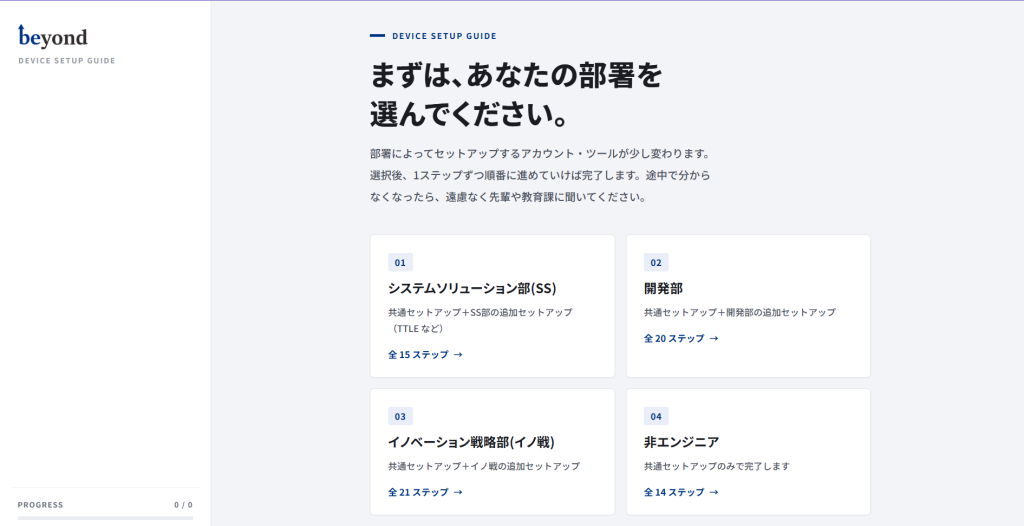
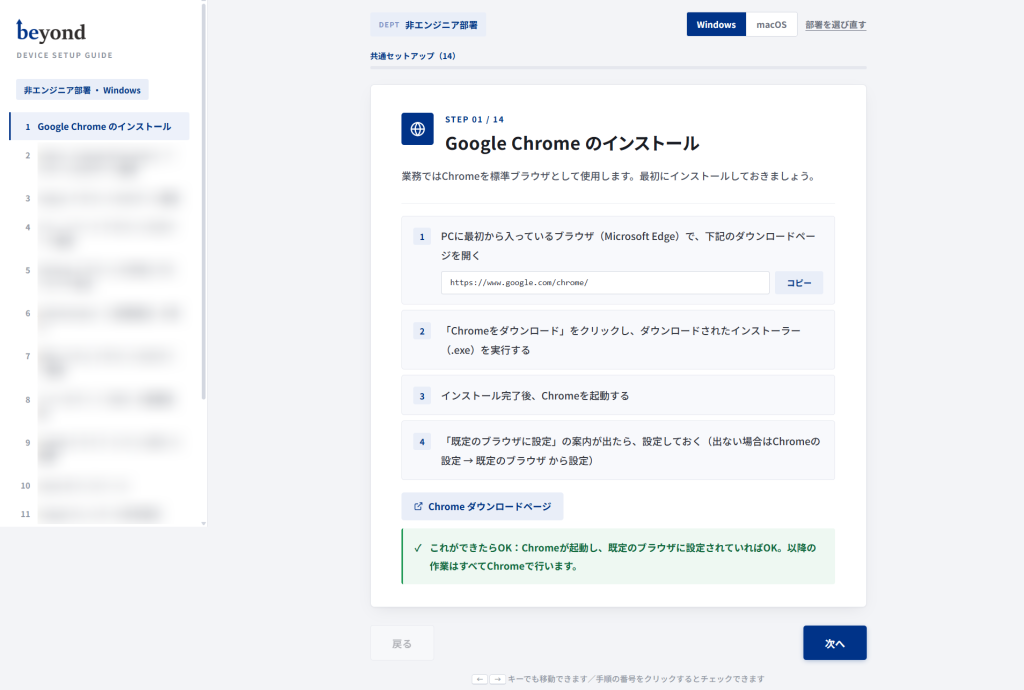
Four ways to write a manual that won't cause confusion
To create a user-friendly manual, four things proved effective: writing down the criteria for completion, arranging steps in order of dependency, illustrating confusing screens with diagrams, and creating separate procedures for each operating system.
All of these were designed to enable new employees to make decisions on their own without having to ask senior colleagues.
Write the criteria for completion
At the end of each step, we place a "If this is done, it's OK" statement.
For example, for a VPN, it would be "If the VPN connection is established and you can access company resources, it's OK." Having a standard allows new employees to check it themselves and move on to the next step.
Arrange them in order of dependency
Since all tool invitation emails arrive in the Workspace Gmail account, I placed Google account verification second.
This dependency varies depending on the company's tools used, so human verification is necessary.
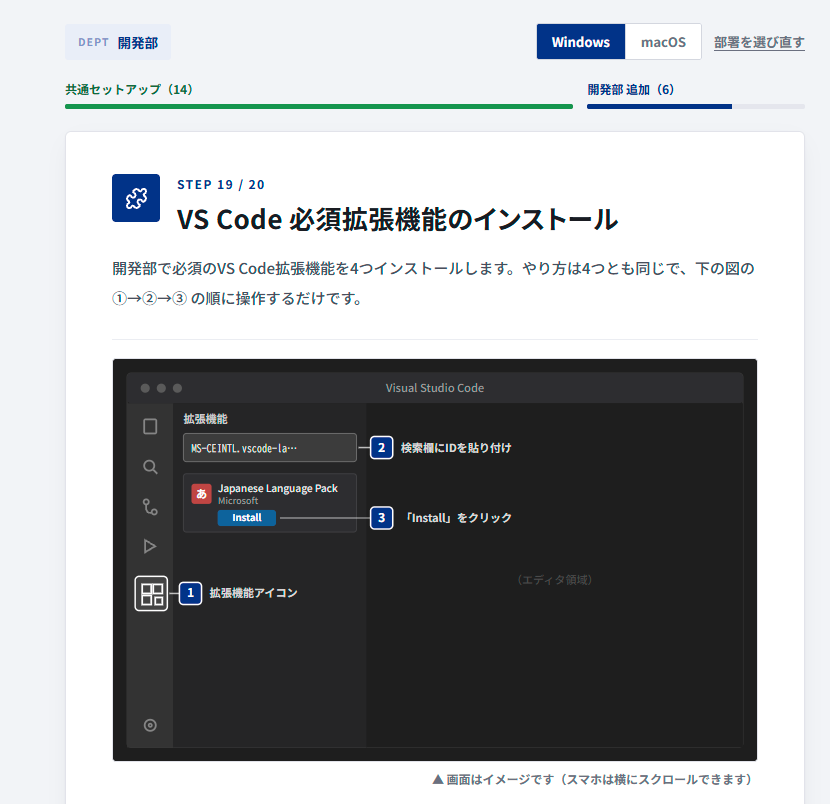
Confusing screens are shown in diagrams
Adding extensions to VS Code or editing Windows environment variables is difficult to explain using text alone, as it's hard to tell exactly where to click. I've
created a diagram simulating the screen, labeled ①②③, and linked it to the step-by-step instructions.
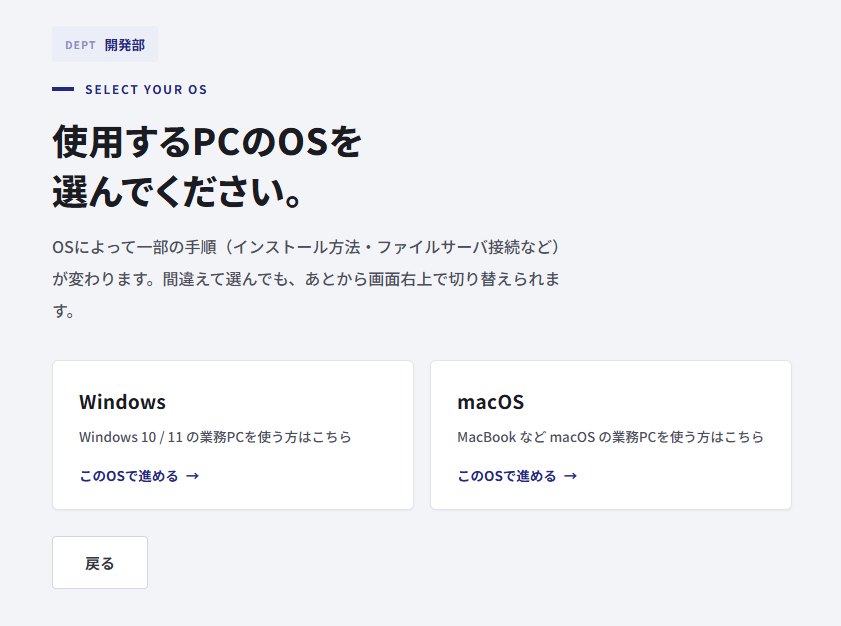
Create separate procedures for each operating system
The Mac instructions were rewritten rather than simply rephrased from the Windows instructions.
For example, WSL2 is not needed on Mac, and make is included in Command Line Tools, so steps that are not needed on Mac are clearly marked as "not needed".
Designing an easy-to-read manual: What I learned after redesigning it four times
To make the manual easy to read, it was effective to limit the areas to be colored to the "selected item" and the "next" button, and to use thin lines and dark text. I revised the design four times before arriving at this conclusion
- A version with added decorations: a route map-style list and large numbers in the background. The decorations were more prominent than the information.
- A version with ample margins for easier viewing: Composed only of thin lines and white space. Refined, but the text is faint and small.
- The heavily colored version: Solid navy blue with thick lines. Everything is assertive, making it hard to tell what's important.
- Limited coloring version: Only the selected item and main button are colored. Bold text is limited to a thickness that does not bleed.
When you describe your preferences using abstract terms like "a sophisticated feel," the AI tends to interpret them in extreme ways. It's more effective
to describe the problematic aspects, such as "too pale to read" or "lines too thick and smudge," to get closer to your goal more quickly.
Tips for gathering procedures from different departments through interviews
The key to gathering procedures from each department is to show them a draft version and ask them to fill in the blanks.
In one example, we placed a draft version on the company server and gathered procedures by having the person in charge from each department try it out.
- Include a URL for the temporary version: Showing the screen where "Departmental Setup" is stuck at "Content Reviewing" will make it immediately clear what is being asked.
- We'll handle the formatting: Adding "bullet points are OK" lowers the barrier to replying.
We used AI to format the received memos and existing procedure manuals into a manual format.
FAQ
Q. Can manuals be created using generation AI?
A. Yes, it can. The generation AI can create not only drafts but also web manuals (HTML) including screen transitions and copy buttons.
However, the AI cannot determine whether company-specific procedures are correct, so on-site review is necessary.
Q. Can I create it even without programming knowledge?
A. In this case, I didn't write a single line of code. All that was needed was to communicate what I wanted to create using words and to check if the result was correct by interacting with it. This method of creating things solely through dialogue is also called "vibe coding." Deployment to the company server and final checks are handled by humans
Q. Is it okay to input internal company information into the AI that generates data?
A. First, please follow the company's AI usage rules.
This time, we did not enter any authentication information such as passwords, and only used the procedure and the URL of the internal wiki page.
The published article and screenshots do not include internal URLs or the names of the people in charge.
Q. How do you update the manuals you create?
A. We are overwriting the same HTML file on our internal server.
Since the URL doesn't change, users can view the latest version using the link they previously shared.
The procedure is compiled into one file, so correcting it in one place will reflect the changes in the display for all departments.
Q. What are the advantages of creating a web-based manual instead of using Word or PDF?
A. The procedure displayed can be switched depending on the department or OS, a copy button and completion checkbox can be added, and it can be read on both PCs and smartphones.
On the other hand, because this format does not use a database, the procedure checks will be reset when the page is reloaded.
Summary: Manual creation using generative AI is about "AI creating the manual, humans verifying it."
When creating manuals using generation AI, it's most efficient to let the AI handle the creation process while humans spend their time gathering and verifying the information.
In this example, a procedure manual that was originally a bulleted list was transformed into a web-based manual with branched procedures based on department and operating system.
We ensure accuracy through a three-pronged approach: automated AI testing, human verification of operations, and on-site reviews. We
believe this verification system becomes even more crucial as the scope of AI operations expands.
Going forward, we plan to continue using it for new graduates and mid-career hires, while further refining its usability and accuracy
The Education Department at Beyond Co., Ltd. provides ServerCamp (an IT training service operated by Beyond Co., Ltd.) based on the know-how gained from in-house training
If you're having trouble designing or creating training materials for new employees, please feel free to contact us!


The person who wrote this article
About the author