

Highlight HTML in ES6 template strings in Sublime
This is Kusakabe from the development team
ES6 introduced template literals by default.
This is convenient when using AngularJS or Vue.js because you don't need to escape single or double quotes when writing HTML tags within a string.

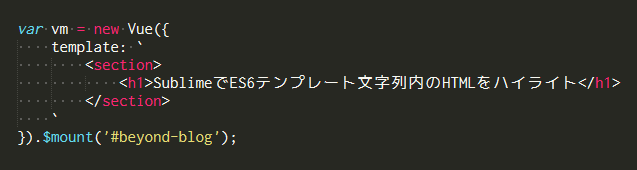
As you can see, the highlighting done by the editor can be rather dull
This article will show you how to highlight HTML tags in template strings as HTML tags in Sublime Text
However,Michael Russellhas kindly made a syntax file available on Gist, so let's use that.
I immediately opened Sublime Text,
Tools -> Developer -> New Syntax...
Proceed as described above, and overwrite the contents of the opened windowhere, then save it.
The file name can be anything you like, but the extension should be sublime-syntax. This completes the addition of the syntax.
Now open the file that uses the template string
View -> Syntax -> Javascript NG
If so, it should be highlighted like the featured image of this article!
In addition, when some js file is open
View -> Syntax -> Open all with current extension as... -> Javascript NG
Then, Javascript NG will be automatically selected when opening a file with the .js extension
(Although the syntax name has "NG" in it, it can be used without any problems when writing not only Angular but also Vue.)




The person who wrote this article
About the author









