
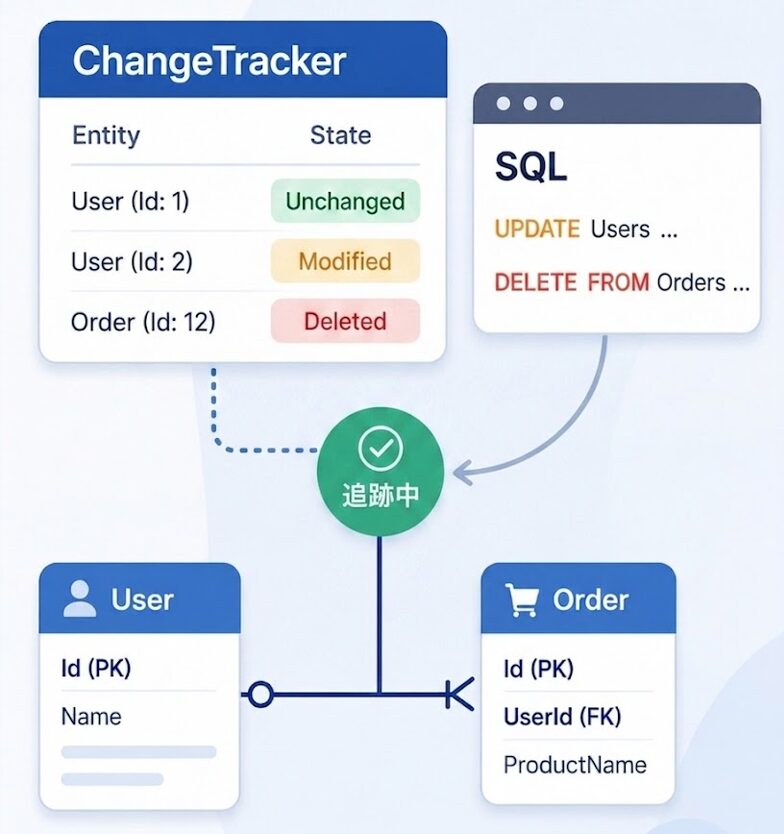
[C#] Entity Framework Core -ChangeTracker-
Hello, I'm Eita
In the past, I've summarized how relationships are established in EF Core
Having worked with Laravel (Eloquent), I found EF Core's mechanism of "inferring relationships even without explicit specification" a little strange
In the previous article, I used that feeling of unease as a starting point to organize how EF Core interprets the relationships between entities and treats them as an internal model
[C#] Entity Framework Core -Relationship Establishment Conditions-
[C#] Entity Framework Core -Relationship Establishment Conditions-
With that in mind, let's clarify how EF Core manages entity changes, specifically through its ChangeTracker
In the course of my work, I encountered a situation where an unexpected commit was about to occur,
- What changes does EF Core remember?
- What is the management unit for
DbContextandChangeTracker? - Timing to be aware of during implementation
I'm leaving this here as a personal memo
I hope this helps someone with their organization
What is ChangeTracker?
First,ChangeTracker isDbContext is currently tracking.
In EF Core, the DbContext remembers entities retrieved from the database, as well as entities that have been added , updated , or removed
Then, when SaveChanges() is called, INSERT / UPDATE / DELETE operations are executed based on the state managed by ChangeTracker
To put it simply, the relationship is as follows:
DbContext: Unit of work with the databaseChangeTracker: A tool for tracking what has changed within a given work unit.SaveChanges(): Reflects remembered changes in the database.
In other words, EF Core doesn't manually write SQL every time;instead, it determines the necessary SQL based on the current state of the DbContext.
Entity state
ChangeTracker manages entities in several states.
Typical conditions are as follows:
| situation | meaning | What happens when SaveChanges is executed? |
|---|---|---|
Detached |
Not tracked by DbContext |
Do nothing |
Unchanged |
After obtaining the database, no changes have been made | Do nothing |
Added |
Newly added | INSERT |
Modified |
Changed | English: |
Deleted |
Scheduled for deletion | DELETE |
For example, if you change the value of an entity retrieved from the database and call SaveChanges() , EF Core will detect the change and perform an UPDATE
// Retrieve from DB: Unchanged var user = context.Users.First(); // Update property: Modified user.Name = "After Change"; // Changes are detected and UPDATE is executed when SaveChanges() is called context.SaveChanges();
The important point here is that the changes are not yet reflected in the database until SaveChanges() is called
ChangeTracker simply remembers "planned changes" within the DbContext .
When does the ChangeTracker state change?
Next, let's organize the moments when the entity's state changes
| timing | example | situation |
|---|---|---|
| When retrieved from the DB using a regular query | Context.Users.FirstAsync() |
Unchanged |
| When you add a new one | context.Users.Add(user) |
Added |
When you tell someone that an object created with ` new` "already exists in the database" |
Context.Users.Attach(user) |
Unchanged |
| When you change the properties of a tracked entity | user.Name = "After Change" |
Modified |
| When you want to force a detached object to be updated | Context.Users.Update(user) |
Modified |
| When you select to delete | Context.Users.Remove(user) |
Deleted |
Generally, regular queries in EF Core are tracked .
Therefore, the entities retrieved as follows are tracked in the DbContext
var users = context.Users.ToList();
On the other hand, tracking does not occur when using AsNoTracking()
var users = context.Users .AsNoTracking() .ToList();
In this case, even if you change the retrieved users , ChangeTracker will not remember that change.
Therefore, if the data is only referenced and not updated , you can avoid unnecessary tracking by using AsNoTracking()
When will I be removed from ChangeTracker?
Entities tracked by ChangeTracker do not remain indefinitely
Tracking will primarily cease at the following times:
| timing | Content |
|---|---|
When DbContext is Dispose |
Normal tracking end timing |
ChangeTracker.Clear() is called |
Remove all entities currently tracked by the DbContext |
When Entry(entity).State = EntityState.Detached |
Exclude specific entities from tracking |
When deletion is successful with SaveChanges() |
Deleted entities become Detached. |
State after SaveChanges()
of SaveChanges() will basically be as follows:
| SaveChanges | After SaveChanges |
|---|---|
Added |
Unchanged |
Modified |
Unchanged |
Deleted |
Detached |
In other words, entities that have been added or updated will continue to be tracked as "Unchanged" even after the changes are reflected in the database
On the other hand, deleted entities are treated as if they have disappeared from the database and are therefore classified as Detached
List of state transitions
Based on what we've covered so far, let's summarize the basic state transitions
| operation | state transition | Impact / Supplement |
|---|---|---|
new Entity |
Detached |
Immediately after creating a new instance, the DbContext is not yet aware of its existence. |
Add(entity) |
Detached → Added |
Inserted in SaveChanges ( ) |
| Get data from the database? | Detached → Unchanged |
The state immediately after data acquisition, with no changes |
| Change the value of the acquired data | Unchanged → Modified |
Since the value has changed, it will be automatically updated. |
Remove(entity) |
Unchanged → Deleted |
I plan to delete data from the database. |
SaveChanges() success (add/update) |
Added / Modified → Unchanged |
Saving is complete, and there are no changes compared to the database |
SaveChanges() successful (deletion) |
Deleted → Detached |
It disappears from the database and is removed from the managed list |
Update(entity) |
Detached → Modified |
The data created using `new` is used as the target for `UPDATE` without ever using `SELECT`. |
Note: A state that DbContext is unaware of is called Detached . For example, an object that you have simply created using `new` , or an entity obtained with `AsNoTracking()` , is not tracked and is in a state that DbContext is unaware of.
Things you should know when using ChangeTracker
Do not include in tracking (As No Tracking)
As mentioned earlier, if the data is only referenced and not updated, you can exclude it from ChangeTracker tracking by using AsNoTracking()
var users = context.Users .AsNoTracking() .ToList();
Read-only processing avoids unnecessary tracking, thus preventing wasted memory consumption and unintended updates
Managed on a DbContext basis
The ChangeTracker is not shared across the entire application; it exists for each DbContext instance
Therefore, even though they are the same entity, the following are different things
- State being tracked in A's
DbContext - The state being tracked in B's
DbContext
If you are not aware of this unit,
- How many changes are remembered?
- Why was this change also reflected in
SaveChanges()?
This will make it difficult to understand
Note: DbContext lifetime
a DbContext is determined by the settings configured during DI registration.
When you register a DbContext using AddDbContext in an ASP.NET Core web application , the DbContext is registered as Scoped by default
Therefore, the same DbContext instance is usually used within a single request.
The official documentation states that AddDbContext is registered as Scoped by default, and that in many ASP.NET Core applications, each request will have a different scope, i.e., a different DbContext
To check how DbContext is registered in your own code , refer to the registration section in the following files, etc
Startup.csProgram.cs
Timing to be careful about during implementation
ChangeTracker is a convenient tool, but if you're not aware of what you're tracking, it can lead to unexpected updates.
Personally, I think the following are times when you should be especially careful
| timing | Problems that occur |
|---|---|
| Rollback / When an exception occurs | Even if the transaction on the database side is reversed, the ChangeTracker does not automatically revert to its state before the rollback, which can lead to a discrepancy between the state in the database and the state remembered by DbContext. |
| Long-running batch processing, etc | Previously handled data continues to accumulate in the tracking list, potentially leading to wasted memory consumption and unintended involvement in updates |
| Read-only queries | If tracking is enabled even though it's only for displaying information on the screen, it can lead to unnecessary memory consumption and potentially cause accidental updates |
Furthermore, I believe the following points should be kept in mind regarding these matters
- After use: Dispose of items instead of reusing them unnecessarily. Be mindful of their lifespan.
- If you can't separate them,
Clear(): Manually reset the tracking state immediately after a rollback, for example, when handling errors within the same Context. - if you don't intend to update
Use AsNoTracking(): Add this to places that don't save data, such as list displays, to avoid unnecessary tracking.
What exactly makes ChangeTracker so useful?
Up to this point, we have focused on and organized information regarding the state management and points to note about ChangeTracker
Therefore, let me also summarize the advantages of ChangeTracker
1. The same entity can be treated as the same instance
While managed by ChangeTracker within the same DbContext , if multiple entities with the same primary key exist within the DbContext , it becomes ambiguous as to which instance's state should be saved as "correct"
To avoid this situation, EF Core treats entities with the same primary key within the same DbContext as a single instance (Identity Resolution).
Identity Resolution is a mechanism necessary for ChangeTracker to manage the entity state consistently,
I found it convenient that even when handling the same data multiple times within the same DbContext
(Of course, you still need to be aware of which entity is being tracked.)
2. It automatically determines the necessary SQL based on the entity's state and relationships
As explained above, EF Core generates and executes the necessary SQL statements for INSERT , UPDATE , and DELETE operations without requiring you to manually construct them
Furthermore, if the relationships between entities are correctly established, EF Core will handle the necessary SQL execution order and foreign key binding, including for child entities linked to parent entities
var user = new User { Name = "Yamada Taro", Orders = new List<Order> { new Order { ProductName = "Product A" }, new Order { ProductName = "Product B" } } }; context.Users.Add(user); context.SaveChanges();
In this example, if the relationship between User and Order is correctly built in the IModel , EF Core can understand the relationship between user and order data
Therefore, after registering a user, the system links the assigned user ID as an external key for the order data and then registers the order data
In other words,ChangeTracker manages the state of not only individual entities but also related entities.
Then, SaveChanges() , EF Core uses that state information and model information to determine and execute the necessary SQL and its execution order.
Let's briefly summarize the ChangeTracker workflow
Finally, let's summarize the process of how ChangeTracker remembers changes and reflects them in the database
Change management workflow using WorkTracker
Retrieve entities via DbContext ↓ ChangeTracker tracks the entities (default is Unchanged) ↓ Perform property changes / Add / Remove etc. ↓ The state on ChangeTracker changes (Modified / Added / Deleted) ↓ Call SaveChanges() ↓ EF Core executes UPDATE / INSERT / DELETE based on the state held by ChangeTracker ↓ The state is updated to the saved state (Modified / Added becomes Unchanged, Deleted becomes Detached)summary
So far, we have summarized the role of ChangeTracker in EF Core and how it manages the state of entities
ChangeTracker is a mechanism for managing the state of entities and reflecting necessary changes to the database when SaveChanges() is called
It automatically detects changes to retrieved entities and generates the necessary SQL queries, so you can reflect object changes in the database without having to explicitly write detailed update code
On the other hand, if you are not aware of what is being tracked, unexpected changes may be reflected in the database at the time of SaveChanges()
Therefore, when dealing with EF Core,
- What's in the database?
- the current
DbContextremember?
I realized that it's important to be aware of both perspectives
That's it!!




The person who wrote this article
About the author