

Easily create multiple email addresses from one email address! Useful ways to use Gmail
Hello.
I'm Nomushin, the smartphone development team member.
When developing an app or system, you may need multiple email addresses for testing purposes, right?
There are services that easily create disposable email addresses for you, but
this time I'll introduce a little trick using Gmail to easily create multiple addresses from a single address.
It's not a particularly new technique, but if you're not familiar with it, I highly recommend giving it a try
What you need
・Gmail address ×1
Yes, that's it!
This time, I will use " [email protected]
If you send an email to this address, it will actually be delivered to Nomushin, but please refrain from sending spam emails.
Method 1: @googlemail.com
Although the Gmail address is " [email protected] ", emails will actually be delivered to "googlemail.com" as well .
If you send it to "[email protected] ", it will arrive in " [email protected] "
Now you have two email addresses instead of one!
Method 2: Period propagation method
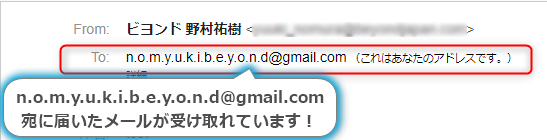
In Gmail,periods (also called dots) before the "@" symbol are ignored.
In other words, all emails sent to the following address will end up in " [email protected] "
- nomyuki.beyond@gmail.com
- nom.yuki.beyond@gmail.com
- [email protected]
However, you cannot use two or more consecutive dots, or place a dot immediately before the "@" symbol. For example,
"[email protected]" or "[email protected]" are not allowed.
However, please note that this is not a Gmail restriction, but is determined as a general rule (RFC) for email addresses
Using this method, you should be able to generate a lot of email addresses...!
This information about periods can also be found in the Gmail Help section
Method 3: Plus Append Method (Alias)
Even if you can increase the number of email addresses by adding dots, there's a limit to that, right?!
...For those of you who feel that way, I'll teach you one last method.
The method is simply to add a "+" (plus sign) followed by any string of characters to the end of your account name .
For example, even if you specify an address like "nomyukibeyond [email protected] " as the recipient , it will end up being delivered to " [email protected] "
You shouldn't delve too deeply into the added words.
...You really shouldn't.
This method allows you to generate an infinite number of email addresses
This use of the "+" symbol to extend an accountaliases, which allows you to add categories to an address to make it easier to categorize your emails.
By the way, methods 1-3 described so far can be used in combination .
Emails to "[email protected]" will also be delivered.
...It's pretty annoying, isn't it?
Bonus: Email address rules
Some of you might be wondering, "Is it okay to use a plus sign (+) in an email address?"
Based on the RFC definition that was briefly mentioned in Method 2, the answer is "yes, it's OK."
Since the original RFC is quite lengthy,Wikipedia, and the characters that can be used in email as defined in the RFC are as follows:
- Uppercase and lowercase Latin letters (although they are case-sensitive, most implementations do not distinguish between uppercase and lowercase. They are generally written in lowercase.)
・Numbers
・
!#$%&'*+-/=?^_`{|}~(In reality, providers often limit the number of symbols that can be used.)• Period (
.) (Can be used anywhere except at the beginning and end. Two or more consecutive periods are not allowed.)
Regarding the distinction between uppercase and lowercase Latin letters (alphabet letters) in the notes, it seems that Gmail does not distinguish between them.
, even if you send an email to "nomyuki [email protected] ", it will still arrive in " [email protected] "
Also, there are surprisingly many symbols that can be used.
However, as noted, even if they are OK according to the RFC definition, they are often restricted by the provider that actually handles sending and receiving emails, so it might be best to limit the use of symbols like - _ . in actual email addresses
summary
So, what do you think? If you already knew all the methods I've introduced, you must be a Gmail expert!
Gmail has many convenient features if you delve into it.
It's a waste to only use it the same way you would a regular provider email!
If you're interested, you might find it worthwhile to look into it further.
lastly
I have launched "SEKARAKU Lab," a service website for the system development company I belong to.
Beyond offers a one-stop service for everything from server design and construction to operation, so please feel free to contact us if you have any problems with server-side development.
SEKARAKU Lab:https://sekarakulab.beyondjapan.com/
See you next time!




The person who wrote this article
About the author









