

SimpleMDE: A Markdown editor that can be used in both browsers and electron

Hello.
I'm Mandai, the Wild team member in charge of development.
There are many rich text editors that can be used in browsers, but when it comes to editors for Markdown, it seems like there are still very few options
This time, we will introduce SimpleMDE, which is easy to implement
introduction
A demohere, and it seems quite simple, with only the essential functions.
Since the module is available via CDN, we'll use that to load it.
After that, simply create a textarea within your HTML and create a new instance of simpleMDE, and you'll have a simple Markdown editor!
<!DOCTYPE html><html lang="ja"><head><meta charset="UTF-8"><meta name="viewport" content="width=device-width, initial-scale=1.0"><title> test </title><link rel="stylesheet" href="https://cdn.jsdelivr.net/simplemde/latest/simplemde.min.css"></head><body><textarea></textarea><script src="https://cdn.jsdelivr.net/simplemde/latest/simplemde.min.js"></script><script> var simplemde = new SimpleMDE(); </script></body></html>
It may be difficult to use on a website, but if you combine it with electron or something similar and turn it into a native desktop application, I think the uses for it will expand
Use from node.js
Next, I will introduce how to use simpleMDE from Electron
Here, I would like to try installing a module from npm and displaying it
First, install it
npm install simplemde
The entry point JavaScript should look something like this:
// app.js 'use strict'; var electron = require('electron'); var app = electron.app; var BrowserWindow = electron.BrowserWindow; var mainWindow = null; app.on('window-all-closed', () => { if (process.platform != 'darwin') app.quit(); }); app.on('ready', () => { mainWindow = new BrowserWindow(); mainWindow.on('closed', ()=>{ mainWindow = null; }); mainWindow.loadURL('file://' + __dirname + '/index.html'); });
Next, create an index.html file in the same directory.
This is almost identical to the previous HTML file, but even simpler.
<!-- index.html --><!DOCTYPE html><html lang="ja"><head><meta charset="UTF-8"><meta name="viewport" content="width=device-width, initial-scale=1.0"><title> test </title><link rel="stylesheet" href="https://cdn.jsdelivr.net/simplemde/latest/simplemde.min.css"></head><body><textarea></textarea><script src="./index.js"></script></body></html>
Create index.js, which will be loaded from HTML
// index.js var simplemde = require('/path/to/simplemde.min.js'); var editor = new simplemde();
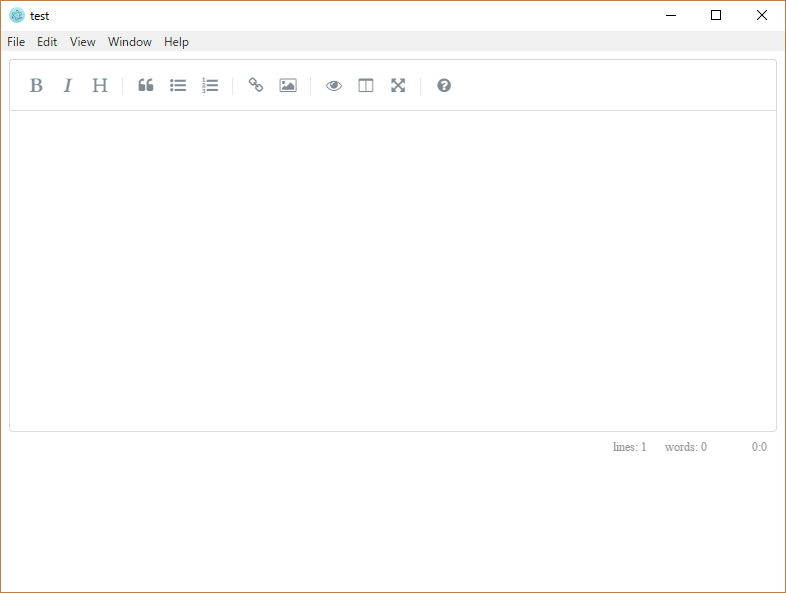
After preparing the above files and compiling them, an editor with the same style as the one displayed in the browser was displayed
Recommendations for modification
simleMDE is quite extensible, and adding menus is easy.
Font Awesome icons for menu icons , eliminating the need to prepare images individually.
Let's try adding a save button
// index.js var simplemde = require(/path/to/simplemde.min.js''); var editor = new simplemde({ toolbar: { { name: 'save', action: save_content, className: 'fa fa-save', title: 'save', }, '|', 'bold', 'italic', 'heading', '|', 'quote', 'unordered-list', 'ordered-list', '|', 'link', 'image', '|', 'preview', 'side-by-side', 'fullscreen', '|', 'guide', } }); function save_content(){ // some processes }
You'll need to implement the saving mechanism yourself, but the editor settings are now complete.
If you register additional menus, the default menus will disappear, so you'll need to register those as well, but the setup is very easy.
Troublesome points
For normal use, it seems easy to use, but when combined with other CSS frameworks, layout issues become noticeable.
For example,Foundation, a border appears on every line within the area enclosed by three backticks in the preview screen.
The CSS integration seems a bit weak, and since it doesn't seem to have an interpreter like Sass, you need to write your own CSS and override it.
Also, when displaying the markdown and preview side-by-side in a side-by-side view, it automatically switches to full-screen mode.
Checking the CSS, this is specified with `!important`, so there's room for improvement, or rather, a mechanism to control this behavior would be desirable.
In terms of speed, processing becomes slower as the amount of text increases, but I think this is a problem with the CodeMirror module used internally, so if speed is important to you, you might want to consider other libraries
summary
That concludes my introduction to simpleMDE, a tool for easily creating Markdown editors.
Its combination with Electron seems very effective, so creating a Markdown editor as an Electron project might be a simple and rewarding experience.
That's all




The person who wrote this article
About the author









