

[ZABBIX3.4] Setting monitoring exclusion time
2019.04.26




This is Nakagawa from the Technical Sales Department
Sometimes, server load increases at specific times due to daily backup and aggregation processes, triggering alerts.
You can't stop the processes, but you also want to reduce unnecessary alerts...
In such cases, you can reduce the number of alerts that don't need to be triggered by setting monitoring exclusion times.
Setting monitoring exclusion time
To set an exclusion period for a specific time, use the time function. Go
to Settings > Hosts > Select the target host > Triggers > Select the trigger for which you want to set the monitoring exclusion period.
Original condition + and(start time of exclusion or end time of exclusion)
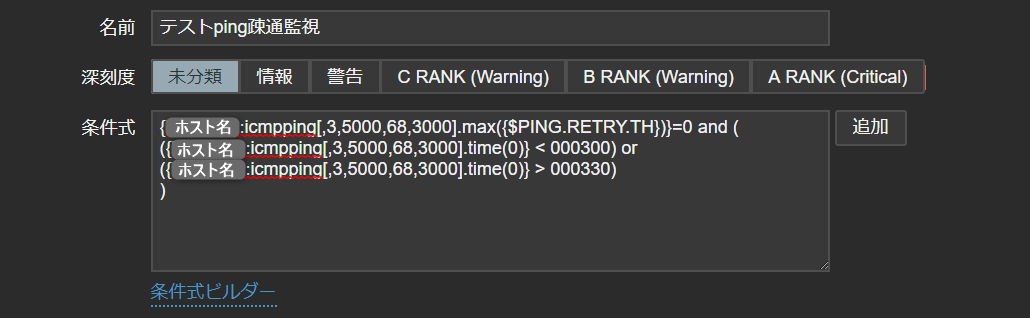
{hostname:icmpping[<target> ,<packets> ,<interval> ,<size> ,<timeout> ].max({$PING.RETRY.TH})}=0 and (({hostname:icmpping[<target> ,<packets> ,<interval> ,<size> ,<timeout> ].time(0)} < 030000) or ({hostname:icmpping[<target> ,<packets> ,<interval> ,<size> ,<timeout> ].time(0)} > 033000))
-> With the above settings, an alert will not be generated only if the time period in which ping communication fails is between 3:00 and 3:30
About the Expression Builder
Conditional Expression Builder > Test
Conditional Expression Builder allows you to run multiple tests using the conditional expression you create.
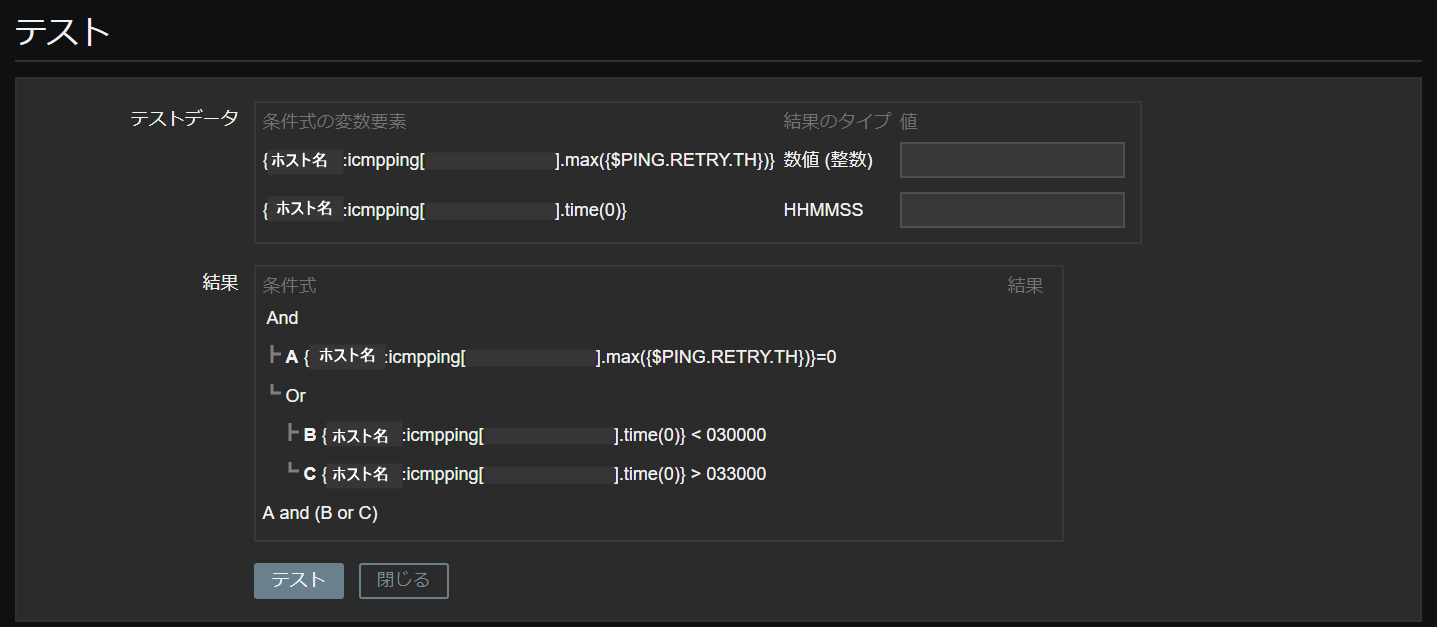
The input fields are as follows:
*The numerical (integer) fields vary depending on the type of monitoring.
| Numerical value (integers) | Ping communication [0 = failure 1 = success] |
| HHMMSS | hours, minutes, seconds |
The conditional expressions for each of the ABCs are as follows:
Condition B returns TRUE between 00:00:00 and 02:59:59.
Condition C returns TRUE between 03:30:01 and 23:59:59.
Conditions for the final result (bottom item) to be TRUE or FALSE
[A = TRUE B or C = TRUE]
If both results are TRUE, the final result at the bottom will be TRUE
[A = TRUE B or C = FALSE]
Since only one is TRUE, the final result is FALSE
[A = FALSE B or C = TRUE]
Since only one is TRUE, the final result is FALSE
[A = FALSE B or C = FALSE]
Both are FALSE, so the final result is FALSE
An alert will be sent if the final result of the conditional expression is TRUE.
If the final result is FALSE, no alert will be sent.
Based on these conditions, we will conduct operational tests.
Test using the conditional expression builder
Use the condition builder to check that the monitoring exclusion time settings are correct
=======================================================
Example 1 (Ping failed at 02:59:59)
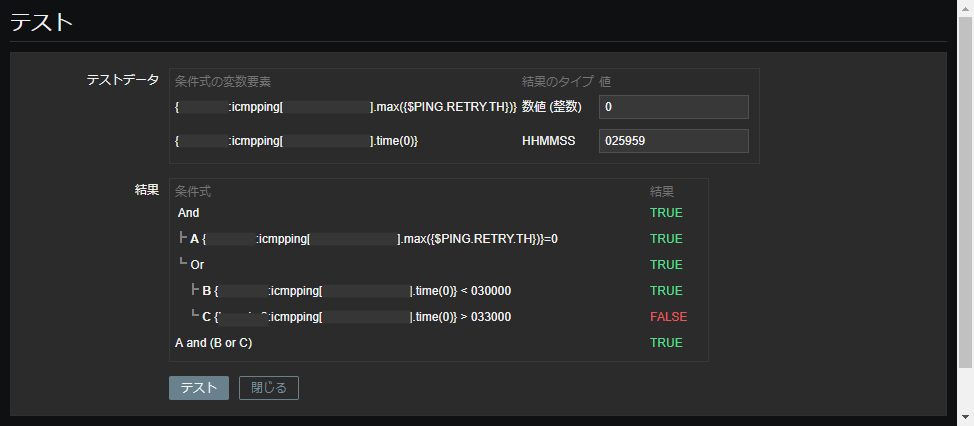
⇒ A = TRUE (Ping failed)
B = TRUE (Corresponds to 00:00:00 ~ 02:59:59)
C = FALSE (Does not correspond to 03:30:01 ~ 23:59:59)
The final result = TRUE, so an alert is triggered.
Example 2 (Ping failed at 03:30:01)
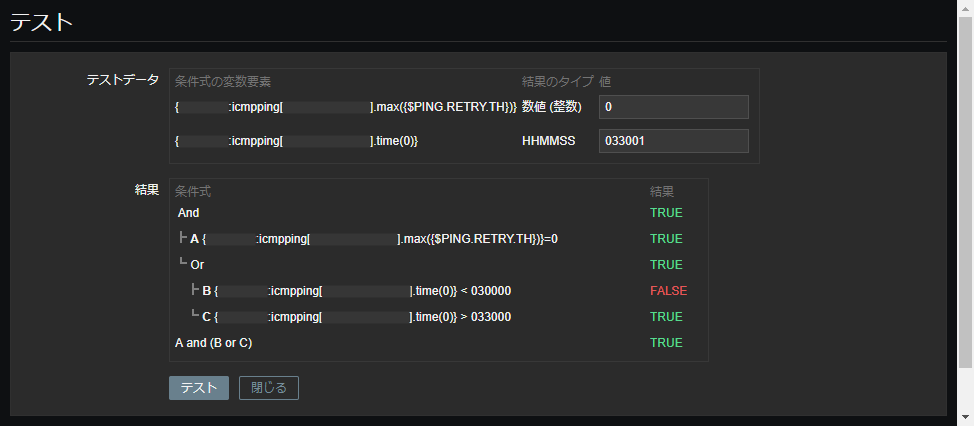
⇒ A = TRUE (Ping failed)
B = FALSE (Does not fall within the timeframe of 00:00:00 ~ 02:59:59)
C = TRUE (Falls within the timeframe of 03:30:01 ~ 23:59:59)
The final result is TRUE, so an alert is triggered.
Example 3 (Ping failed at 03:00:00)
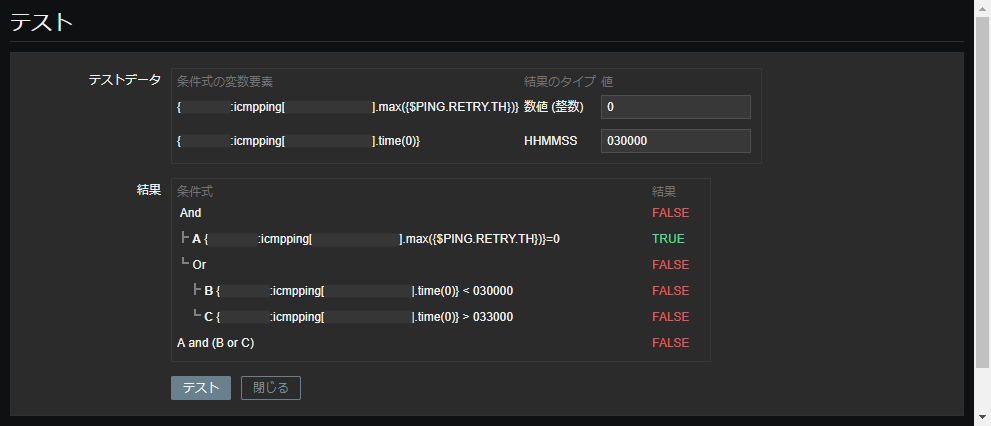
⇒ A = TRUE (Ping failed)
B = FALSE (Does not apply to 00:00:00 ~ 02:59:59)
C = FALSE (Does not apply to 03:30:01 ~ 23:59:59)
The final result is FALSE, so no alert is triggered.
Example 4 (Ping failed at 03:30:00)
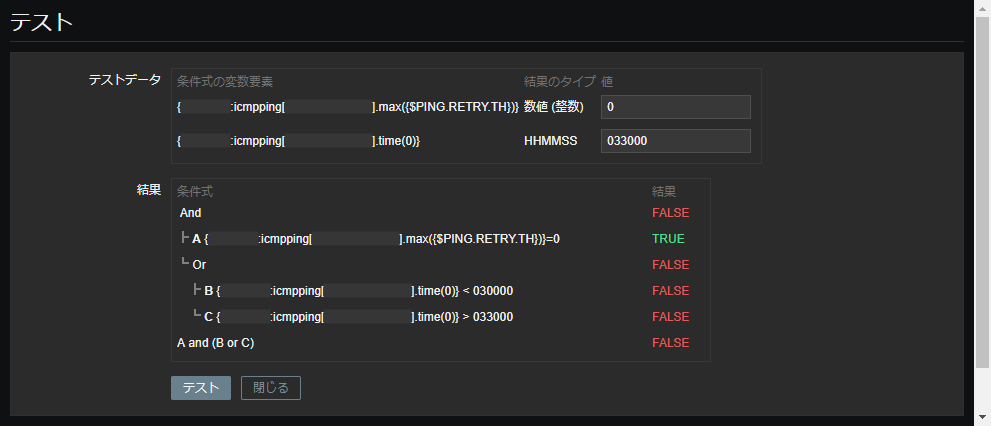
⇒ A = TRUE (Ping failed)
B = FALSE (Not applicable to 00:00:00 ~ 02:59:59)
C = FALSE (Not applicable to 03:30:01 ~ 23:59:59)
The final result is FALSE, so no alert is triggered.
Example 5 (Ping successful at 02:59:59)
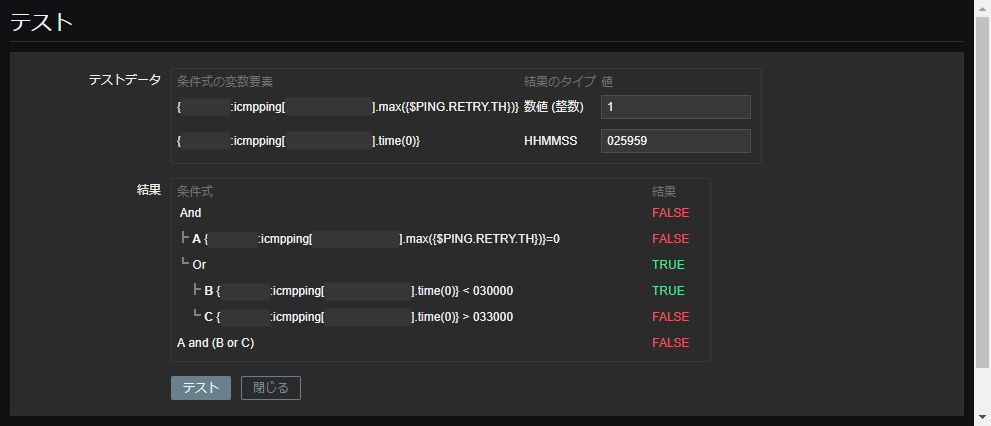
⇒ A = FALSE (Ping successful)
B = TRUE (Corresponds to 00:00:00 ~ 02:59:59)
C = FALSE (Does not correspond to 03:30:01 ~ 23:59:59)
The final result = FALSE, so no alert is triggered.
Example 6 (Ping successful at 03:30:01)
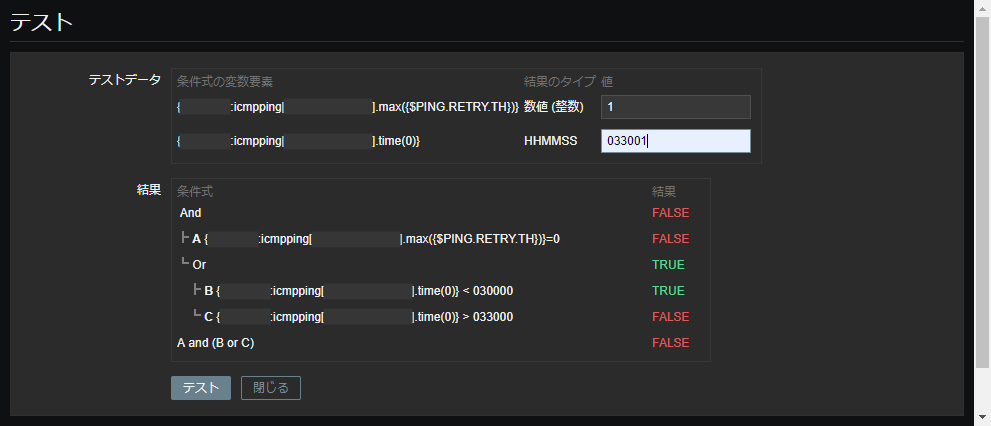
⇒ A = FALSE (Ping successful)
B = FALSE (Does not fall within the timeframe of 00:00:00 ~ 02:59:59)
C = TRUE (Falls within the timeframe of 03:30:01 ~ 23:59:59)
The final result is FALSE, so no alert is triggered.
Example 7 (Ping successful at 03:00:00)
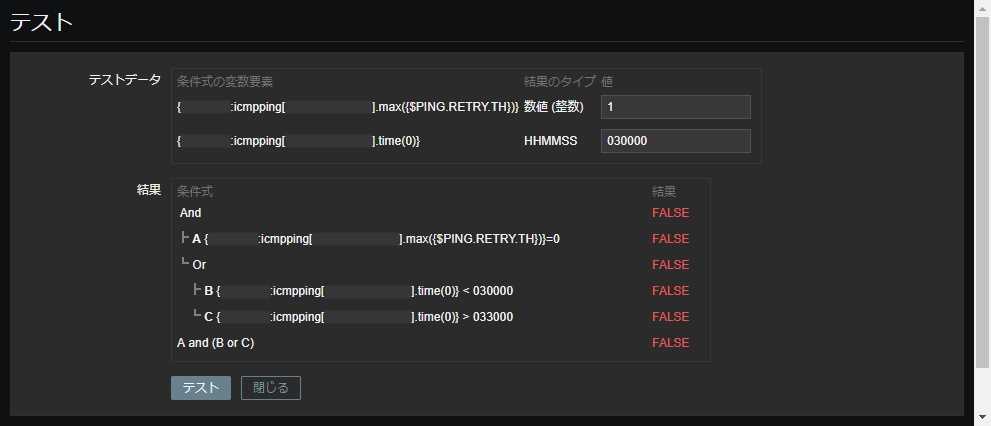
⇒ A = FALSE (Ping successful)
B = FALSE (Does not fall within the timeframe of 00:00:00 ~ 02:59:59)
C = FALSE (Does not fall within the timeframe of 03:30:01 ~ 23:59:59)
The final result is FALSE, so no alert is triggered.
Example 8 (Ping successful at 03:30:00)
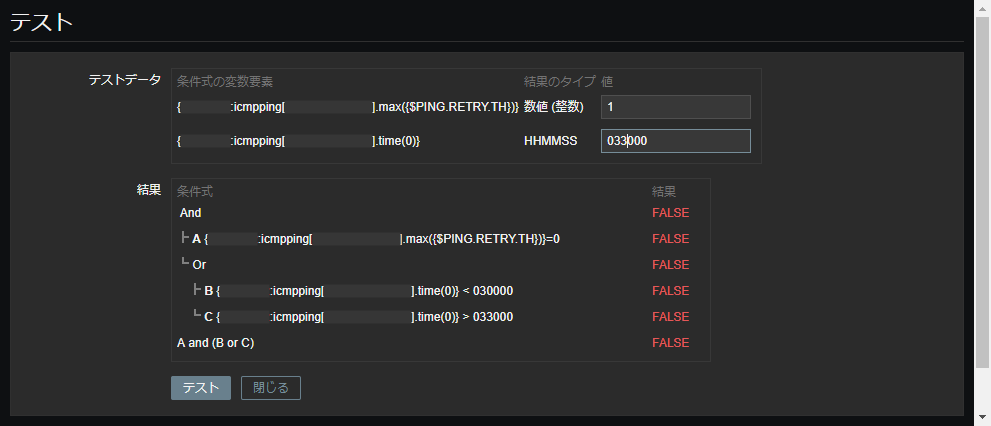
⇒ A = FALSE (Ping successful)
B = FALSE (Does not fall within the timeframe of 00:00:00 ~ 02:59:59)
C = FALSE (Does not fall within the timeframe of 03:30:01 ~ 23:59:59)
The final result is FALSE, so no alert is triggered.
check the eight patterns described in the example, and if they perform as expected, then there should be no problem. I hope this
is helpful.
summary
This time, we implemented the "Monitoring Exclusion Time Settings" in Zabbix and performed a simple test using the "Conditional Expression Builder."
Even if you confirm that there are no problems in the test, be sure to check that the graph also behaves as expected after changing the settings!
The person who wrote this article
About the author









