

Use Terraformer to import existing infrastructure resources into Terraform
2020.05.07





I'm Teraoka, an infrastructure engineer.
In my previous article, I introduced the `terraform import` command
as a way to import existing resources into Terraform
How to import existing infrastructure resources with Terraform
As mentioned in the summary of this article,
the import command only rewrites the tfstate file;
you have to manually write the tf files by comparing them to the tfstate. If
there are many files, this could take an enormous amount of time, which is a problem.
I have good news for all of you.
A tool called terraformer has been released as open-source software.
https://github.com/GoogleCloudPlatform/terraformer
CLI tool to generate terraform files from existing infrastructure (reverse Terraform). Infrastructure to Code
As described, it appears to be a CLI tool that automatically generates Terraform files from existing infrastructure.
Instructions for use are also available on GitHub, so let's try using it.
install
On Mac, you can install it using the brew command
$ brew install terraformer $ terraformer version Terraformer v0.8.7
So far, so good.
This time we'll be using v0.8.7.
Infrastructure Configuration
I created the infrastructure to be imported in advance using terraformer
https://github.com/beyond-teraoka/terraform-aws-multi-environment-sample
Configuration diagram
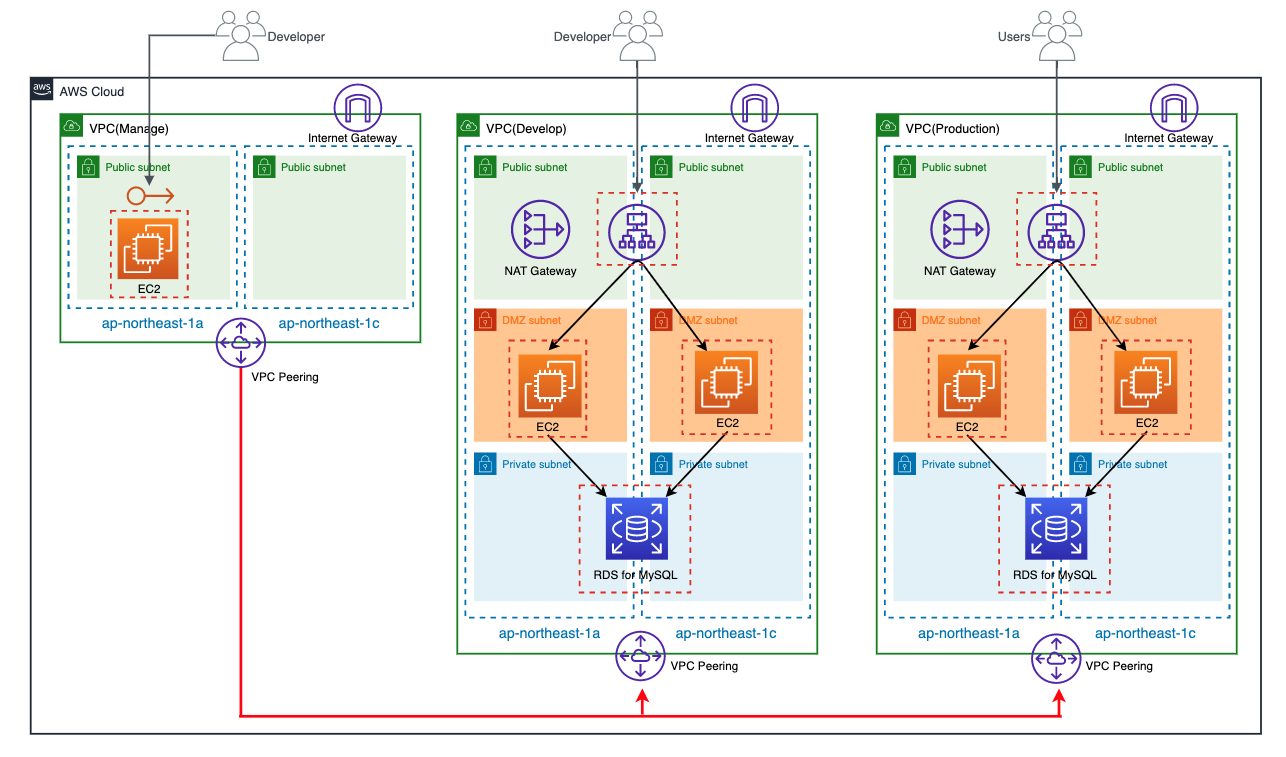
I have three environments in the same AWS account
- develop
- production
- manage
Additionally, each environment has the following resources:
- VPC
- Subnet
- Route Table
- Internet Gateway
- NAT Gateway
- Security Group
- VPC Peering
- EIP
- EC2
- ALB
- RDS
Although not shown in the diagram, each environment's resources are tagged with an Environment tag, and their
values are set to dev, prod, and mng, respectively.
Prepare authentication information
Please prepare your AWS credentials.
Please prepare these according to your environment.
$ cat /Users/yuki.teraoka/.aws/credentials [beyond-poc] aws_access_key_id = XXXXXXXXXXXXXXXXXXXX aws_secret_access_key = XXXXXXXXXXXXXXXXXXXXXXXXXXXXXXXXXXXXXX [beyond-poc-admin] role_arn = arn:aws:iam::XXXXXXXXXXXX:role/XXXXXXXXXXXXXXXXXXXXXX source_profile = beyond-poc
Running terraformer
First, try running it as per the example on GitHub
$ terraformer import aws --resources=alb,ec2_instance,eip,ebs,igw,nat,rds,route_table,sg,subnet,vpc,vpc_peering --regions=ap-northeast-1 --profile=beyond-poc-admin 2020/05/05 18:29:14 aws importing region ap-northeast-1 2020/05/05 18:29:14 aws importing... vpc 2020/05/05 18:29:15 open /Users/yuki.teraoka/.terraform.d/plugins/darwin_amd64: no such file or directory
It seems you need the plugin directory from when you run `terraform init`.
Prepare an `init.tf` file and run `init`.
$ echo 'provider "aws" {}' > init.tf $ terraform init
I'll try running it again
$ terraformer import aws --resources=alb,ec2_instance,eip,ebs,igw,nat,rds,route_table,sg,subnet,vpc,vpc_peering --regions=ap-northeast-1 --profile=beyond-poc-admin
It seems the import was successful.
A directory called "generated" has been created, which wasn't there before.
Directory Structure
$ tree . └── aws ├── alb │ ├── lb.tf │ ├── lb_listener.tf │ ├── lb_target_group.tf │ ├── lb_target_group_attachment.tf │ ├── outputs.tf │ ├── provider.tf │ ├── terraform.tfstate │ └── variables.tf ├── ebs │ ├── ebs_volume.tf │ ├── outputs.tf │ ├── provider.tf │ └── terraform.tfstate ├── ec2_instance │ ├── instance.tf │ ├── outputs.tf │ ├── provider.tf │ ├── terraform.tfstate │ └── variables.tf ├── eip │ ├── eip.tf │ ├── outputs.tf │ ├── provider.tf │ └── terraform.tfstate ├── igw │ ├── internet_gateway.tf │ ├── outputs.tf │ ├── provider.tf │ ├── terraform.tfstate │ └── variables.tf ├── nat │ ├── nat_gateway.tf │ ├── outputs.tf │ ├── provider.tf │ └── terraform.tfstate ├── rds │ ├── db_instance.tf │ ├── db_parameter_group.tf │ ├── db_subnet_group.tf │ ├── outputs.tf │ ├── provider.tf │ ├── terraform.tfstate │ └── variables.tf ├── route_table │ ├── main_route_table_association.tf │ ├── outputs.tf │ ├── provider.tf │ ├── route_table.tf │ ├── route_table_association.tf │ ├── terraform.tfstate │ └── variables.tf ├── sg │ ├── outputs.tf │ ├── provider.tf │ ├── security_group.tf │ ├── security_group_rule.tf │ ├── terraform.tfstate │ └── variables.tf ├── subnet │ ├── outputs.tf │ ├── provider.tf │ ├── subnet.tf │ ├── terraform.tfstate │ └── variables.tf ├── vpc │ ├── outputs.tf │ ├── provider.tf │ ├── terraform.tfstate │ └── vpc.tf └── vpc_peering ├── outputs.tf ├── provider.tf ├── terraform.tfstate └── vpc_peering_connection.tf 13 directories, 63 files
Please pay attention to the directory structure;
it seems that Terraformer imports files in the default structure "{output}/{provider}/{service}/{resource}.tf".
This is also documented on GitHub.
Terraformer by default separates each resource into a file, which is put into a given service directory.
The default path for resource files is {output}/{provider}/{service}/{resource}.tf and can vary for each provider.
This structure presents the following problems:
- Because tfstate is split for each Terraform resource, even small changes require multiple Applys
- All environment resources are recorded in the same tfstate, so changes in one environment can affect all environments
Ideally, I'd like to divide tfstate by environment, such as develop, production, and manage, so that
all resources for each environment are recorded in the same tfstate.
When I looked into whether this is possible, I found the following:
- You can explicitly specify the hierarchy using the --path-pattern option
- You can import only resources that have the tag specified in the --filter option
It seems possible to achieve this by combining these two, so let's give it a try
$ terraformer import aws --resources=alb,ec2_instance,eip,ebs,igw,nat,rds,route_table,sg,subnet,vpc,vpc_peering --regions=ap-northeast-1 --profile=beyond-poc-admin --path-pattern {output}/{provider}/develop/ --filter="Name=tags.Environment;Value=dev" $ terraformer import aws --resources=alb,ec2_instance,eip,ebs,igw,nat,rds,route_table,sg,subnet,vpc,vpc_peering --regions=ap-northeast-1 --profile=beyond-poc-admin --path-pattern {output}/{provider}/production/ --filter="Name=tags.Environment;Value=prod" $ terraformer import aws --resources=ec2_instance,eip,ebs,igw,route_table,sg,subnet,vpc,vpc_peering --regions=ap-northeast-1 --profile=beyond-poc-admin --path-pattern {output}/{provider}/manage/ --filter="Name=tags.Environment;Value=mng"
After the import is complete, the directory structure will look like this:
Directory Structure
$ tree . └── aws ├── develop │ ├── db_instance.tf │ ├── db_parameter_group.tf │ ├── db_subnet_group.tf │ ├── eip.tf │ ├── instance.tf │ ├── internet_gateway.tf │ ├── lb.tf │ ├── lb_target_group.tf │ ├── nat_gateway.tf │ ├── outputs.tf │ ├── provider.tf │ ├── route_table.tf │ ├── security_group.tf │ ├── subnet.tf │ ├── terraform.tfstate │ ├── variables.tf │ └── vpc.tf ├── manage │ ├── instance.tf │ ├── internet_gateway.tf │ ├── outputs.tf │ ├── provider.tf │ ├── route_table.tf │ ├── security_group.tf │ ├── subnet.tf │ ├── terraform.tfstate │ ├── variables.tf │ ├── vpc.tf │ └── vpc_peering_connection.tf └── production ├── db_instance.tf ├── db_parameter_group.tf ├── db_subnet_group.tf ├── eip.tf ├── instance.tf ├── internet_gateway.tf ├── lb.tf ├── lb_target_group.tf ├── nat_gateway.tf ├── outputs.tf ├── provider.tf ├── route_table.tf ├── security_group.tf ├── subnet.tf ├── terraform.tfstate ├── variables.tf └── vpc.tf 4 directories, 45 files
The resources are divided by environment.
If you take a look at vpc.tf under develop, you'll see that only the VPC for the corresponding environment is imported.
develop/vpc.tf
resource "aws_vpc" "tfer--vpc-002D-0eea2bc99da0550a6" { assign_generated_ipv6_cidr_block = "false" cidr_block = "10.1.0.0/16" enable_classiclink = "false" enable_classiclink_dns_support = "false" enable_dns_hostnames = "true" enable_dns_support = "true" instance_tenancy = "default" tags = { Environment = "dev" Name = "vpc-terraformer-dev" } }
Regarding tfstate, all the resources for each environment are recorded in a single file, so there shouldn't be any problems there either.
The contents are long, so I'll omit them.
Concerns
There are some places where resource ID values are hard-coded
There are several instances where resource ID values are hardcoded,
such as the vpc_id in the aws_security_group below
resource "aws_security_group" "tfer--alb-002D-dev-002D-sg_sg-002D-00d3679a2f3309565" { description = "for ALB" egress { cidr_blocks = ["0.0.0.0/0"] description = "Outbound ALL" from_port = "0" protocol = "-1" self = "false" to_port = "0" } ingress { cidr_blocks = ["0.0.0.0/0"] description = "allow_http_for_alb" from_port = "80" protocol = "tcp" self = "false" to_port = "80" } name = "alb-dev-sg" tags = { Environment = "dev" Name = "alb-dev-sg" } vpc_id = "vpc-0eea2bc99da0550a6" }
When writing new HCL, you dynamically reference it like this: "vpc_id = aws_vpc.vpc.id", but
it seems that auto-completion during import is still difficult.
Since the VPC ID is already recorded in tfstate, you only need to modify the tf file.
The description of terraform_remote_state does not correspond to 0.12
There are some places where the HCL description is from Terraform 0.11, such as the vpc_id of aws_subnet below
resource "aws_subnet" "tfer--subnet-002D-02f90c599d4c887d3" { assign_ipv6_address_on_creation = "false" cidr_block = "10.1.2.0/24" map_public_ip_on_launch = "true" tags = { Environment = "dev" Name = "subnet-terraformer-dev-public-1c" } vpc_id = "${data.terraform_remote_state.local.outputs.aws_vpc_tfer--vpc-002D-0eea2bc99da0550a6_id}" }
If you apply it in this state on the 0.12 series, it will run, but a warning will be generated
Also, if you change the --path-pattern option to separate directories for each environment,
the tfstate itself will be output to a single file, but
when referencing resources within the tf file, it is still referenced using terraform_remote_state.
Looking at GitHub, there is the following description, so it seems to be by design.
Connect between resources with terraform_remote_state (local and bucket).
In the case of the above vpc_id, since aws_vpc and aws_subnet are recorded in the same tfstate,
it can be referenced simply by using "vpc_id = aws_vpc.tfer--vpc-002D-0eea2bc99da0550a6.id".
It seems that this part will also need to be corrected manually.
summary
So, what do you think?
Using Terraformer seems like it would make importing existing infrastructure much easier.
There are a few concerns, but they're not too difficult to fix, so I think they're within acceptable limits.
I've always thought that Terraform import was a pain, so
I sincerely respect the people at Waze SRE who created a tool that solves that problem so well. I encourage
everyone to try it out.
The person who wrote this article
About the author









