

I created an Ansible Playbook to build a three-tier network configuration on AWS
Hello.
This is Shimeji from the SS team.
I previously wrote an article about building a two-tier network with Ansible, but in actual projects, we often need to build environments with a three-tier network, right?
So, I've created a Playbook to build an AWS three-tier network using Ansible.
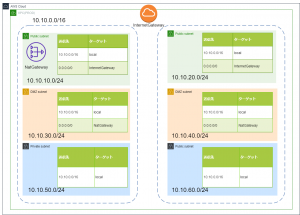
*The environment we will actually build is here↓
Directory structure
The directory structure of the playbook is as follows:
. ├── README.md ├── ansible.cfg ├── hosts ├── roles │ └── aws_vpc │ ├── tasks │ │ └── main.yml │ └── vars │ └── main.yml └── vpc_create.yml
Playbook
Yes, it's a Playbook.
It's basically the same as a 2-layer Playbook, but it adds the functionality to create a NATGATEWAY and a route table for the DMZ subnet.
--- # tasks file for aws_vpc - name: create_vpc ec2_vpc_net: name: "{{ vpc_name }}" cidr_block: "{{ vpc_cidr }}" region: "{{ region }}" profile: "{{ profile }}" dns_hostnames: yes dns_support: yes register: vpc_info # PUBLIC_SUBNET creation - name: create_public_subnet ec2_vpc_subnet: vpc_id: "{{ vpc_info.vpc.id }}" cidr: "{{ item.pub_subnet_cidr }}" az: "{{ item.subnet_az }}" region: "{{ region }}" resource_tags: { "Name":"{{ item.pub_subnet_name }}" } profile: "{{ profile }}" register: pubsub_info with_items: - "{{ pub_subnet }}" # Create DMZ_SUBNET - name: create_dmz_subnet ec2_vpc_subnet: vpc_id: "{{ vpc_info.vpc.id }}" cidr: "{{ item.dmz_subnet_cidr }}" az: "{{ item.subnet_az }}" region: "{{ region }}" resource_tags: { "Name":"{{ item.dmz_subnet_name }}" } profile: "{{ profile }}" register: pubsub_info with_items: - "{{ dmz_subnet }}" # PRIVATE_SUBNET creation - name: create_private_subnet ec2_vpc_subnet: vpc_id: "{{ vpc_info.vpc.id }}" cidr: "{{ item.pri_subnet_cidr }}" az: "{{ item.subnet_az }}" region: "{{ region }}" resource_tags: { "Name":"{{ item.pri_subnet_name }}" } profile: "{{ profile }}" register: prisub_info with_items: - "{{ pri_subnet }}" # Create IGW - name: create_igw ec2_vpc_igw: vpc_id: "{{ vpc_info.vpc.id }}" region: "{{ region }}" tags: { "Name":"{{ igw_name }}" } profile: "{{ profile }}" register: igw_info # Create ROUTETABLE (IGW) - name: create_route_table ec2_vpc_route_table: vpc_id: "{{ vpc_info.vpc.id }}" subnets: "{{ atache_igw_subnet }}" routes: - dest: 0.0.0.0/0 gateway_id: "{{ igw_info.gateway_id }}" region: "{{ region }}" profile: "{{ profile }}" resource_tags: { "Name":"{{ rttable_pub_name }}" } # Get SUBNETID to place NGW - name: get_subnet_id shell: aws ec2 describe-subnets --region {{ region }} --profile {{ profile }} --output text | grep -B 1 {{ ngw_subnet_name }} | awk 'NR==1 {print $12}' register: ngw_subnet_id #- name: show # debug: # msg: "{{ ngw_subnet_id.stdout }}" # Create NGW - name: create_ngw ec2_vpc_nat_gateway: subnet_id: "{{ ngw_subnet_id.stdout }}" region: "{{ region }}" profile: "{{ profile }}" wait: yes register: ngw_info #- name: show # debug: # msg: "{{ ngw_info.nat_gateway_id }}" # Wait until NGW is created #- name: wait_for_ngw # pause: # minutes: 5 # Create ROUTETABLE (NGW) - name: create_route_table2 ec2_vpc_route_table: vpc_id: "{{ vpc_info.vpc.id }}" subnets: "{{ atache_ngw_subnet }}" routes: - dest: 0.0.0.0/0 gateway_id: "{{ ngw_info.nat_gateway_id }}" region: "{{ region }}" profile: "{{ profile }}" resource_tags: { "Name":"{{ rttable_dmz_name }}" }
The output of the awscli command is formatted to obtain the DMZ subnet ID.
This is then used to create the NATGATEWAY.
Also, since it takes some time for the NATGATEWAY to be created, the process is temporarily stopped using the "pause" module.
*Update:
I received a comment on Twitter pointing out that "ec2_vpc_nat_gateway" has a "wait" option!
Thank you!
Defining variables
--- # vars file for aws_vpc # REGION region: "ap-northeast-1" # PROFILE profile: "default" # VPC vpc_name: "shimeji-3layer-vpc" vpc_cidr: "10.10.0.0/16" # IGW igw_name: "shimeji-3layer-igw" # NGW ngw_name: "shimeji-3layer-ngw" # Subnet name where NGW will be created ngw_subnet_name: "shimeji-3layer-public-subnet-a" # ROUTETABLE(PUBLIC) rttable_pub_name: "shimeji-3layer-pub-rt" # ROUTETABLE(DMZ) rttable_dmz_name: "shimeji-3layer-dmz-rt" # PUBLIC_SUBNET pub_subnet: - { pub_subnet_cidr: "10.10.10.0/24" ,subnet_az: "ap-northeast-1a" ,pub_subnet_name: "shimeji-3layer-public-subnet-a" } - { pub_subnet_cidr: "10.10.20.0/24" ,subnet_az: "ap-northeast-1c" ,pub_subnet_name: "shimeji-3layer-public-subnet-c" } # DMZ_SUBNET dmz_subnet: - { dmz_subnet_cidr: "10.10.30.0/24" ,subnet_az: "ap-northeast-1a" ,dmz_subnet_name: "shimeji-3layer-dmz-subnet-a" } - { dmz_subnet_cidr: "10.10.40.0/24" ,subnet_az: "ap-northeast-1c" ,dmz_subnet_name: "shimeji-3layer-dmz-subnet-c" } # PRIVATE_SUBNET pri_subnet: - { pri_subnet_cidr: "10.10.50.0/24" ,subnet_az: "ap-northeast-1a" ,pri_subnet_name: "shimeji-3layer-private-subnet-a" } - { pri_subnet_cidr: "10.10.60.0/24" ,subnet_az: "ap-northeast-1c" ,pri_subnet_name: "shimeji-3layer-private-subnet-c" } # Subnet associated with IGW atache_igw_subnet: - "10.10.10.0/24" - "10.10.20.0/24" # Subnet to associate with NGW atache_ngw_subnet: - "10.10.30.0/24" - "10.10.40.0/24"
This time, we will prefix each resource with "shimeji-3layer"
execution
Let's actually try it out
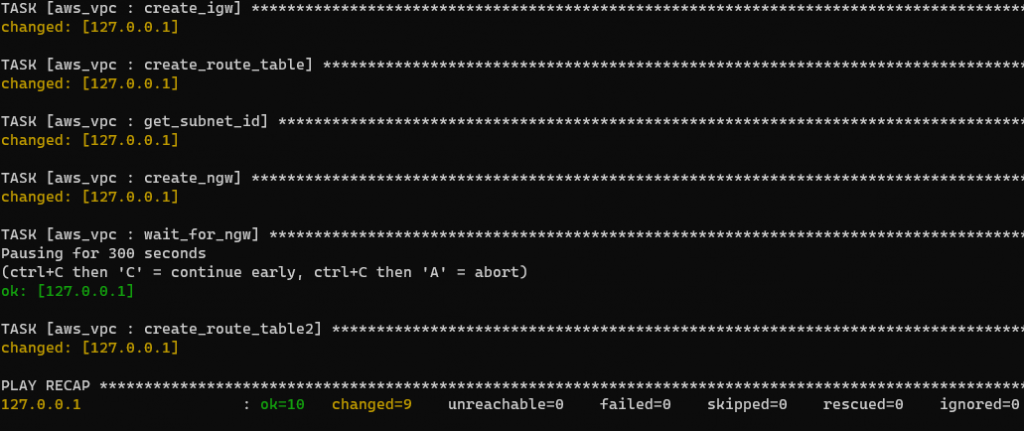
root@BYD-NPC-023:/opt/playbook/aws-vpc-3layer# ansible-playbook -i hosts vpc_create.yml PLAY [create vpc subnet igw routetable] ********************************************************************************************************************************************************************************* TASK [aws_vpc : create_vpc] ***************************************************************************************************************************************************** changed: [127.0.0.1] TASK [aws_vpc : create_public_subnet] *************************************************************************************************************************************************************************** changed: [127.0.0.1] => (item={u'pub_subnet_name': u'shimeji-3layer-public-subnet-a', u'subnet_az': u'ap-northeast-1a', u'pub_subnet_cidr': u'10.10.10.0/24'}) changed: [127.0.0.1] => (item={u'pub_subnet_name': u'shimeji-3layer-public-subnet-c', u'subnet_az': u'ap-northeast-1c', u'pub_subnet_cidr': u'10.10.20.0/24'}) TASK [aws_vpc : create_dmz_subnet] ***************************************************************************************************************************************************************** changed: [127.0.0.1] => (item={u'dmz_subnet_cidr': u'10.10.30.0/24', u'dmz_subnet_name': u'shimeji-3layer-dmz-subnet-a', u'subnet_az': u'ap-northeast-1a'}) changed: [127.0.0.1] => (item={u'dmz_subnet_cidr': u'10.10.40.0/24', u'dmz_subnet_name': u'shimeji-3layer-dmz-subnet-c', u'subnet_az': u'ap-northeast-1c'}) TASK [aws_vpc : create_private_subnet] **************************************************************************************************************************************************************** changed: [127.0.0.1] => (item={u'pri_subnet_cidr': u'10.10.50.0/24', u'pri_subnet_name': u'shimeji-3layer-private-subnet-a', u'subnet_az': u'ap-northeast-1a'}) changed: [127.0.0.1] => (item={u'pri_subnet_cidr': u'10.10.60.0/24', u'pri_subnet_name': u'shimeji-3layer-private-subnet-c', u'subnet_az': u'ap-northeast-1c'}) TASK [aws_vpc : create_igw] ************************************************************************************************************************************************ changed: [127.0.0.1] TASK [aws_vpc : create_route_table] ***************************************************************************************************************************************************** changed: [127.0.0.1] TASK [aws_vpc : get_subnet_id] ****************************************************************************************************************************************************************** changed: [127.0.0.1] TASK [aws_vpc : create_ngw] **************************************************************************************************************************************************************** changed: [127.0.0.1] TASK [aws_vpc : wait_for_ngw] **************************************************************************************************************************************************************** Pausing for 300 seconds (ctrl+C then 'C' = continue early, ctrl+C then 'A' = abort) ok: [127.0.0.1] TASK [aws_vpc : create_route_table2] ********************************************************************************************************************************************************** changed: [127.0.0.1] PLAY RECAP ***************************************************************************************************************************************************** 127.0.0.1 : ok=10 changed=9 unreachable=0 failed=0 skipped=0 rescued=0 ignored=0
Yep, it was a success!
Conclusion
While you can build an AWS network by clicking around in the management console, it's time-consuming and prone to human error.
Using Ansible, however, saves time and reduces the chances of mistakes!
↓By the way, here is the second floor




The person who wrote this article
About the author









