

[Ansible] I wrote a playbook to build an AWS network

Hello. It's been a while.
This is Shimeji from the SS team.
Today's topic is a Playbook for building an AWS network using Ansible.
*Since my seniors have written articles on building AWS networks using Terraform and CloudFormation, I'll follow suit.*
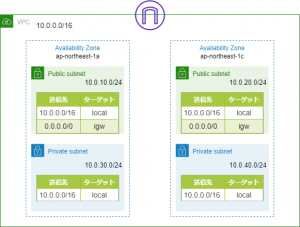
The network we'll build will look like this:
Directory structure
The directory structure of the playbook is as follows:
├── README.md ├── ansible.cfg ├── hosts ├── roles │ └── aws_vpc │ ├── tasks │ │ └── main.yml │ └── vars │ └── main.yml └── vpc_create.yml
Playbook
inventory file
root@DESKTOP-MOGIJIA:/opt/playbook/aws-vpc-2layer# cat hosts [localhost] 127.0.0.1
Please specify the local host in the inventory file
Role
Ansible allows you to modularize Playbooks into units called "Roles," each representing a specific role.
In this case, we'll create a separate Role called "aws_vpc" and include it from the main Playbook.
root@DESKTOP-MOGIJIA:/opt/playbook/aws-vpc-2layer# cat roles/aws_vpc/tasks/main.yml --- # tasks file for aws_vpc - name: create_vpc ec2_vpc_net: name: "{{ vpc_name }}" cidr_block: "{{ vpc_cidr }}" region: "{{ region }}" dns_hostnames: yes dns_support: yes register: vpc_info # PUBLIC_SUBNET create - name: create_public_subnet ec2_vpc_subnet: vpc_id: "{{ vpc_info.vpc.id }}" cidr: "{{ item.pub_subnet_cidr }}" az: "{{ item.subnet_az }}" region: "{{ region }}" resource_tags: { "Name":"{{ item.pub_subnet_name }}" } register: pubsub_info with_items: - "{{ pub_subnet }}" # PRIVATE_SUBNET creation - name: create_private_subnet ec2_vpc_subnet: vpc_id: "{{ vpc_info.vpc.id }}" cidr: "{{ item.pri_subnet_cidr }}" az: "{{ item.subnet_az }}" region: "{{ region }}" resource_tags: { "Name":"{{ item.pri_subnet_name }}" } register: prisub_info with_items: - "{{ pri_subnet }}" # Create IGW - name: create_igw ec2_vpc_igw: vpc_id: "{{ vpc_info.vpc.id }}" region: "{{ region }}" tags: { "Name":"{{ igw_name }}" } register: igw_info # Create ROUTETABLE (IGW) - name: create_route_table ec2_vpc_route_table: vpc_id: "{{ vpc_info.vpc.id }}" subnets: "{{ atache_igw_subnet }}" routes: - dest: 0.0.0.0/0 gateway_id: "{{ igw_info.gateway_id }}" region: "{{ region }}" resource_tags: { "Name":"{{ rttable_pub_name }}" }
Ansible allows you to build AWS VPCs, subnets, internet gateways, etc., using the "ec2_vpc_xxx" module.
Additionally, we'll store various values as variables so they can be changed later.
Defining variables
root@DESKTOP-MOGIJIA:/opt/playbook/aws-vpc-2layer# cat roles/aws_vpc/vars/main.yml --- # vars file for aws_vpc # REGION region: "ap-northeast-1" # VPC vpc_name: "shimeji-wd-vpc" vpc_cidr: "10.0.0.0/16" # IGW igw_name: "shimeji-igw" # ROUTETABLE(PUBLIC) rttable_pub_name: "shimeji-pub-rt" # PUBLIC_SUBNET pub_subnet: - { pub_subnet_cidr: "10.0.10.0/24" ,subnet_az: "ap-northeast-1a" ,pub_subnet_name: "shimeji-wd-public-subnet-a" } - { pub_subnet_cidr: "10.0.20.0/24" ,subnet_az: "ap-northeast-1c" ,pub_subnet_name: "shimeji-wd-public-subnet-c" } # PRIVATE_SUBNET pri_subnet: - { pri_subnet_cidr: "10.0.30.0/24" ,subnet_az: "ap-northeast-1a" ,pri_subnet_name: "shimeji-wd-private-subnet-a" } - { pri_subnet_cidr: "10.0.40.0/24" ,subnet_az: "ap-northeast-1c" ,pri_subnet_name: "shimeji-wd-private-subnet-c" } # Subnet linked to IGW atache_igw_subnet: - "10.0.10.0/24" - "10.0.20.0/24"
This time, we will add the prefix "shimeji" to the name of each resource
Playbook
Yes, this is the main Playbook.
It includes the Role created above.
root@DESKTOP-MOGIJIA:/opt/playbook/aws-vpc-2layer# cat vpc_create.yml --- # VPC CREATE Playbook - name: create vpc subnet igw routetable hosts: localhost connection: local gather_facts: False become: False roles: - aws_vpc
Since we are not provisioning a server this time, we do not need "gather_facts" or "become".
That's all there is to it.
execution
root@DESKTOP-MOGIJIA:/opt/playbook/aws-vpc-2layer# ansible-playbook -i hosts vpc_create.yml PLAY [create vpc subnet igw routetable] ******************************************************************************** TASK [aws_vpc : create_vpc] ************************************************************************************************ changed: [127.0.0.1] TASK [aws_vpc : create_public_subnet] ************************************************************************************* changed: [127.0.0.1] => (item={u'pub_subnet_name': u'shimeji-wd-public-subnet-a', u'subnet_az': u'ap-northeast-1a', u'pub_subnet_cidr': u'10.0.10.0/24'}) changed: [127.0.0.1] => (item={u'pub_subnet_name': u'shimeji-wd-public-subnet-c', u'subnet_az': u'ap-northeast-1c', u'pub_subnet_cidr': u'10.0.20.0/24'}) TASK [aws_vpc : create_private_subnet] ********************************************************************************* changed: [127.0.0.1] => (item={u'pri_subnet_cidr': u'10.0.30.0/24', u'pri_subnet_name': u'shimeji-wd-private-subnet-a', u'subnet_az': u'ap-northeast-1a'}) changed: [127.0.0.1] => (item={u'pri_subnet_cidr': u'10.0.40.0/24', u'pri_subnet_name': u'shimeji-wd-private-subnet-c', u'subnet_az': u'ap-northeast-1c'}) TASK [aws_vpc : create_igw] ************************************************************************************************ changed: [127.0.0.1] TASK [aws_vpc : create_route_table] ********************************************************************************* changed: [127.0.0.1] PLAY RECAP ******************************************************************************************************************* 127.0.0.1 : ok=5 changed=5 unreachable=0 failed=0 skipped=0 rescued=0 ignored=0
Yes, it's working properly
Conclusion
Here are some articles by my respected seniors:
■ CloudFormation
https://beyondjapan.com/blog/2019/03/cloudformation1/
■ Terraform
https://beyondjapan.com/blog/2018/07/terraform-aws-network-module/




The person who wrote this article
About the author









