

[terraform] I wrote a module to build a three-layer network configuration on AWS
2018.07.21




My name is Teraoka and I am an infrastructure engineer
This time we will talk about terraform modules
I've created a custom module that allows you to
quickly build a configuration that divides your AWS network into three layers: Public, DMZ, and Private, and that can be reused for any project. Here's a summary of it
By running the code described in this article, you can deploy the following configuration on AWS
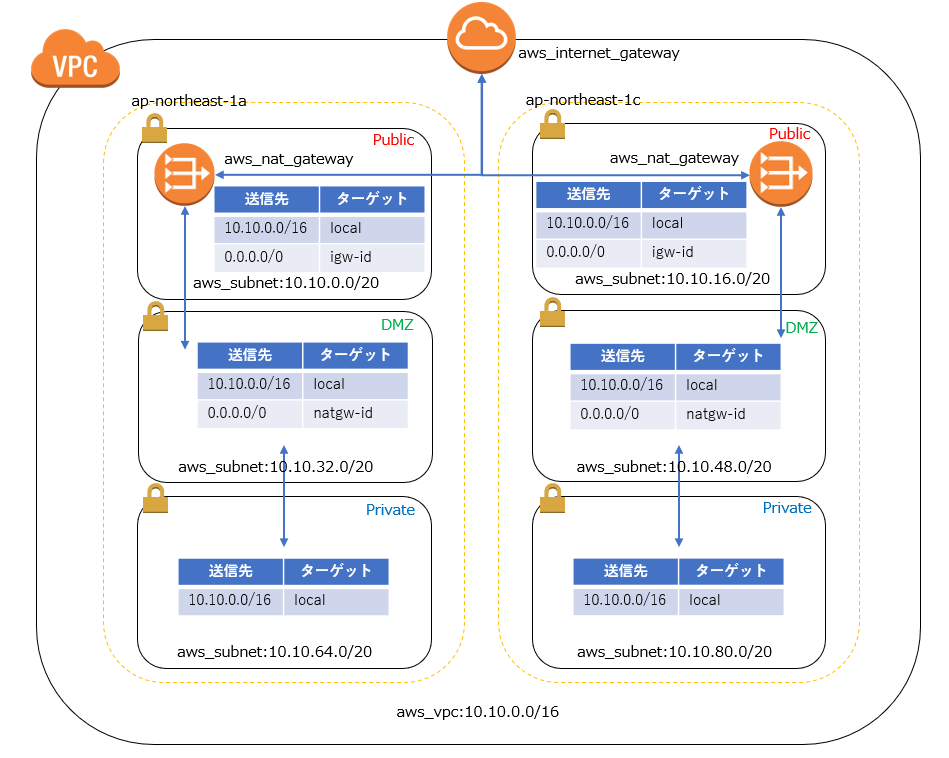
Multi-AZ and DMZ subnets communicate with the outside world via NATGateway
Public subnets communicate directly with the Internet Gateway,
while private subnets are only for local communication.
It may look complicated at first glance, but it's actually a fairly common configuration
The result of modularizing this configuration with terraform is as follows
■Define variables for the values to be passed to the module
First, define the value to be passed to the module as a variable
variable "vpc_config" { default = { project = "tf-moduletest" environment = "stg" cidr_block = "10.10.0.0/16" } } variable "availability_zones" { default = ["ap-northeast-1a","ap-northeast-1c"] } variable "public_subnets" { default = ["10.10.0.0/20","10.10.16.0/20"] } variable "dmz_subnets" { default = ["10.10.32.0/20","10.10.48.0/20"] } variable "private_subnets" { default = ["10.10.64.0/20","10.10.80.0/20"] }
■ Write a module
This part is the main topic of this article
Since it simply involves building a resource based on values defined in a variable, it
can basically be reused in any project.
###### # VPC ###### resource "aws_vpc" "vpc" { cidr_block = "${var.vpc_config["cidr_block"]}" tags { Name = "vpc-${var.vpc_config["project"]}-${var.vpc_config["environment"]}" } } ################ # Public subnet ################ resource "aws_subnet" "public" { count = "${length(var.public_subnets)}" vpc_id = "${aws_vpc.vpc.id}" cidr_block = "${element(var.public_subnets, count.index)}" availability_zone = "${element(var.availability_zones, count.index)}" map_public_ip_on_launch = "true" tags { Name = "subnet-${var.vpc_config["project"]}-${var.vpc_config["environment"]}-public-${substr(element(var.availability_zones, count.index),-1,1)}" } } ################ # DMZ subnet ################ resource "aws_subnet" "dmz" { count = "${length(var.dmz_subnets)}" vpc_id = "${aws_vpc.vpc.id}" cidr_block = "${element(var.dmz_subnets, count.index)}" availability_zone = "${element(var.availability_zones, count.index)}" tags { Name = "subnet-${var.vpc_config["project"]}-${var.vpc_config["environment"]}-dmz-${substr(element(var.availability_zones, count.index),-1,1)}" } } ################ # Private subnet ################ resource "aws_subnet" "private" { count = "${length(var.private_subnets)}" vpc_id = "${aws_vpc.vpc.id}" cidr_block = "${element(var.private_subnets, count.index)}" availability_zone = "${element(var.availability_zones, count.index)}" tags { Name = "subnet-${var.vpc_config["project"]}-${var.vpc_config["environment"]}-private-${substr(element(var.availability_zones, count.index),-1,1)}" } } ############################### # Public routes and association ############################## resource "aws_route_table" "public" { vpc_id = "${aws_vpc.vpc.id}" tags { Name = "rtb-${var.vpc_config["project"]}-${var.vpc_config["environment"]}-public" } } resource "aws_internet_gateway" "internet_gateway" { vpc_id = "${aws_vpc.vpc.id}" tags { Name = "igw-${var.vpc_config["project"]}-${var.vpc_config["environment"]}" } } resource "aws_route" "public_internet_gateway" { route_table_id = "${aws_route_table.public.id}" destination_cidr_block = "0.0.0.0/0" gateway_id = "${aws_internet_gateway.internet_gateway.id}" } resource "aws_route_table_association" "public" { count = "${length(var.public_subnets)}" subnet_id = "${element(aws_subnet.public.*.id, count.index)}" route_table_id = "${aws_route_table.public.id}" } ############################ # DMZ routes and association ########################### resource "aws_route_table" "dmz" { count = "${length(var.dmz_subnets)}" vpc_id = "${aws_vpc.vpc.id}" tags { Name = "rtb-${var.vpc_config["project"]}-${var.vpc_config["environment"]}-dmz-${substr(element(var.availability_zones, count.index),-1,1)}" } } resource "aws_eip" "nat" { count = "${length(var.dmz_subnets)}" vpc = true } resource "aws_nat_gateway" "nat_gateway" { count = "${length(var.dmz_subnets)}" allocation_id = "${element(aws_eip.nat.*.id, count.index)}" subnet_id = "${element(aws_subnet.public.*.id, count.index)}" tags { Name = "nat-${var.vpc_config["project"]}-${var.vpc_config["environment"]}-public-${substr(element(var.availability_zones, count.index),-1,1)}" } } resource "aws_route" "dmz_nat_gateway" { count = "${length(var.dmz_subnets)}" route_table_id = "${element(aws_route_table.dmz.*.id, count.index)}" destination_cidr_block = "0.0.0.0/0" gateway_id = "${element(aws_nat_gateway.nat_gateway.*.id, count.index)}" } resource "aws_route_table_association" "dmz" { count = "${length(var.dmz_subnets)}" subnet_id = "${element(aws_subnet.dmz.*.id, count.index)}" route_table_id = "${element(aws_route_table.dmz.*.id, count.index)}" } ############################### # Private routes and association ############################## resource "aws_route_table" "private" { vpc_id = "${aws_vpc.vpc.id}" tags { Name = "rtb-${var.vpc_config["project"]}-${var.vpc_config["environment"]}-private" } } resource "aws_route_table_association" "private" { count = "${length(var.private_subnets)}" subnet_id = "${element(aws_subnet.private.*.id, count.index)}" route_table_id = "${aws_route_table.private.id}" }
■ Call the module you wrote
To call a module in terraform, write the following:
You simply specify the directory containing the .tf file describing the module in `source` and
pass the necessary variables to execute the module specified in `variable`.
module "vpc" { source = "../modules/network/vpc/" vpc_config = "${var.vpc_config}" availability_zones = "${var.availability_zones}" public_subnets = "${var.public_subnets}" dmz_subnets = "${var.dmz_subnets}" private_subnets = "${var.private_subnets}" }
That's all there is to it, all you need to do is decide on the killer terraform apply
....That's all
The person who wrote this article
About the author









