

Introducing features and useful functions you should know when considering using Alibaba Cloud ApsaraDB for POLARDB

I'm Teraoka, an infrastructure engineer.
Today I'll be talking about a particular service on Alibaba Cloud.
Alibaba Cloud launches new services in Japan, including cloud database "ApsaraDB for PolarDB"
On the 20th, Alibaba Cloud announced that it will begin offering the relational database "ApsaraDB for PolarDB" in Japan on its public cloud, "Alibaba Cloud."
It's finally here..
So, this time, we'll be focusing on how to fully utilize PolarDB in the Japan region, and
I'll be introducing some useful features for actually using it as a database for services!
What is ApsaraDB for PolarDB?
As a prerequisite, I'd like to briefly touch upon PolarDB.
PolarDB is a managed relational database service compatible with MySQL, PostgreSQL, and Oracle. It is
touted as Alibaba's proprietary next-generation managed distributed RDS,
offering high performance and cost-effectiveness.
As you can see from actually using it, it
is clearly designed with AWS Aurora in mind as a competitor to other cloud services.
Intel's tests show that QPS is improved by approximately 1.3 times and
95th percentile latency (delay) is improved by approximately 1.8 times compared to "Amazon Aurora".*1
If it's clearly designed with Aurora in mind, then the key points of interest are its features and how it differentiates itself.
I'd like to summarize them in a comparative format.
Features of PolarDB and its differences from Aurora
architecture
Both PolarDB and Aurora are called distributed relational database services.
The following is an architecture diagram of PolarDB, which can be broadly divided into four concepts.*2
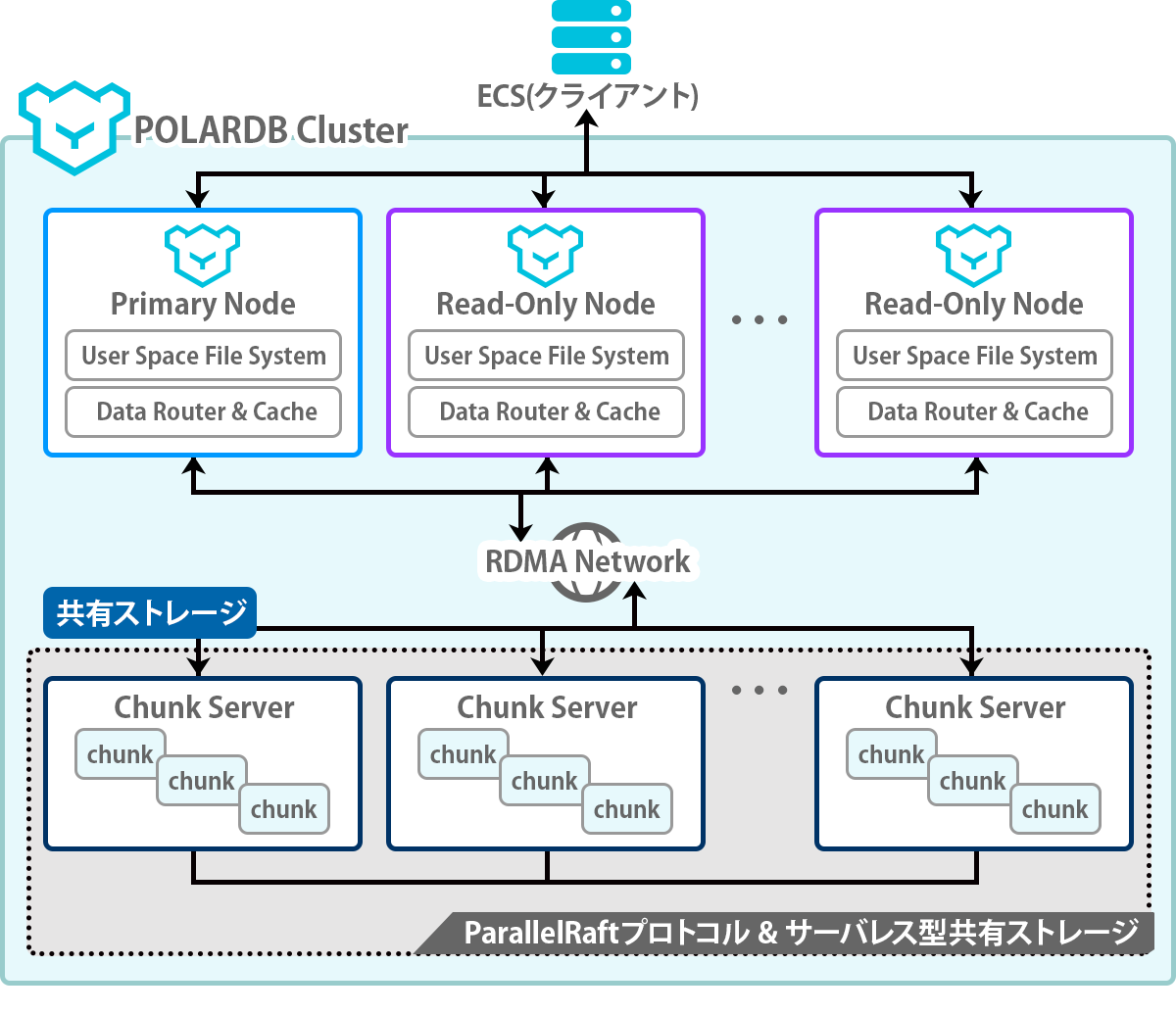
Cluster
is like a logical group consisting of one Primary Node and N Read-Only Nodes.
When a cluster is created, a DNS record called a cluster endpoint is automatically assigned to it.
By accessing this endpoint, you can issue SQL queries to the database.
Additionally, PolarDB endpoints support read/write isolation※3
- Write request: sent to the Primary Node
- Read requests: sent to the primary or read-only node depending on the load of each node
As you can see, it automatically determines the target node internally.
Aurora has separate endpoints for writing and reading, but
PolarDB only has one and distributes the traffic appropriately internally, which is convenient.
Primary Node
This is a single node within the cluster that can perform both write and read operations.
Write requests to the database are primarily executed against this node.
While Aurora has a multi-master capability that allows the use of multiple primary nodes,
PolarDB does not have this feature, so currently, write requests cannot be distributed across multiple nodes.
Read-Only Node
These are read-only nodes that can be launched up to 15 times within a cluster.
While it's possible to manually increase or decrease their number, using DAS (Database Autonomous Service)
allows for scaling in/out according to the load.*4
The AutoScall feature and the ability to launch up to 15 nodes are the same as Aurora,
indicating a strong focus on functionality.
Chunk Server
Both PolarDB and Aurora completely separate computing and storage processing on each node.
In PolarDB, storage processing is handled by what is called a Chunk Server.
Database data is stored on this Chunk Server, and
the storage capacity can be automatically scaled up or down according to the data volume. Automatic
storage scaling is also available in Aurora, but the maximum expansion capacity differs:
Aurora is up to 64TB, while PolarDB can expand up to 100TB.
Useful features of PolarDB
Here are some of the features I found useful when actually using it
Data migration support by DTS
If you are using PolarDB for the first time, you don't need to consider these points, but
if you want to migrate from an existing service's database, you will need to consider the following:
- How to migrate data from an existing database
- How to reduce downtime when switching to PolarDB
In situations like this, PolarDB allows the use of DTS (Data Transmission Service), so
having a data migration process readily available is very helpful.*5
Online scale up/down
PolarDB can scale up and down while online.
In contrast, Aurora requires temporarily stopping nodes, which is perhaps its biggest differentiating factor.
I was concerned about the downtime when changing the specifications, so I created a test database like the one below
CERATE DATABASE TEST; CREATE TABLE test ( column int(10) DEFAULT NULL ) ENGINE=InnoDB;
When changing the specifications, I checked by issuing an update every second
update test set column=unix_timestamp();
The console displays a message indicating that the connection will be lost for up to 30 seconds, but
the total time it took to complete the changes was actually 10 minutes, and the connection error only occurred for about 10 seconds of that time.
On the other hand, Aurora requires stopping a node when changing its specifications,
resulting in approximately 5 to 10 minutes of downtime.
To avoid this, a common practice in Aurora
to select the desired specifications, add a new read-only node, and
manually failover that node to promote it to a write node, thereby
minimizing downtime.
Even with failover enabled, it takes more than 10 seconds in my experience, so
PolarDB is definitely faster.
It looks like you could choose to tolerate downtime of around 10 seconds!
Enhancement of monitoring items
PolarDB offers a comprehensive set of metrics that can be viewed by default ( *6
It's excellent because it allows you to check not only resource metrics like CPU usage, but also performance metrics related to InnoDB.
In the case of Aurora, you can check similar metrics in Performance Insights, but this incurs an additional charge.
PolarDB does not have any information on its pricing page (*7), so it appears to be free to use.
You can also set up alerts using CloudMonitor.
And guess what? CloudMonitor is free to use too! Amazing!
summary
This time, I've introduced the features and useful functions of PolarDB from an operational perspective.
This article doesn't include the actual setup procedures, but
understanding its features and functions is important when using it for a new project or migrating from another RDB, so
I hope it will be helpful to those considering using PolarDB.
I also plan to keep an eye on future PolarDB updates.
source
*1 https://www.intel.com/content/www/us/en/products/docs/storage/alibaba-cloud-polardb-solution-brief.html
*2 https://www.sbcloud.co.jp/entry/sol/polardb/
*3 https://www.alibabacloud.com/help/ja/doc-detail/68510.htm
*4 https://www.alibabacloud.com/help/doc-detail/169686.htm
*5 https://jp.alibabacloud.com/product/data-transmission-service
*6 https://www.alibabacloud.com/help/ja/doc-detail/68555.htm
*7 https://www.alibabacloud.com/help/ja/doc-detail/68498.htm




The person who wrote this article
About the author









