

A first-year education officer tried remote training for new employees using Google Classroom
Hello.
This is Mastani from the Systems Solutions Department.
I have been participating in an education improvement project since the end of last year, and starting this year, I am working as part of the education team, preparing training materials for new employees, and implementing and managing the training
In addition to the COVID-19 pandemic, we also need to provide training to members who have been assigned to other locations such as Yokohama and Shikoku, so since last year we have been conducting more remote training for new employees
This year, I joined the education team and became the person in charge of managing the training. Here's what I felt..
Management and giving instructions is difficult!

Even though I create materials for each training session and share them in a specific folder on Google Drive, I
still get questions like, " Which document should I use ?" and " Where are the documents located?
Also, when training is conducted remotely, different people use different versions of Google Meet, which confuses new members. While some of this is due to my own shortcomings, I've come to realize just how difficult it is to manage and direct training sessions.
At that time, I heard from the head of the Canadian office that "Canadian schools are using Google Classroom to manage classes and assignments," and as I looked into it, I thought, "This might solve the problems we are currently facing," so I researched how to use it and then introduced it in a training session.
What is Google Classroom?
Google Classroom is a tool that allows you to manage teaching and learning in one place. It's easy to use, secure, and helps teachers manage, measure, and enhance the learning experience.
(Source: https://edu.google.com/intl/ALL_jp/products/classroom/)
Anyone with a Google account can use it for free, and it's easy to implement because it's simple to use. However, when using it in schools, the use of "Google Workspace for Education" is required.
Google Classroom is managed on a "class" basis, and you add teachers and students to each class to use it.
(Think of it like a school class.)
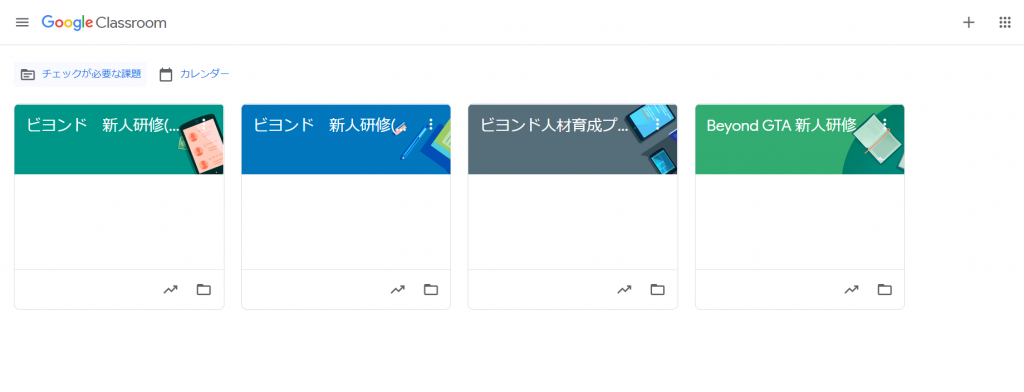
From now on, in accordance with the official documentation, we will refer to Google Classroom as " Classroom ," the training provider as " Teacher ," and the trainee as " Student ."
Features of Google Classroom
Classroom's features are as follows:
- Everything can be handled in one place
→ Assignment management, document sharing, test administration and responses, etc., can all be handled on Classroom. - Easy to use
→ Creating and joining classes is simple, requiring only a few clicks, making it easy even for those unfamiliar with computers. - Joint video calls are possible for the entire class
→ You can use a class-specific Google Meet to conduct screen calls. - Accessible from various devices
→ By installing the Classroom app, you can access it not only from your computer but also from your smartphone or tablet.
Classroom Features
Next, we will introduce the features of Classroom from both the teacher and student sides
teacher side
- Creating assignments, tests, materials, and questions
- Assignments, test grading, and feedback
- Managing student assignments and test scores
- Write and send shared information to the whole class or specific students
- Join a shared Google Meet for a class
- View your class schedule on Google Calendar
- Create a dedicated folder for your class under My Drive in Google Drive
Student side
- Assignments, materials, and test completion and submission
- Questions for teachers
- Write and send information to the whole class
- Join a shared Google Meet for a class
- View your class schedule on Google Calendar
- Create a dedicated folder for your class under My Drive in Google Drive
Compared to teachers, students can only perform limited actions such as submitting assignments and asking questions.
Questions can also be sent in a way that only teachers can see them, sowho want to ask questions but are worried about what others might thinkcan ask them without worrying about their surroundings.
Good things about using Google Classroom
I'd like to share what I found to be beneficial after actually implementing Classroom in our training sessions
No need to rush to prepare before the training

Since you can upload materials to Classroom, you can access them from there.
By uploading materials for each training session in advance, you can quickly find the materials you need for that session, so you won't have to frantically search for them before the session starts !
Furthermore, new members who received training using Classroom commented, " It's really helpful to be able to quickly review the training materials anytime !"
Since everything can be done in one place using Classroom, it has become easier to give instructions to trainers and those in charge of training

When requesting training sessions, we used to give multiple instructions such as "The training materials are in this path" and "Use this Meet for the training." However, noweverything is provided in Classroom, which reduces the amount of preparation required for the training instructors.
Also, students only need to join the Meet session provided in Classroom when it's time, so they don't have to worry about "Which Meet session will the next training be held in?"
Issues can be managed centrally

I felt that there was no chance of anything being overlooked because everything from creating assignments to submitting them could be done within Classroom.
Also, because it integrates with Google Forms, for exact match questions or multiple-choice tests, everything from creation to answering and grading can be done entirely within Google Classroom. We
didn't assign any assignments in this training, but I would like to use this feature in the next training for new graduates.
Conclusion
So, what did you think?
Classroom is free to use as long as you have a Google account, so I recommend giving it a try!
In addition to new employee training at companies, I think it would also be good to use in cram schools, club activities, and more.
We will continue to test various tools to make training smoother and better. I hope to share my impressions of using them on my blog!
Thank you for reading to the end




The person who wrote this article
About the author









