

[Super Easy!] Auto-fill addresses using YubinBango.js

Hello! This is Fukui from the Systems Development Department!
This time, I'd like to introduce a form I created using the YubinBango.js JavaScript library that automatically fills in your address just by entering your postal code!
It's very easy and quick to implement, so if you're interested, please give it a try!
*The information required for implementation is included in the README on GitHub below, so please refer to it if you are in a hurry.
https://github.com/yubinbango/yubinbango
What is YubinBango.js?
First, let me give you a brief introduction to what YubinBango.js is
As I've already mostly covered at the beginning,
this is an extremely convenient JavaScript library that,
when you enter a postal code,
automatically fills in the corresponding address in a designated input form
It's very easy to use. After loading the library into your html, all you have to do is assign the specified class to the "Postal Code Input Form" and "Address Input Form (Address Display Area)". (Easy...!!)
I actually tried it!
So, I actually created a sample form. (The decoration is done with Bootstrap.)
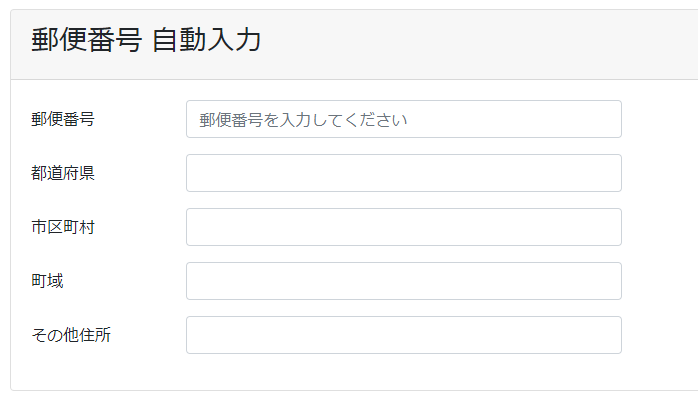
Below is the code I wrote to try it out!
<script src="https://yubinbango.github.io/yubinbango/yubinbango.js" charset="UTF-8"></script><div class="col-12 px-2"><form action="" class="h-adr" method="post"> <span class="p-country-name" style="display:none;">Japan</span><div class="card card-info mt-4"><div class="card-header"><h3 class="card-title"> Postal code auto-fill</h3></div><div class="form-horizontal"><div class="card-body"><div class="form-group row"> <label for="zip_code" class="col-1 col-form-label">post code</label> <div class="col-3"><input type="text" name="zip_code" id="zip_code" placeholder="郵便番号を入力してください" class="p-postal-code form-control" value=""></div></div><div class="form-group row"> <label for="prefecture_name" class="col-1 col-form-label">prefectures</label> <div class="col-3"><input type="text" id="prefecture_name" class="p-region form-control" value=""></div></div><div class="form-group row"> <label for="city_name" class="col-1 col-form-label">municipalities</label><div class="col-3"><input type="text" id="city_name" class="p-locality form-control" value=""></div></div><div class="form-group row"> <label for="town_name" class="col-1 col-form-label">Town area</label><div class="col-3"><input type="text" id="town_name" class="p-street-address form-control" value=""></div></div><div class="form-group row"> <label for="extended_address_name" class="col-1 col-form-label">Other address</label> <div class="col-3"><input type="text" id="extended_address_name" class="p-extended-address form-control" value=""></div></div></div></div></div></form></div>
Implementation points
There are four key points to keep in mind when implementing this:
① Specify the class "h-adr" for the form tag.
② Specify "Japan" for the element with the class "p-country-name" within the form.
③ Specify the class "p-postal-code" for the form where you enter the postal code.
④ Specify the class of the element that displays the address as follows: prefecture name (p-region), city/ward/town/village (p-locality), town/district (p-street-address), and subsequent address (p-extended-address).
And when I entered a postal code into the sample form I created, the results were as follows!
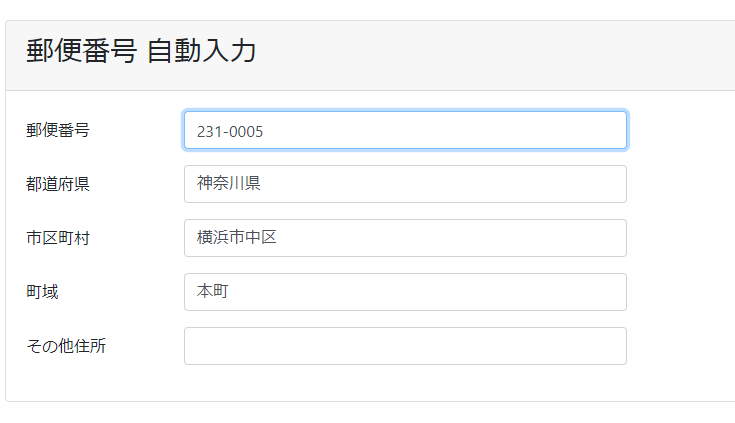
In this way, the address will be automatically entered according to the postal code.
Incidentally,automatic address entry works even if the postal code does not include hyphens.
Also, although the sample separates the prefecture name and city/ward/town/village, it is alsoto input them as a single concatenated string by specifying the prefecture name (p-region), city/ward/town/village (p-locality), town/district (p-street-address), and subsequent address (p-extended-address) as class attributes of a single element.
bonus
YubinBango.js is extremely useful, so I decided to take a look at when it actually works
Checking the Chrome Developer Tools confirms that a keyup event listener
Therefore, the autofill process was triggered when you entered the postal code!
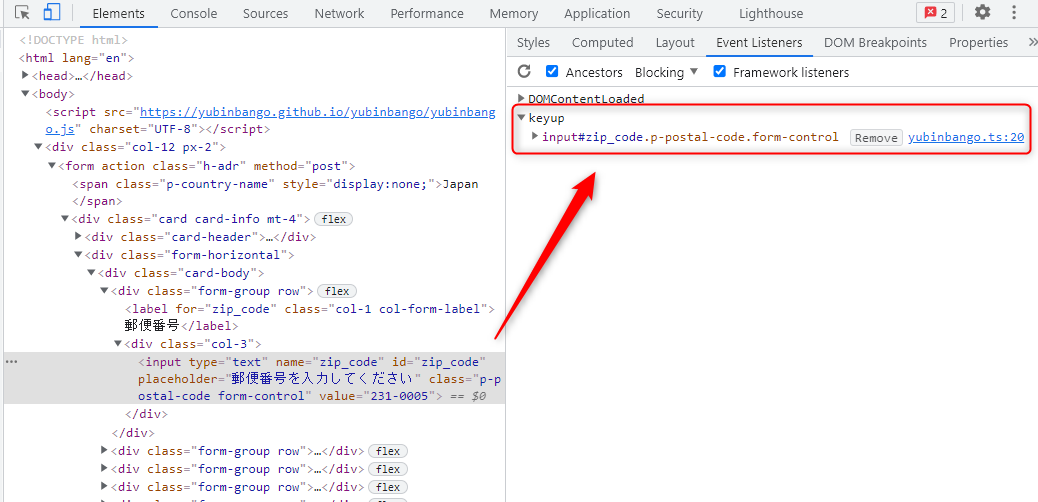
...Which means,
yes!The trigger conditions for this event can be changed to something other than keyup!
As mentioned at the beginning, there is a JS file on GitHub, so please use the JavaScript source code from the following link to create your own JS file:
https://github.com/yubinbango/yubinbango/blob/gh-pages/yubinbango.js
*This time, you will need to load the newly created JS file. Please check if you are not loading it via CDN.
We won’t go into the full JavaScript code, but you can see in the code below that a keyup event listener has been added
r[r.length - 1].addEventListener("keyup", function (e) { t.prototype.u(nv(e.target.parentNode)) }, !1)
By changing this event, you can specify any event you like!
In this case, let's saywe change it to a "click" event.
r[r.length - 1].addEventListener("click", function (e) { t.prototype.u(nv(e.target.parentNode)) }, !1)
I checked the developer tools.
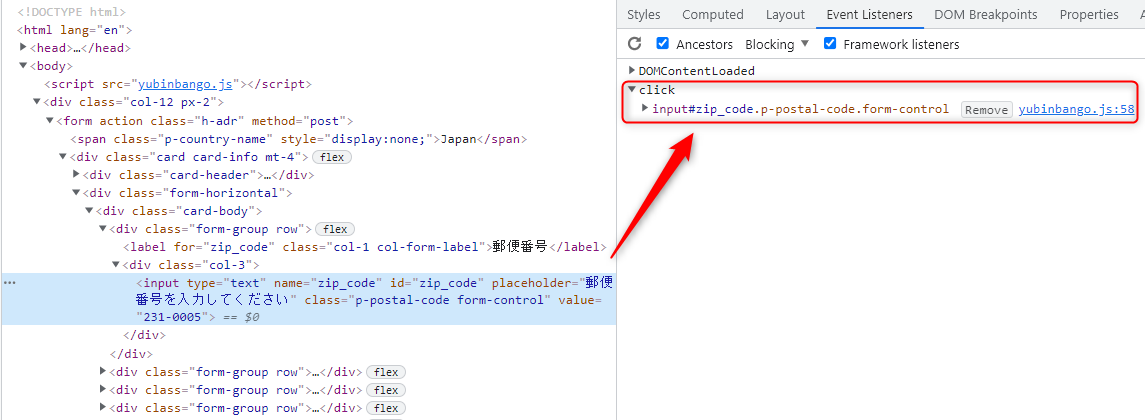
I was able to confirm that it had been successfully changed to a "click" event!
Of course, you can change it to various events other than click, such as keydown or focus!
My impressions after using YubinBango.js
Today, we introduced how to auto-fill addresses using YubinBango.js!
While there are various methods for automatically entering and displaying addresses, and the situations in which this can be used in actual development may be quite limited, I think it's perfect for developing apps used in a somewhat closed environment, such as internal company tools!
In any case, its ease of use and quick implementation are its main attractions, so I hope you'll give it a try!
lastly
I have launched "SEKARAKU Lab," a service site for the system development company I belong to.
Beyond offers a one-stop service for everything from server design and construction to operation, so please feel free to contact us if you have any problems with server-side development.
SEKARAKU Lab:[https://sekarakulab.beyondjapan.com/](https://sekarakulab.beyondjapan.com/)
Thank you for reading to the end!




The person who wrote this article
About the author









