

DHCP for Beginners
2016.03.08




My name is Ito and I am an infrastructure engineer
Are you familiar with DHCP? It's
actually something that's all around us.
Do you have internet access at home or at work?
If you can do it, then there is a good chance that you are already using DHCP
This article aims to shed some light on DHCP, which operates behind the scenes
What is DHCP?
DHCP stands for Dynamic Host Configuration Protocol, and in simple terms,a protocol that assigns configuration information to clients on a network so that they can communicate.
When you connect a LAN cable to your PC, the DHCP server will provide you with a pooled IP address, as well as information about the gateway and DNS server, which will then be configured
This means that you can simply plug in the LAN cable and start up the PC, and there is no need to configure the network
In this scenario, a DHCP server is present within the LAN, and a PC that receives an IP address from that server is called a " DHCP client ."
Your home PC can probably access the Internet without any "network settings." This is "DHCP." At home, the router usually handles the DHCP function
Here are some of the settings you can configure on your DHCP server:
- IP address
- Subnet mask
- Default Gateway
- DNS Server
There are other DHCP settings like this:
- Lease periods for various addresses
- Scope (subnet range) settings
- Setting up a reservation to assign a fixed IP to a specific PC
Here's a brief explanation of each of the three settings:
| Lease period | The period during which the assigned IP address can be used; when the lease period expires, the DHCP client obtains a new IP address |
| scope | 1 scope = 1 subnet. For example, "192.168.1.2 to 192.168.1.129" and "192.168.1.130 to 192.168.1.253" are each a scope |
| reservation | A function that continues to assign the same IP address to a DHCP client (e.g., server) with a specific function |
This is how it is possible to set up, but how does DHCP assign IP addresses?
More specific details about DHCP
To use DHCP, the DHCP client must be in a state where it can receive an IP address.
Since DHCP is a "protocol for dynamically configuring hosts," the DHCP client must be in a state where "network configuration is dynamically performed."
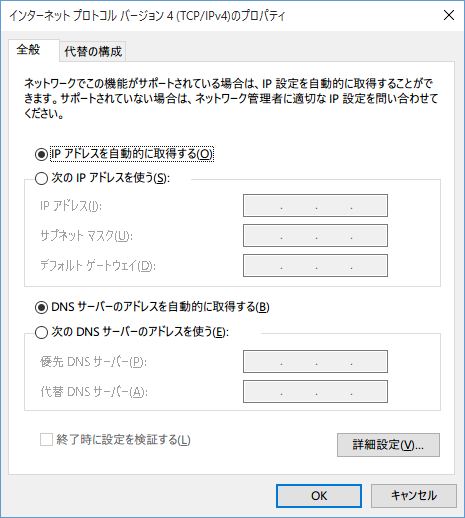
This is what it looks like on Windows. By default, Windows is set to receive DHCP, so you don't need to worry too much about it
On Windows 10, you can check this as follows:
Go to [Control Panel] - [Network and Sharing Center] - [Change adapter settings] and check the properties of the target network.
If you need to assign a static IP address, assign it manually as described above
When a DHCP client receives an IP address
Here is a brief summary of the process that a DHCP client goes through to receive an IP address
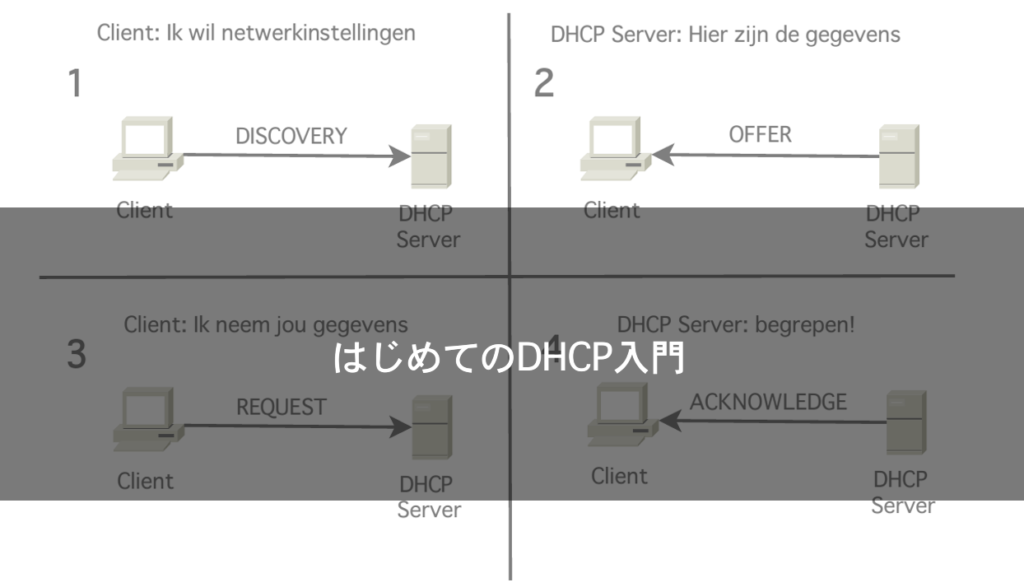
- When the client starts up, it broadcasts a request for an IP address (DHCPDISCOVER)
- The DHCP server broadcasts the IP address (DHCPOFFER)
- The client broadcasts a request saying "I'll use this IP address" (DHHCPREQUEST)
- The DHCP server responds with OK/NG (DHCPACK/DHCPNAK)
What do you think? The key is to exchange messages multiple times via broadcasting, since the IP address has not yet been determined
It is also assumed that there will be multiple DHCP servers
When the IP address lease is about to expire
When an IP address is assigned, the assigned IP address is linked to the MAC address of the DHCP client and the lease period of the IP address is managed. Therefore, even if the DHCP client and server do not communicate, the IP address will remain assigned
However, if communication has not occurred after the lease period has expired, the IP address will revert to the DHCP server. The same
procedure described earlier will be performed when a network connection is established.
Now, let me explain the process of leasing in more detail
- When the lease period is half over, the server requests an extension of the IP address (performs the same operation as when the IP address is received)
- If an extension request is sent to the DHCP server and there is no response (DHCPACK), the request will fail
- Periodically send renewal requests to the DHCP server
- If the lease expires without a response, the IP address will be terminated
What do you think? The smart thing about DHCP is that it basically tries to use the same IP address.
This eliminates the need to think about IP address settings again.
And that means the load on the DHCP server won't increase either.
This is how DHCP works.
So why does the DHCP protocol exist?
Wouldn't it be better to just assign everything statically? That's one way of thinking, isn't it?
What are the benefits of DHCP?
If you don't use DHCP, you have to configure the "IP address/gateway/DNS server" for every single device...
the thought alone is terrifying.
This will be quite beneficial for administrators, such as those in the company's IT department.
After all, with static IP assignment, you have to manage which device corresponds to which IP address.
The great thing about this is that it allows for centralized management using just a DHCP server
On the other hand, a disadvantage is that if the DHCP server goes down and cannot be restored,
all DHCP clients may lose communication. This
is a huge issue, but it's probably an extremely rare occurrence, so it might not be something to worry about too much.
summary
How was it?
You might not be familiar with DHCP, but I think most PCs at home are using DHCP.
Our company also uses DHCP to assign IP addresses to each client.
DHCP is convenient, but if you don't properly decide on the configuration during the setup phase, you can run into problems.
For example, if an IP address isn't returned after the lease period has expired, you might end up with a shortage of IP addresses
and receive a lot of complaints from users.
Please use it in a planned manner
If you want to talk to a cloud professional
Since our founding, Beyond has used the technical capabilities we have cultivated as a multi-cloud integrator and managed service provider (MSP) to design, build, and migrate systems using a variety of cloud/server platforms, including AWS, GCP, Azure, and Oracle Cloud
We provide a custom-made cloud/server environment optimized for our customers based on the specifications and functions of the systems and applications they require, so if you are interested in the cloud, please feel free to contact us
● Cloud/Server design and construction
● Cloud/Server migration
● Cloud/Server operation, maintenance, and monitoring (24 hours a day, 365 days a year)
The person who wrote this article
About the author









