

[Deadline Approaching] Recommendations for a Free Windows 10 Upgrade
2016.05.31




*This article does not compel you to upgrade to Windows 10.
We are not responsible for any problems that may arise after the update.
This is Yamada from the Systems Department
Last July, Windows 10 was released as an upgrade version for free, albeit for a limited time—an unprecedented move. However,
just about a month from now, on July 28, 2016, it will reach its one-year anniversary, and the free period will finally end.
Here is the price after the free period ends
| Windows 10 Pro | 25,800 yen |
|---|---|
| Windows 10 Home | 13,800 yen |
While the free release shows Microsoft's strong determination to win back users,
lately that determination has become a bit too overt, confusing some users.
Are they going to go that far?! Windows 10 updates are too pushy
While I don't think it's right to force it on people who don't want it,
I've been using it for about a year since its release, and my impression is that it's not so bad (in fact, it's definitely better than Windows 8). It feels
like Windows 8 has been modified to be more like Windows 7, similar to how Windows 7 was modified from Vista to be more like XP to be easier to use.
So, this time I'd like to introduce some new features of Windows 10 that I personally feel are "improvements!"
1. The Start button is back
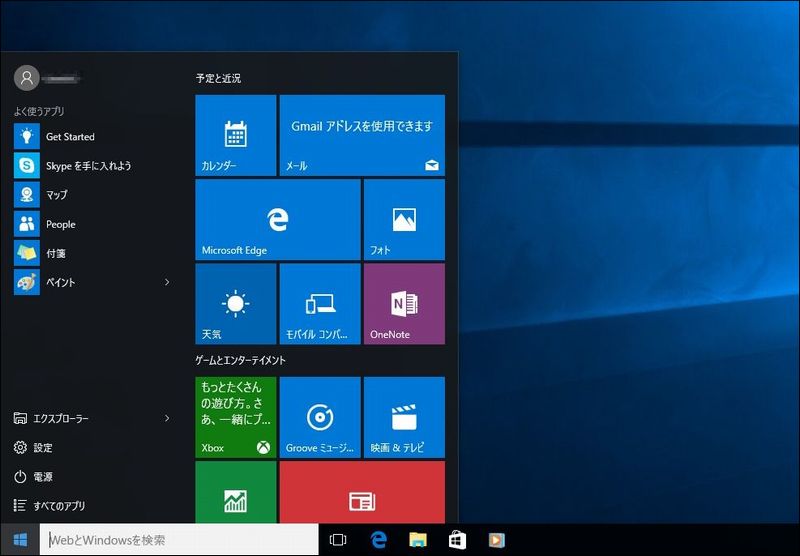
I think this is absolutely essential as long as Windows uses this UI.
In fact, I wonder why they removed it in Win8.
The Start button and app tiles are displayed simultaneously,
making it much easier to access various functions.
The search box next to the Start button is also incredibly useful, providing instant access to various functions on the web and within the OS.
2. Virtual desktops are now available
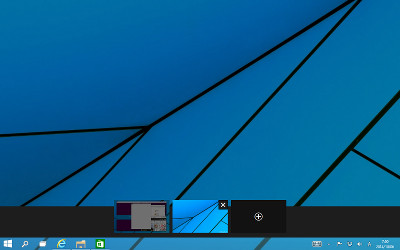
While this feature is now standard on Macs, it has finally been added to Windows.
If you're comfortable with keyboard shortcuts, it's an incredibly convenient feature.
Ctrl + Win + D to add a virtual desktop;
Ctrl + Win + ← or → to switch between virtual desktops;
Ctrl + Win + F4 to close a virtual desktop.
3. The app window is easier to use
In Windows 8, the Mail app would take up the entire screen, which was incredibly inconvenient, but
you don't have to worry about that with the new Windows.
Each app can be resized as needed.
This is what makes desktop users want to try using Windows apps.
4. Continuum is super convenient
This
feature allows you to seamlessly switch between user interfaces that are easier to use for tablets (touch operation) and desktops (keyboard and mouse operation).
It's especially effective on netbooks and tablet PCs like the Surface.
When Windows 8 forced a touch-centric UI, I was really at a loss, but
with this, you have the option of using Windows 10 regardless of whether you're using a tablet or desktop!
5. The email and schedule apps are surprisingly easy to use
Since email and scheduling apps can share accounts, you
only need to set up your account in one app and you won't need to reconfigure it in each app.
Google accounts are also easy to set up, allowing you to quickly access Gmail and Google Calendar.
So, that's about it
Other things
I haven't really tried out the voice recognition assistant "Cortana" yet. It
just recently got Japanese language support, didn't it?
The new browser "Edge" is lightweight and feels better than IE, but
in terms of lightness, Google Chrome is better, and for advanced features, Firefox is better, so I don't think it's worth switching yet.
There was talk of making it compatible with plugins for both browsers, so it depends on that.
I haven't had a chance to try out the biometric authentication "Windows Hello" because there are too few compatible devices (T_T).
Facial recognition seems convenient, so I wish they'd broaden its availability a bit more.
However, it's not entirely free of the bugs that have been rumored to exist; there still seem to be some remaining issues.
I myself have installed it on 5-6 computers, including work PCs and those of acquaintances, and I
've encountered roughly the same problems on every machine, regardless of whether it's a laptop, desktop, or tablet.
After upgrading to Windows 10, the Start menu is not displayed or cannot be opened. How to fix this?
Furthermore, when upgrading from Windows 7/8, the upgrade installation is selected by default, but
the boot speed is noticeably slower compared to a clean install. In my environment, the difference was more than double.
I also think there were many software malfunctions during the upgrade installation.
However, since similar problems have occurred with previous OS upgrade installations,
wouldn't it be better to just do a clean install as usual instead of being lazy?
Or rather, the fact that the default setting inherits the state of the previous OS is the real problem...
Well, I've listed plenty of downsides, but I still think it's far easier to use than Windows 8. It's
lighter and faster. I'm sure the bugs will be fixed as time goes on, and for a free program, it's definitely worth considering.
Furthermore, Microsoft has said that this might be the last Windows version update, so
considering support issues and such, I think this is a good opportunity.
Criticism is inevitable with anything new, but
I think it's best not to be swayed solely by information on the internet, but to check things out for yourself.
Of course, at your own risk!
The person who wrote this article
About the author









