

Tips for troubleshooting Postfix Admin password validation
2016.07.27





This is Yamada from the Systems Department
If you're using Postfix as your mail server,
"Postfix Admin" allows you to easily manage virtual domains and email accounts using a GUI.
I think this tool is used not only by server administrators but also by people who have set up a small email server at home, but
I encountered a slight problem when creating an email account with this tool, so I'm making a note of it.
When I tried to add an email account to a domain using Postfix Admin,
I needed to add a very simple password of about four digits, but I got
an error message saying, "You must use a five-character password."
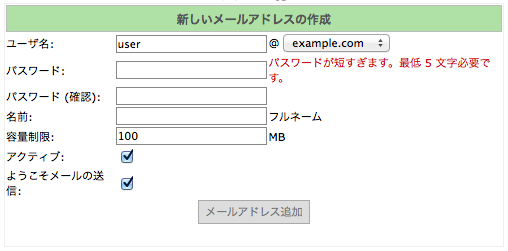
Huh??? Did I set such a restriction in Postfix????
if it's getting blocked by Postfix Admin???
I tried searching for "Postfix Admin password restriction" but didn't find much useful information. . .
So I'll diligently examine the Postfix Admin configuration file.
The configuration file is as follows
[Document root]/postfixadmin/config.inc.php
In the middle of this file you'll find something like this
// Password validation $CONF['password_validation'] = array( # '/regular expression/' => '$PALANG key (optional: + parameter)', '/.{5}/' => 'password_too_short 5', # minimum length 5 characters '/([a-zA-Z].*){3}/' => 'password_no_characters 3', # must contain at least 3 characters '/([0-9].*){2}/' => 'password_no_digits 2', # must contain at least 2 digits );
That makes sense.
You can create password validation rules one by one using regular expressions and
set multiple rules in an array.
By default, the rules are: from top to bottom
, 5 characters or more
, 3 or more letters (uppercase or lowercase)
, and 2 or more numbers
.
For an explanation of regular expressions,click here.
Now, change and comment out any unnecessary parts
// Password validation $CONF['password_validation'] = array( # '/regular expression/' => '$PALANG key (optional: + parameter)', '/.{4}/' => 'password_too_short 4', # minimum length 3 characters ←Let's use 4 characters this time # '/([a-zA-Z].*){3}/' => 'password_no_characters 3', # must contain at least 3 characters ←Comment this out # '/([0-9].*){2}/' => 'password_no_digits 2', # must contain at least 2 digits ←Comment this out too );
You have now successfully changed the password validation settings.
Since this involves editing a PHP file, you don't need to restart Apache.
If you're struggling with more detailed email server settings, or
if you simply can't be bothered to manage your email server, please feelfree to leave it all to us!
The person who wrote this article
About the author









