

[PHP] Points to note when checking whether a specified string/pattern is included
Introduction
This is Kusakabe from the WEB team.
I often forget what the return values of strpos() and preg_match() look up, so I've put together this memo along with some minor points to keep in mind. This
only focuses on whether a string/pattern is included in the specified string, and only explains some of the functions, so please refer to the manual for details on each function.
Overall
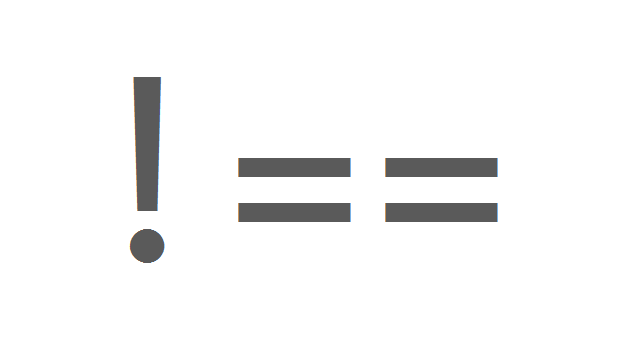
When comparing values, use === and !== instead of == and != unless there's a specific reason not to.
In particular, if you're surprised that 0 == FALSE becomes TRUE, it's recommended to consult a type comparison table
table of contents
- Checks whether a string contains a specified string
- Checks whether a string contains a specified pattern
- Extracting elements that match a pattern from an array
Checks whether a string contains a specified string
strpos() [Manual]
int strpos(string $heystack, mixed $needle)
argument
heystack: The string to search for.
needle: The string to search for. It's also possible to specify types other than strings, but... (see below)
Return Value
This function returns the position (starting at 0) of the first occurrence of `needle` in the heystack.
It returns FALSE if `needle` is not present in the heystack.
strpos($heystack, $needle) !== FALSE
You can check for existence by looking at the value of
Note 1
If needle appears at the top of heystack, the return value is 0
strpos($heystack, $needle) != FALSE
will return FALSE if the string appears at the beginning. Be sure to compare the types as well
Note 2
In the manual
If needle is not a string, convert it to an integer and treat it as the character corresponding to that number
The above does
not mean (The part about casting to an integer is correct.)
"if needle is not a string, cast it to an integer and then cast it to a string."
When needle is not a string, it is treated as the character corresponding to the integer-casted needle when considered as a decimal ASCII code.
In other words, the following two are not equivalent,
strpos('2100', 100) strpos('2100', (string)(int)100) // needle becomes the string 100
The following three are equivalent:
strpos('2100', 100) strpos('2100', chr((int)100)) strpos('2100', 'd')
To avoid unintended results, it's best to specify a string for `needle` unless there are special circumstances.
For more information on `chr()`, see
PHP: chr - Manual.
Note 3
No error occurs if you put an array into needle, but this does not mean that you can specify multiple needles; it just means that the array is cast to an integer
#As of PHP 7.0, casting an array to an integer will return 0 for an empty array and 1 for a non-empty array
strstr() [Manual]
This function finds the first occurrence of "needle" and returns the string from that point to the end.
It returns FALSE if "needle" is not found, so it can be used for existence checks, but it is not recommended to use this function solely for that purpose.
Note:
If you only need to check if a needle exists in a specific Haystack, use the faster and less memory-intensive strpos() instead.
Checks whether a string contains a specified pattern
preg_match() [Manual]
int preg_match(string $pattern, string $subject)
Return Value
If there is a string that matches the pattern in the subject, it returns 1; if not, it returns 0; if an error occurs during the matching process, it returns FALSE
preg_match($pattern, $subject) === 1
Just check if it is TRUE
Points to note
If you need to distinguish between no match and an error, be aware that 0 == FALSE is TRUE
Extracting elements that match a pattern from an array
Here, the array
$input = ['first', 'second', 'third', 'fourth', 'fifth'];
Let's consider an example of extracting elements that end with "th".
The easiest way to do this is to use preg_grep().
preg_grep() [Manual]
array preg_grep(string $pattern, array $input)
Return Value
array extracted from the input elements that match the pattern
:
preg_grep('/th$/', $input) // ['fourth', 'fifth']
this is
array_filter($input, function($s) { return preg_match('/th$/', $s) === 1; })
is equivalent to
Points to note
Specifying the constant PREG_GREP_INVERT as the third argument to preg_grep() extracts elements that do not match the pattern. It also extracts elements where the matching process results in an error. In other words, the following two are equivalent:
preg_grep('/th$/', $input, PREG_GREP_INVERT) array_filter($input, function($s) { return preg_match('/th$/', $s) !== 1; })
#There is no constant defined to explicitly specify "extract elements that match the pattern", so if you want to extract matching elements, omit the third argument or specify 0




The person who wrote this article
About the author









