

Japanese fonts (Gothic) that can be used on both CentOS and Windows!
Hello.
I'm Mandai, the Wild team member in charge of development.
How do you type in Japanese on Linux?
Many people might not pay much attention to it because they use it for work, but just changing the font can change your mood, and more importantly, it changes how easy the characters are to read. So, it's nice to use a font that's easy to read so you can write code and type commands in a good mood.
This time, we will introduce some high-quality Japanese fonts that are available for free and will help meet such needs, along with some trivia
Japanese fonts that can be installed with yum
You might be thinking, "Isn't yum just a software installer?" But it's surprisingly versatile and handles things like this too.
It's easy, so let's quickly install it.
IPA font

When it comes to Japanese fonts for Linux, this is probably the one to go with. It's
high quality for something that's available for free. And
since it's distributed by the Information-technology Promotion Agency, Japan (IPA), you can use it with confidence.
As long as the name IPA font is not used, it is allowed to be modified and redistributed, and there are many fonts derived from IPA fonts
For CentOS, you can install it using yum
sudo yum install ipa-gothic-fonts ipa-pgothic-fonts
This is the beginner's level
VL Gothic Font
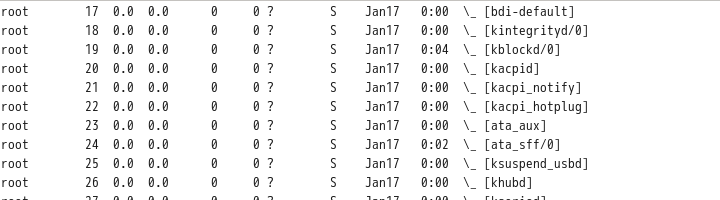
A slightly less popular style is VL Gothic
To install VL Gothic on CentOS, use the following command:
sudo yum install vlgothic-fonts vlgothic-p-fonts
In my case, I like to use VL Gothic when writing source code, and I have both the code and the terminal set to VL Gothic
When you hear the name VL Gothic, you might be wondering, "What is that?" But if you trace it back to its origins, you'll see that it's based on the M+ font, with the missing parts created using parts of the M+ font, and the parts that were still missing being supplemented with characters based on the Sazanami font, making it a font that takes the best of both worlds
It's purely a matter of personal preference, but I don't really like the English characters in monoscope, and IPA fonts are not suitable for use in a terminal, so I prefer VL Gothic
By the way, M+ fonts themselves are still being added, and are updated once about 100 characters have been accumulated
Other useful Japanese fonts
The fonts up to this point can be easily installed using yum, but the fonts below require some manual installation in the terminal
Sazanami Font
efont Project Japanese Top Page - OSDN

From the list of downloadable files , select and download the latest version of the Sazanami font
Although it's called the latest version, the last update date was 2004, so it's well over 12 years old.
The origin of this font is quite interesting; it was developed as a replacement font after the Tofu font (oh, how nostalgic...) was discontinued.
The reasons for the discontinuation of distributionthe announcement regarding the end of the Toufu font production activities, but it seems to have been an unfortunate font.
To install, extract the "sazanami-20040629.tar.bz2" downloaded from the URL above, create a suitable directory under /usr/share/fonts/ and put the file there
wget https://ja.osdn.net/dl/efont/sazanami-20040629.tar.bz2 tar jxf sazanami-20040629.tar.bz2 sudo mv sazanami-20040629 /usr/share/fonts/sazanami
This completes the font installation
By the way, East Wind is pronounced "kochi".
If you read it as "tonpuu", you've been playing too much mahjong, so please study.
Noto Sans CJK JP
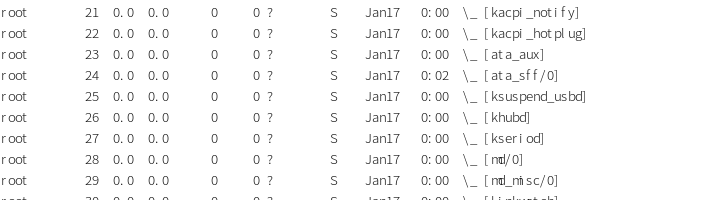

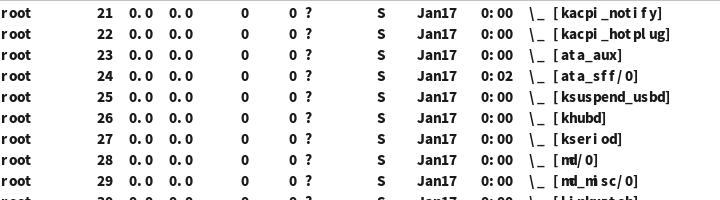
*Three thickness levels from top to bottom: thin, regular, and black
This font is so high-quality that you'll be amazed it's open source!
It's no surprise, considering it's a font created through a collaboration between Google and Adobe.
However, the file size is...
When text is rendered by a computer, sometimes characters are displayed as “tofu”.
This single sentence is sure to capture the hearts of Japanese-speaking users.
Incidentally, Noto is apparently derived from "no more tofu," and seems to be a strong message that they won't be displaying those square tofu shapes anymore.
"Noto Sans Mono CJK JP" is slightly thicker, so if you don't like that, you can adjust the thickness of "Noto Sans CJK JP" to suit your preference
The installation method is as follows:
wget https://noto-website-2.storage.googleapis.com/pkgs/NotoSansCJKjp-hinted.zip unzip NotoSansCJKjp-hinted.zip sudo mkdir /usr/share/fonts/NotoSansCJKjp sudo mv NotoSans* /usr/share/fonts/NotoSansCJKjp/
The font files in the zip file have the extension "otf", but they can be used in the same way as ttf
As I mentioned earlier, this font was jointly developed by Google and Adobe. Therefore, there are separate releases; Noto Sans has a version released by Google, while Adobe has a version called Gen no Kaku Gothic (Source Han Sans).
There are some minor differences, but they are generally considered the same.
Gen no Kaku Gothic apparently refers to the Japanese portion of the "Source Han Sans" font family, which includes Gen no Kaku Gothic, but it's rather confusing.
Why would they do that...?
If you search, you will find many derivative fonts based on this font, but because the base font is so well-made, many of them seem to be quite playful
Takao Font

Some Linux distributions use the Takao font as the default Japanese font.
This is because the Takao font is a derivative of the IPA font. The Takao font
was created to provide a more flexible way to maintain the IPA font, which has a relatively slow release cycle.
Incidentally, the name Takao comes from Takao Hayashi, the designer of the TB font, which the IPA font was based on.
To add another bit of trivia, the TB font itself is a paid font and can be purchased as part of the TypeBank font family TB Gothic
The installation method is as follows
#URL is wget https://launchpad.net/takao-fonts/trunk/15.03/+download/TakaoFonts_00303.01.zip unzip TakaoFonts_00303.01.zip sudo mkdir /usr/share/fonts/TakaoFonts sudo mv TakaoFonts_00303.01/Takao* /usr/share/fonts/TakaoFonts/
There's more trivia than fonts now
That's all




The person who wrote this article
About the author









