

[AWS] You can now expand the root volume (EBS) without stopping the service!!!
2017.02.17




This is Yamada from the Systems Department
An update to Amazon EBS was announced on February 14th.
Amazon EBS Update – New Elastic Volumes Change Everything.
Amazingly, you can now change the volume type, size, and IOPS of an EBS volume from the console panel.
Previously, expanding an EBS volume required stopping and detaching the instance and then attaching it to another instance, which was incredibly cumbersome. This is a huge improvement!
Now you can modify EBS volumes as needed while your service is running!
So, let's try it out right away
Expand the EBS size from the AWS console
First, select the EBS volume you want to expand.
In this example, we will change a 30GiB GP2 volume to 40GiB.
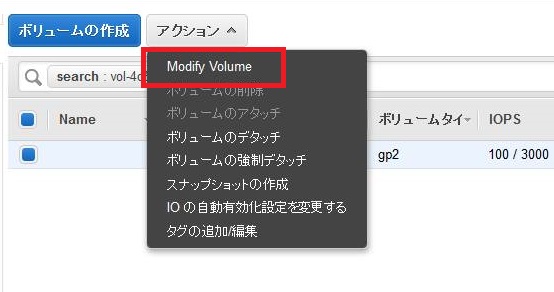
First, select ① EBS and ② click "Action"

. The status should of course be "in-use".
Then the words "Modify Volume" appear in the menu!
Click on it.
A subwindow for various EBS modification options will appear like this.
This time we're only changing the size, but if you change the volume type to "IO1", you'll also be able to change the IOPs.
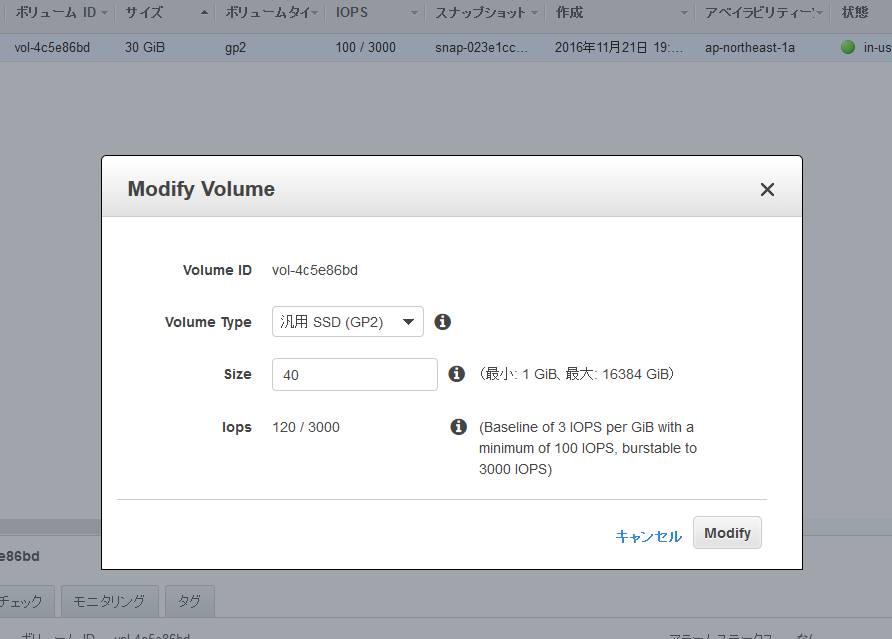
Once you're finished making changes, click "Modify".
A confirmation message will appear. It will
say things like "This process may affect performance" and "Please make sure the OS file system recognizes it.
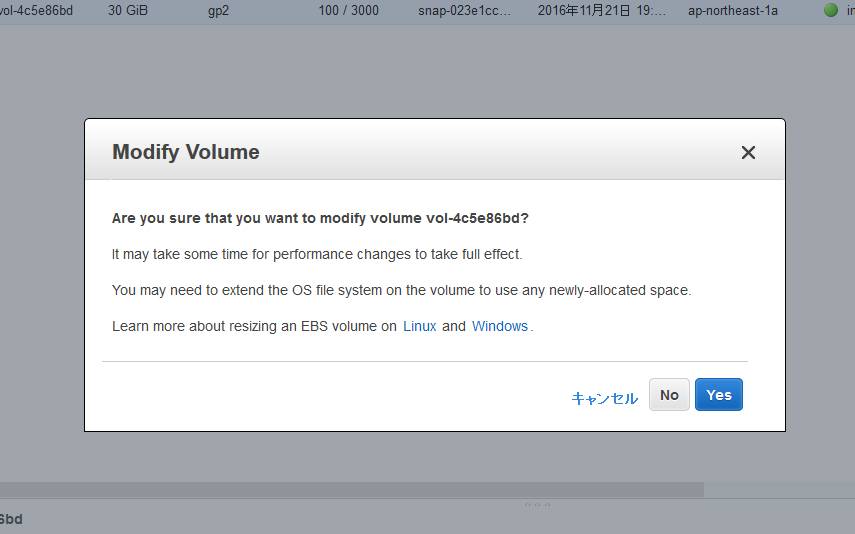
" Clicking "Yes" will start the configuration change.
This time, it took about 10 minutes to complete.
Make the instance aware of the expanded volume area
Once you've made the changes, the next step is to have the OS recognize it!
Check the physical disk with lsblk. It's growing properly!!
[root@beyond ~]# lsblk NAME MAJ:MIN RM SIZE RO TYPE MOUNTPOINT xvda 202:0 0 40G 0 disk mqxvda1 202:1 0 30G 0 part /
However, the root partition remains at 30GB.
Let's expand it using the growpart command.
[root@beyond ~]# growpart /dev/xvda 1 CHANGED: disk=/dev/xvda partition=1: start=4096 old: size=62910430,end=62914526 new: size=83881950,end=83886046
The file system is not yet expandable
[root@beyond ~]# df -h Filesystem Size Used Avail Use% Mounted on /dev/xvda1 30G 24G 5.5G 82% /devtmpfs 992M 56K 992M 1% /dev tmpfs 1002M 0 1002M 0% /dev/shm
Resize the file system with the resize2fs command
[root@beyond ~]# resize2fs /dev/xvda1 resize2fs 1.42.12 (29-Aug-2014) Filesystem at /dev/xvda1 is mounted on /; on-line resizing required old_desc_blocks = 2, new_desc_blocks = 3 The filesystem on /dev/xvda1 is now 10485243 (4k) blocks long.
And guess what?! It was perfectly recognized without even a single reboot!! AWS is amazing!!!
[root@beyond ~]# df -h Filesystem Size Used Avail Use% Mounted on /dev/xvda1 40G 24G 16G 61% /devtmpfs 992M 56K 992M 1% /dev tmpfs 1002M 0 1002M 0% /dev/shm
supplement
If you're getting this error, you might have forgotten to run the growpart command when expanding the root volume.
That was the case for me too...
[root@beyond ~]# resize2fs /dev/xvda resize2fs 1.42.12 (29-Aug-2014) resize2fs: Device or resource busy while trying to open /dev/xvda Couldn't find valid filesystem superblock.
Conclusion
So, what did you think? Personally, I think this EBS update is a great one, as it significantly increases the flexibility of initial setup and operation.
If you're too busy to keep up with the ever-improving AWS information, youleave it all to Beyond!
The person who wrote this article
About the author









