

[PHP] Illustrated guide to array_multisort()
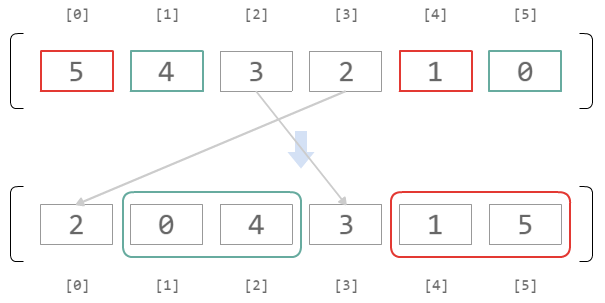
preface
`array_multisort()` is one of many array sorting functions, but
to use itthe manual, so I drew diagrams to help me understand it.
Therefore, this is an explanation for those who are unfamiliar with `array_multisort()`.
A simple example
$arr1 = [10, 100, 1, 0]; $arr2 = [3, 2, 1, 0];
Let's try sorting these two arrays using array_multisort()
array_multisort($arr1, $arr2);
First, sorting of $arr1 is performed.
Since the sorting method and sort order are not specified as arguments here, a loose comparison and ascending order are used.
The following image illustrates the movement of the elements in $arr1 before and after sorting.
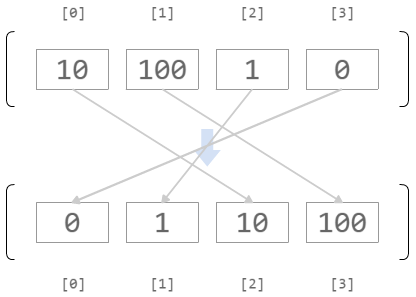
At this time,
(B) The 1st element is the 3rd after sorting.
(C) The 2nd element is the 1st after sorting.
(D) The 3rd element is the 0th after sorting.
A rule is created and applied when sorting $arr2.
The movement of elements in $arr2 before and after sorting is as follows:
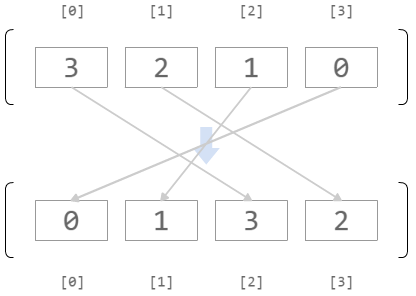
If you pass another array as an argument, the sorting of that array will be affected by the sorting results of $arr2
A difficult example
$arr3 = [500, 100, 250, 0, 500, 100]; $arr4 = [5, 4, 3, 2, 1];
Let's try sorting these two arrays using array_multisort()
array_multisort($arr3, $arr4);
First, sorting of $arr3 is performed.
As in the previous example, since the sorting method and sort order are not specified as arguments, a loose comparison and ascending order are performed.
The following image illustrates the movement of the elements in $arr3 before and after sorting.
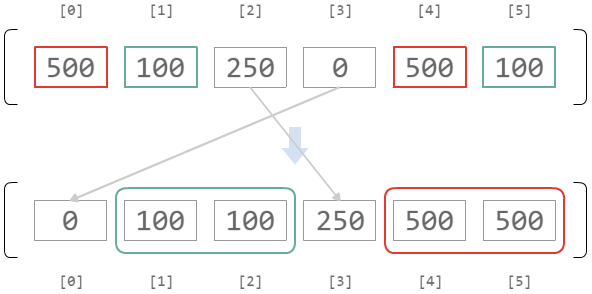
At this time,
(b) The 1st and 5th elements become the 1st or 2nd element after sorting.
(c) The 2nd element becomes the 3rd element after sorting.
(d) The 3rd element becomes the 0th element after sorting.
This creates a rule that is applied when sorting $arr4
The main difference from the previous example is that $arr3 contains two sets of the same number.
100 and 100, and 500 and 500 are the same size (=the comparison result is equal), so
at this point, the sorted placement is undefined, as shown by rules (a) and (b).
So what will be the sorted result of $arr4? It will be like this
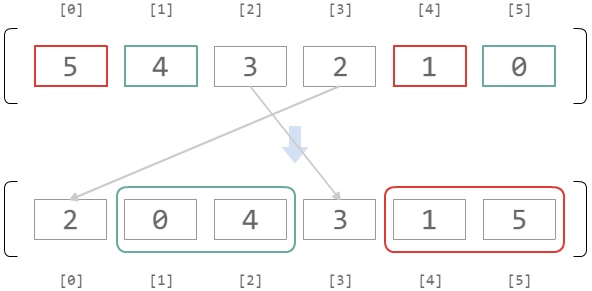
Rules (c) and (d) are executed as is.
For (a), the sort method specified in the argument is applied to the corresponding element (4,0).
In this example, no sort method is specified for $arr4, so the default ascending order is used.
Similarly for (b), the corresponding element (5,1) is sorted in ascending order.
As a result of sorting $arr4, the following array (if passed as an argument)
(a-2) The 4th element is the 4th after sorting.
(b-1) The 1st element is the 2nd after sorting.
(b-2) The 5th element is the 1st after sorting.
(c) The 2nd element is the 3rd after sorting.
(d) The 3rd element is the 0th after sorting.
The following rules apply:
Amazing!
supplement
$arr5 = [0, false]; $arr6 = [100, 200];
There is an array called
array_multisort($arr5, $arr6);
As a result,
Even if the contents of $arr5 become [false, 0],
the contents of $arr6 will not become [200, 100].
This is because, in a lenient comparison, 0 and false are considered equal.
Please refer to the manual for details on how this works
The end




The person who wrote this article
About the author









