

Microsoft's "Microsoft Modern Keyboard with Fingerprint ID" is super cool
table of contents
This is Yamada from the Systems Department.
Today we'll be talking about gadgets.
keyboard
announced by Microsoft.
It's called the "Microsoft Modern Keyboard with Fingerprint ID" and supports fingerprint authentication.
The feature is the "Hidden Fingerprint Sensor"
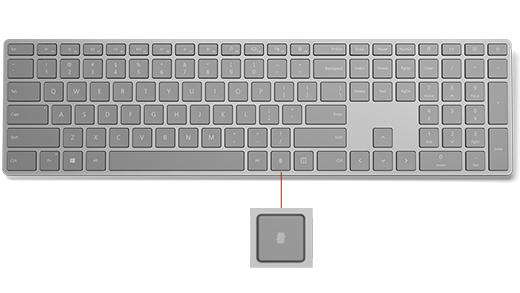
Apparently, the fingerprint authentication key is hidden within the keyboard like the other keys so that it doesn't get in the way of typing
Size and weight
Width: 16.57 inches (420.9 mm)
Height: 4.43 inches (112.6 mm)
Thickness: 0.76 inches (19.3 mm)
Weight: 413.5 g
It's light and thin
Specifications
Connection interface: Bluetooth Low Energy compatible 4.0 / 4.1 / 4.2
Wireless frequency: 2.4 GHz
Wireless range: 10m outdoors, 5m in the office (10m as long as there are no walls blocking the signal)
Compatible OS: Windows 10 with Bluetooth® 4.0 or higher
price
US: $129.99, which is about 14,000 yen in Japanese yen
Conclusion: I want it!
What's so good about this keyboard?
- You can switch between wireless (Bluetooth) and wired (MicroUSB?) connections
- In the wireless case, a full charge lasts for about four months
- Fingerprint authentication is of course compatible with Windows Hello
- The design is simple and cool!
That's what I think.
Windows Hello in particular was announced with such great fanfare when Windows 10 was announced, but
up until now it hasn't been used anywhere other than on the Surface and machines from certain manufacturers, so I'm really excited about it.
This page has setup instructions:
https://www.microsoft.com/surface/en-us/support/touch-mouse-and-search/microsoft-modern-keyboard-fingerprintid-set-up
A new mouse has also been announced, but it doesn't seem to have much in the way of features.
I think the design matches this keyboard.
Product page
I can't wait for it to be released!
 0
0 Loading...0



The person who wrote this article
About the author









