

Creating a Kubernetes cluster using GCP's GKE
2017.12.04




This is Ohara from the Technical Sales Department
We will create a network load balancing cluster
using Google Kubernetes Engine (GKE), GCP's container orchestration tool
Introduction
Google Kubernetes Engine (GKE)
has a feature that manages network load balancing.
To use network load balancing,
simply include the `type: LoadBalancer` field in your service configuration file
GKE will set up the service and enable network load balancing.
Reference:https://cloud.google.com/kubernetes-engine/
This time, we will launch and configure [Cloud Shell] on the GCP management machine
Check the region you are using
First, you need to set the default values and environment variables for gcloud.
You will need to set your [Project ID] and select your GCP [Zone] and [Region].
You can check the list of available GCP regions using the following command.
Note that you cannot check the [zone] using the command below, so
please select and assign any zone from [a to c].
* You can also check the [Region] and [Zone] on the GCP official website below.
Reference:https://cloud.google.com/compute/docs/regions-zones/regions-zones?hl=ja
gcloud compute regions list

This time, we will use the following as an example to set it up
[Project Name]
ohara-test
[Zone Name]
asia-northeast1-a * Enter any zone from [a to c]
[Region name]
asia-northeast1
Set default values for gcloud
gcloud config set project [project name] gcloud config set compute/zone [zone name] gcloud config set compute/region [region name] gcloud config list
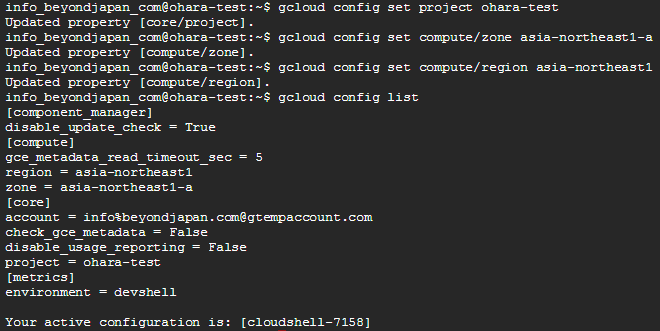
Setting environment variables
export CLUSTER_NAME="httploadbalancer" export ZONE="[Zone]" * The same zone as set with the default values above export REGION="[Region]" * The same region as set with the default values above

*Note: The values set in [gcloud default values] and [environment variables]
must be the same for the zone and region; otherwise, an error will occur.
Create a Kubernetes cluster on GKE
In this example, we will start up "3 nodes (3 instances)".
*Startup may take about 3 to 5 minutes.
gcloud container clusters create networklb --num-nodes 3

*Startup successful

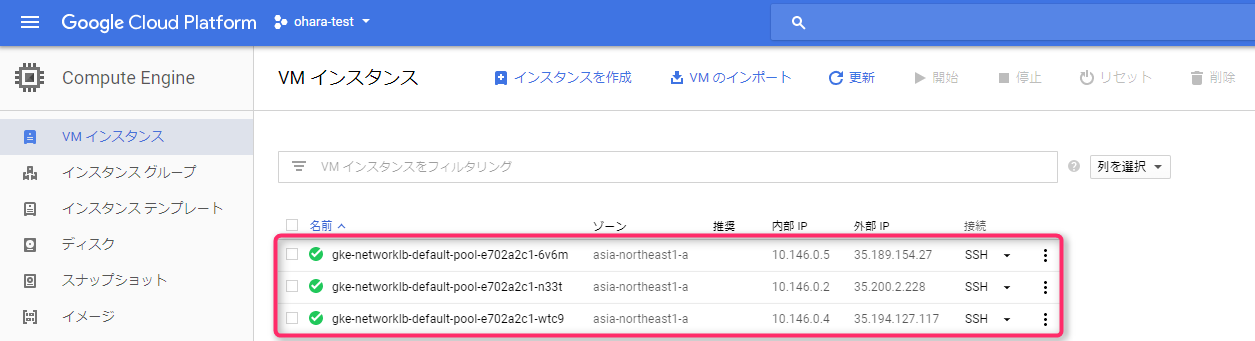
Checking the Google Compute Engine (GCE) control panel, you
see that three nodes (instances) have been created,
each configured as a Kubernetes node.
Deploying nginx on Kubernetes
kubectl run nginx --image=nginx --replicas=3

A replication controller is created that launches three pods,
and an nginx container is run in each pod.
Verify that the pod is running
Check the deployment status.
You should see that the pods are running on different nodes.
Once all pods are in a running status,
you can expose the nginx cluster as an external service.
kubectl get pods -owide

Exposing nginx to the outside world
I'm creating a network load balancer that
distributes load-balanced traffic to three nginx instances
kubectl expose deployment nginx --port=80 --target-port=80 \ --type=LoadBalancer

Check the address of the network load balancer
Check the EXTERNAL-IP (global IP)
Please note that after executing the following command, you may see "[pending]".
In that case, please continue executing the following command until your IP address is displayed in EXTERNAL-IP.
*This may take several minutes.
kubectl get service nginx

And you're done!
If you enter the IP address displayed under EXTERNAL-IP into your browser and
see the following display, then it's successful.

===============================================
Undeploy (delete) nginx
Now, let's go over the steps to delete the Kubernetes cluster we just created.
While it's possible to delete it using the GCE/GKE control panel,
we'll try deleting it from Cloud Shell.
■ Deleting a service
kubectl delete service nginx

■ Removing a Replication Controller
kubectl delete deployment nginx

■ Deleting a cluster
gcloud container clusters delete networklb

The deletion is now complete.
If you check the GCE control panel, you should see that all three instances have been deleted.
summary
■ I created three Kubernetes clusters using GKE from Cloud Shell
■ We deployed nginx on a Kubernetes cluster and made it publicly available
■ The Kubernetes cluster has been deleted
The person who wrote this article
About the author









