

Let's try using Google Cloud PHP Client, which allows you to easily operate various GCP services
Hello.
I'm Mandai, the Wild team member in charge of development.
Like AWS, GCP also has client libraries that support various programming languages
This is a very convenient tool, as it allows you to access various GCP services using the same method.
Furthermore, because it's integrated, the user experience remains consistent across services, meaning that once you learn it, you won't get lost. The more you use it, the more benefits you'll receive.
This time, I'll try using the PHP client library.
Install using composer
Since it can be installed with Composer, the setup is very easy.
GCP client libraries are modularized for each service, so you only need to install the library for the service you need.
In the example below, we are installing the library for Cloud Storage
composer require google/cloud-storage
The installation is now complete.
All that remains is to create a service account using the authentication information (explained below), and it will be ready to use.
There are other libraries for each service, so I have summarized them in a table
| Service Name | Module Name | remarks |
|---|---|---|
| Cloud Storage | google/cloud-storage | |
| Cloud Datastore | google/cloud-datastore | |
| Cloud BigQuery | google/cloud-bigquery | |
| Cloud Spanner | google/cloud-spanner | Beta |
| Cloud Vision | google/cloud-vision | |
| Cloud Translate | google/cloud-translate | |
| Cloud Speech | google/cloud-speech | |
| Cloud Natural Language | google/cloud-language | Some features are in beta |
| Google App Engine | google/cloud-tools | Working with Docker images for Flex environments |
| Cloud Pub/Sub | google/cloud-pubsub | |
| Stackdriver Trace | google/cloud-trace | |
| Stackdriver Logging | google/cloud-logging | |
| Stackdriver monitoring | google/cloud-monitoring | |
| Stackdriver Error Reporting | google/cloud-error-reporting | |
| Video Intelligence | google/cloud-videointelligence | Beta |
| Cloud Firestore | google/cloud-firestore | Beta |
| Cloud Data Loss Prevention | google/cloud-dlp | Data Loss Prevention API Early Access Program participants only |
| Bigquery Data Transfer Service | google/cloud-bigquerydatatransfer | Private free trial |
- All of them can be installed and used via composer
- Data as of January 18, 2018
Create a service account
You create a service account from the GCP cloud console.
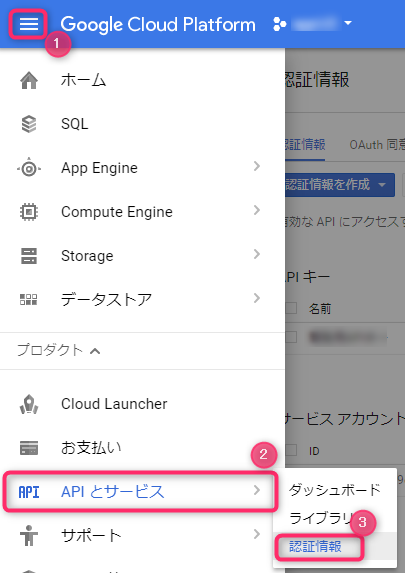
Navigate to the credentials screen from the menu.
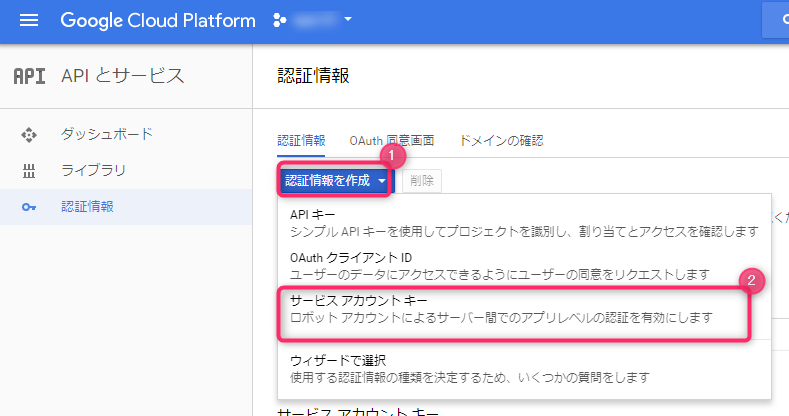
Next, click the "Create Credentials" button and select the service account key
To create a new service account, select "New Service Account"
You can name the service account anything you like, as long as it's easy to manage
There are multiple roles depending on the service, so there is no one specific one, but the "Owner/Administrator" role has the highest level of authority and has the authority to perform all operations within that service. If you find this troublesome, this is the one for you
For accounts issued to developers, you set them to have read and write permissions.
Incidentally, multiple roles can be assigned.
For example, in Datastore, you could have both a user and an index administrator role.
The service account ID is formatted like an email address, and you can set any string before the @
The key type P12 is difficult to handle from PHP, so select "JSON"
After entering the above information, press the Create button.
Once created, the download of a JSON file containing your authentication information will begin.
This JSON file is very important, so please handle it with care
This completes the creation of the service account
Sample Program
I remember being troubled by the fact that the sample program in the GCP documentation did not include the section for reading authentication information, so I will present a sample program below that covers everything from setting authentication information to actually uploading an image, assuming you are using Cloud Storage
<?php require './vendor/autoload.php'; use Google\Cloud\Core\ServiceBuilder; $keyFilePath = '../hogehoge.json'; $projectId = 'sample-123456'; $bucketName = 'new-my-bucket'; $uploadFile = './test.txt'; $gcloud = new ServiceBuilder([ 'keyFilePath' => $keyFilePath, 'projectId' => $projectId, ]); $storage = $gcloud->storage(); $bucket = $storage->createBucket($bucketName); // If using an existing bucket // $bucket = $storage->bucket($bucketName); $bucket->upload(fopen($uploadFile, 'r'));
The above example uploads a file called test.txt to the new-my-bucket bucket
Looking at these examples , they don't use the ServiceBuilder class, but personally, I think it's quicker to use instances created from the ServiceBuilder class because you can retrieve instances for each service after authentication is complete.
The GCP authentication documentationsays to use the environment variable "GOOGLE_APPLICATION_CREDENTIALS" when entering commands, but I personally prefer the method I've introduced here because it requires less preparation if you complete it entirely with PHP.
summary
It's nothing but advantages!
What did you think of the GCP service client libraries that make you want to say just that?
I was hoping there would be a client library for Cloud SQL, but it seems there isn't
There aren't any options specifically for GCE, but frankly, there's no real advantage to managing VMs with PHP.
It's probably best to just use the gcloud command.
There are also clients for services that aren't even publicly available, such as Cloud Data Loss Prevention and Bigquery Data Transfer Service, but I think the speed at which the library is being developed is incredible
In particular, among GCP's storage services, the price of Cloud Storage is by far the cheapest, even for the highest-tier multi-regional plan (65% of the price of the next cheapest standard persistent disk), so if you are planning to deploy a system on GCP, you should actively use it without storing it locally from your program
That's all




The person who wrote this article
About the author









