

Using GPS and Google Maps API in Unity
Hello.
This is Matsuyama from the Systems Development Department (formerly the Yokohama Office).
It's been a while since my last post.
I'm taking a break from AR for now, and this time I'll be writing about GPS functionality and Google Maps.
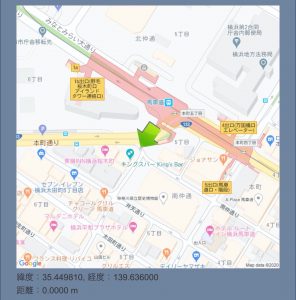
Let's try making something like this.
What to make
- Obtain current location using GPS
- Display a map image centered on that location
- Update the map at regular intervals if you have moved
- Display an icon at your current location on the map
Obtaining location information
First, regarding location information, it can be obtained using the LocationService class.
(Reference: LocationService)
First, let's start updating the location.
While we're at it, let's also enable the compass function.
(Reference Compass)
Input.location.Start(); Input.compass.enabled = true;
Since information cannot be obtained until the program is started, it will wait for the following judgment
// GPS is not allowed if (!Input.location.isEnabledByUser) yield break; // Wait until service status is running while (Input.location.status != LocationServiceStatus.Running) yield return null;
If GPS is not allowed, there's nothing you can do, but just in case
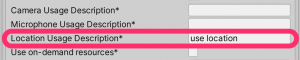
By the way, be aware that if you don't set the Location Usage Description in Project Settings,
you won't be able to obtain location information on the actual device!
Location information (latitude and longitude) can be checked using lastData of LocationService
LocationInfo curr = Input.location.lastData;
Once you have obtained your current location (latitude and longitude), you can obtain a map image from those coordinates
Map display
To use Google Maps, you need to register with Google Maps Platform beforehand. (Details omitted)
Google Maps Platform Official
For displaying a simple map image, you can use the Google Static Map API.
This will retrieve an image centered on your current location, as determined by GPS.
① Specify parameters in the URL
// Base URL string url = @"https://maps.googleapis.com/maps/api/staticmap?"; // Center coordinates url += "center=" + curr.latitude + "," + curr.longitude; // Zoom url += "&zoom=" + 18; // The default is 0, so set it to an appropriate size. // Image size (up to 640x640) url += "&size=" + 640 + "x" + 640; // API Key (key issued by Google Maps Platform) url += "&key=" + GoogleApiKey;
② Download the map image with UnityWebRequest
url = UnityWebRequest.UnEscapeURL(url); UnityWebRequest req = UnityWebRequestTexture.GetTexture(url); yield return req.SendWebRequest();
③ Display downloaded images as sprites
// Create a texture. Texture2D tex = new Texture2D(MapSpriteSize, MapSpriteSize); tex.LoadImage(data); // Create a sprite (instance) dynamically. mapImage.sprite = Sprite.Create(tex, new Rect(0, 0, tex.width, tex.height), Vector2.zero);
So,
we run this process in a coroutine to update it at regular intervals.
We don't need to update the map constantly, so we only update it when we've moved a certain distance from the previous coordinates.
The distance was calculated like this.
///<summary> /// Distance (m) of 1 degree of latitude (longitude) ///</summary> private const float Lat2Meter = 111319.491f; private float getDistanceFromLocation(LocationInfo curr, LocationInfo prev) { Vector3 cv = new Vector3((float)curr.longitude, 0, (float)curr.latitude); Vector3 pv = new Vector3((float)prev.longitude, 0, (float)prev.latitude); returnVector3.Distance(cv, pv) * Lat2Meter; }
Place cursor at current position
Place the cursor on the map and rotate it to face the direction you are facing
this.transform.localEulerAngles = new Vector3(0, 0, 360 - Input.compass.trueHeading);
That's all
The finished product looks like this
summary
This has been a bit brief, but I'll wrap things up here for today.
Here are my general impressions:
• The Google Maps API has a lot of features, so it would be fun to experiment with it.
• GPS errors are quite large.
• For this level of error, the code can be kept quite simple.
We've covered AR and maps (GPS), so maybe next time we'll try combining them to create something.
That's all for today.
I'll upload it to GitHub just in case.
Unity sample
lastly
I have launched "SEKARAKU Lab," a service site for the system development company I belong to.
Beyond offers a one-stop service for everything from server design and construction to operation, so please feel free to contact us if you have any problems with server-side development.
SEKARAKU Lab:[https://sekarakulab.beyondjapan.com/](https://sekarakulab.beyondjapan.com/)




The person who wrote this article
About the author









