

Build an ECR with Terraform that scans container images for vulnerabilities when they are pushed
2020.04.27





Hi, I'm Teraoka, an infrastructure engineer.
This time, I'll show you how to add a setting to perform vulnerability scans when pushing container images to AWS ECR.
I'll also try building it using Terraform.
ECR is AWS's managed container image registry.
It stores the container images you push, but
users must be careful about vulnerabilities in the images themselves.
ECR has a feature that allows you to automatically perform vulnerability scans when a push is made, so
I would like to create a repository with this setting enabled.
Create an ECR repository
We will use the resource aws_ecr_repository
#################### # Provider ################### variable "aws_access_key" { description = "AWS Access Key" } variable "aws_secret_key" { description = "AWS Secret Key" } variable "aws_role_arn" { description = "AWS Role Arn" } variable "aws_region" { default = "ap-northeast-1" } provider "aws" { access_key = "${var.aws_access_key}" secret_key = "${var.aws_secret_key}" region = "${var.aws_region}" assume_role { role_arn = "${var.aws_role_arn}" } } #################### # # ECR ################### resource "aws_ecr_repository" "image-scan-test" { name = "image-scan-test" image_tag_mutability = "MUTABLE" image_scanning_configuration { scan_on_push = true } }
Set `scan_on_push` to `true` in the `image_scanning_configuration` block.
Now let's start from `init`.
$ terraform init Initializing the backend... Initializing provider plugins... - Checking for available provider plugins... - Downloading plugin for provider "aws" (hashicorp/aws) 2.56.0... The following providers do not have any version constraints in configuration, so the latest version was installed. To prevent automatic upgrades to new major versions that may contain breaking changes, it is recommended to add version = "..." constraints to the corresponding provider blocks in configuration, with the constraint strings suggested below. * provider.aws: version = "~> 2.56" Terraform has been successfully initialized! You may now begin working with Terraform. Try running "terraform plan" to see any changes that are required for your infrastructure. All Terraform commands should now work. If you ever set or change modules or backend configuration for Terraform, rerun this command to reinitialize your working directory. If you forget, other commands will detect it and remind you to do so if necessary.
Just to be safe, run the plan before reflecting the changes
$ terraform plan Refreshing Terraform state in-memory prior to plan... The refreshed state will be used to calculate this plan, but will not be persisted to local or remote state storage. --------------------------------------------------------------------------- An execution plan has been generated and is shown below. Resource actions are indicated with the following symbols: + create Terraform will perform the following actions: # aws_ecr_repository.image-scan-test will be created + resource "aws_ecr_repository" "image-scan-test" { + arn = (known after apply) + id = (known after apply) + image_tag_mutability = "MUTABLE" + name = "image-scan-test" + registry_id = (known after apply) + repository_url = (known after apply) + image_scanning_configuration { + scan_on_push = true } } Plan: 1 to add, 0 to change, 0 to destroy. --------------------------------------------------------------------------- Note: You didn't specify an "-out" parameter to save this plan, so Terraform can't guarantee that exactly these actions will be performed if "terraform apply" is subsequently run.
Click Apply to reflect the changes
$ terraform apply An execution plan has been generated and is shown below. Resource actions are indicated with the following symbols: + create Terraform will perform the following actions: # aws_ecr_repository.image-scan-test will be created + resource "aws_ecr_repository" "image-scan-test" { + arn = (known after apply) + id = (known after apply) + image_tag_mutability = "MUTABLE" + name = "image-scan-test" + registry_id = (known after apply) + repository_url = (known after apply) + image_scanning_configuration { + scan_on_push = true } } Plan: 1 to add, 0 to change, 0 to destroy. Do you want to perform these actions? Terraform will perform the actions described above. Only 'yes' will be accepted to approve. Enter a value: yes aws_ecr_repository.image-scan-test: Creating... aws_ecr_repository.image-scan-test: Creation complete after 0s [id=image-scan-test] Apply complete! Resources: 1 added, 0 changed, 0 destroyed
It has been reflected
Push the container image to ECR
We'll be using the following image, which, judging from its name, seems riddled with vulnerabilities.
Make sure to pull it locally beforehand.
https://hub.docker.com/r/cved/cve-2019-9978
If you want to push to ECR , you can simply run the docker push command as usual
after obtaining your authentication credentials using the aws ecr get-login command
$(aws ecr get-login --no-include-email --region ap-northeast-1 --profile test-profile) $ docker tag cved/cve-2019-9978 XXXXXXXXXXXX.dkr.ecr.ap-northeast-1.amazonaws.com/image-scan-test:latest $ docker push XXXXXXXXXXXX.dkr.ecr.ap-northeast-1.amazonaws.com/image-scan-test:latest
Once pushed, check it from the management console
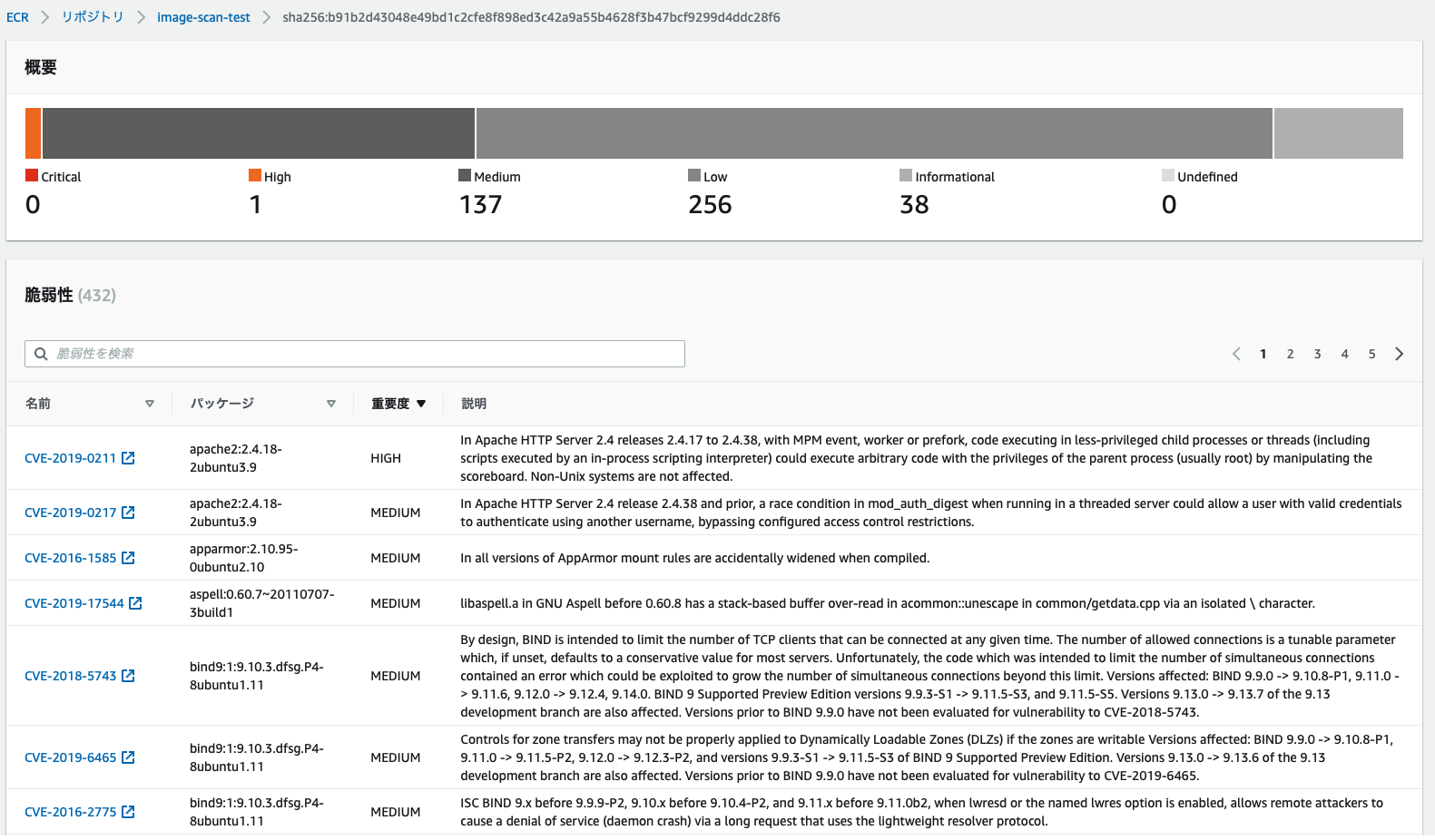
The scan is performed automatically, and you can check the results.
Even so, there are so many vulnerabilities; the fight against vulnerabilities never ends...
summary
What did you think?
The setup itself is easy, and coding it with Terraform makes future development much easier.
I encourage everyone to give it a try.
The person who wrote this article
About the author









