

Get weather data using the Weather API

Good work today.
This is Matsuyama from the Systems Development Department.
This time, I'd like to try creating a weather checking app using a "weather API".
I used to think that it was necessary to purchase weather information from the Japan Meteorological Agency, but
it seems that there are now free APIs available, so I'll use one of those.
Incidentally, the Japan Meteorological Agency also distributes weather data for free, but
it seems to be different from weather data as it is basically just weather information (rain, wind, temperature, etc.).
(They did distribute past weather data.)
Requirements
① Uses Rakuten Rapid API's Open Weather Map
② HTTP communication is reused based on previously created code
③ Obtains weather data for nearby cities from GPS location information
④ Displays latitude, longitude, city name, and weather icon on the screen
*Created with Unity 2019.4.11f1
Rakuten Rapid API
Rakuten Rapid API is a service that allows you to use and develop APIs for various functions.
While account registration is required, many features are available for free, so you can try out a variety of options.
Rakuten Rapid API
Open Weather Map
We will use Open Weather Map, available in the Rakuten Rapid API, to retrieve weather data
.
There are several APIs available, but if you want to get the current weather, the Current Weather Data API seems to be sufficient
You can test it in your browser, so it's a good idea to try adjusting the parameters.
Note that test calls are counted towards the total number of calls. (500 calls per month are free.)
The following information appears to be required for the API request:
• Request headers (fixed)
request.AddHeader("x-rapidapi-host", "community-open-weather-map.p.rapidapi.com"); // Host address request.AddHeader("x-rapidapi-key", "xxxxxxxxxxxxxxxxxx"); // API key issued for each account
- Request parameter
q: City ID (*Required)
Other optional parameters are not necessary.
You can obtain your city ID here
You can also retrieve weather data for registered cities.
HTTP communication
Based on the above requirements, we will proceed with implementation using previously created processes as a basis.
Previous articles can be found here.
Copy the source code from Scripts/Utility and Scripts/Api
: ApiBase.cs
, CoroutineHandler.cs
, SigletonMonoBehaviour.cs
, Network.cs
, ApiSample.cs
, and so on.
Add/adjust functionality to support OpenWeatherMap
1. Supports GET Method
To support the GET method, the request parameters passed in JSON format are converted into a string and concatenated into the URL.
This is a very provisional implementation, but it looks like this.
private string convGetParam(string json) { string jsonTrim = json.Trim('{', '}'); jsonTrim = jsonTrim.Replace("\"", ""); string[] jsonArry = jsonTrim.Split(','); string retStr = "?"; bool isFirst = true; foreach (var data in jsonArry) { if (!data.Contains(":")) break; if (!isFirst) { retStr += "&"; } else { isFirst = false; } string[] paramAry = data.Split(':'); retStr += paramAry[0] + "=" + paramAry[1]; } return retStr; }
2. Set the request header
As mentioned above, you will set the host address and API key here.
*The values are displayed on the OpenWeatherMap screen.
3. Define HTTP request and response parameters
Under Script/Api, create a class for retrieving weather data.
In this case, we'll create it as WeatherApi.cs.
■
Requests should only include the city name.
[Serializable] public struct Request { public string q; }
■ Response
The response is a bit long, but it expands into this form.
Actually, the Weather structure alone is sufficient, but I've made it possible to retrieve all the information just in case.
[Serializable] public struct Coord { public float lon; public float lat; } [Serializable] public struct Weather { public int id; public string main; public string description; public string icon; } [Serializable] public struct Main { public float temp; public float fells_like; public float temp_min; public float temp_max; public int pressure; public int humidity; } [Serializable] public struct Clouds { public int all; } [Serializable] public struct Sys { public int type; public int id; public string country; public int sunrise; public int sunset; } [Serializable] public struct Response { public Coord coord; public List<Weather> weather; // public string base; // base cannot be an element name public Main main; public int visibility; public Wind wind; public Rain rain; public Clouds clouds; public int dt; public Sys sys; public int timezone; public int id; public string name; public int cod; }
*Some names cannot be used and are commented out, but we won't need that information this time so we won't worry about it ^^;
For now, I think everything related to communication is ready
Using GPS
For GPS, I will write the necessary code by referring to what I have created in the past. (
Previous article here)
The GPS processing required this time is as follows:
Input.location.Start(); Input.compass.enabled = true;
Do this first,
Input.location.lastData.longitude; // Longitude Input.location.lastData.latitude; // Latitude
The `lastData` method simply retrieves the latitude and longitude.
*Strictly speaking, it also determines whether GPS is available.*
Input.location.isEnabledByUser; // GPS usage is permitted Input.location.status; // Can be used if in Running state
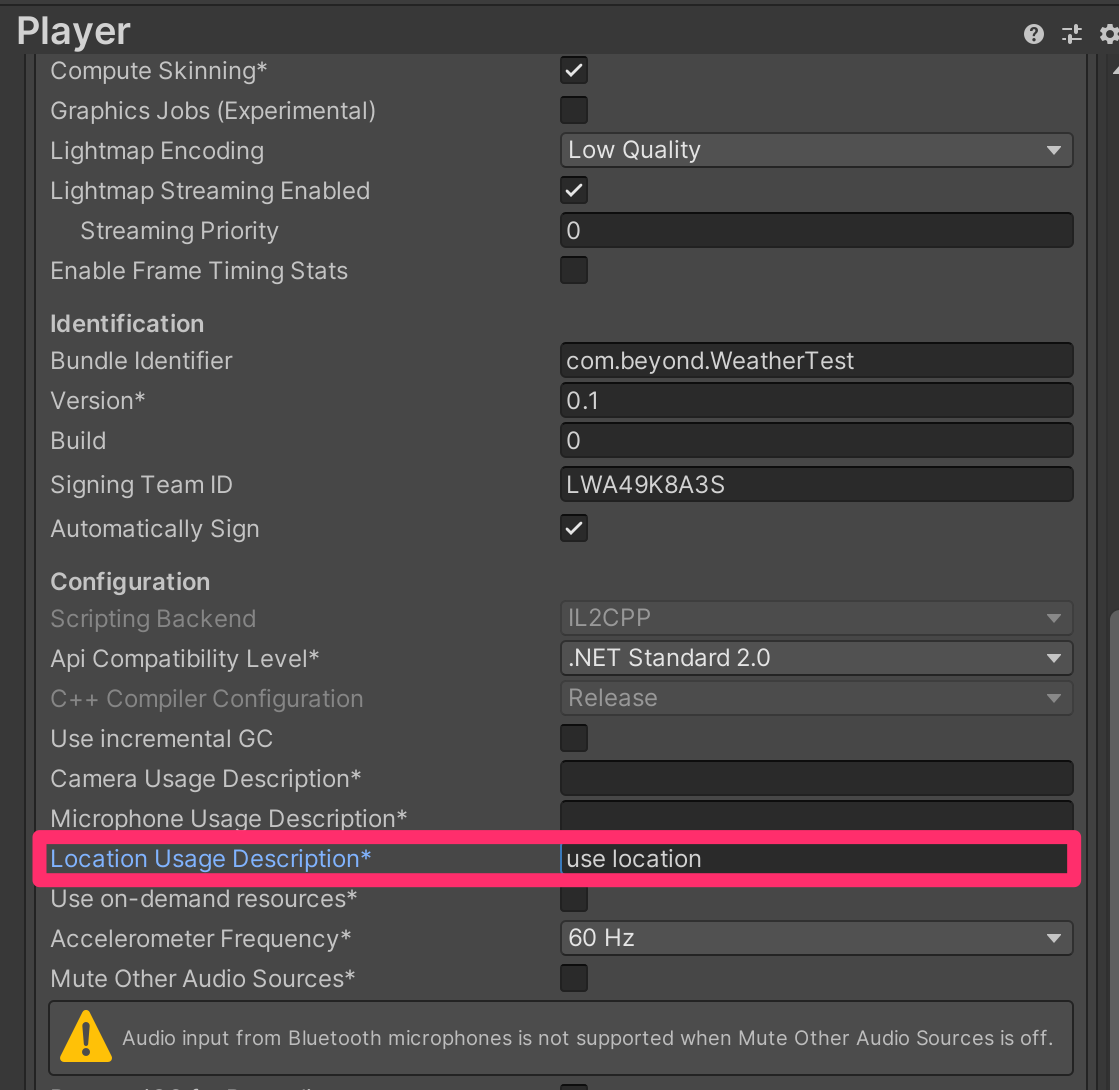
Also, don't forget to fill in the Location Usage Description in Project Settings
Weather Data
As mentioned above, obtaining weather data requires specifying a registered city. Therefore,
for verification purposes, we will extract data for one city from the 47 prefectures and
implement a process that retrieves weather data for the nearest city based on the latitude and longitude obtained via GPS.
First, we create the city data.
The city data will include the prefecture name, city name, city name (for API), latitude, and longitude, defined in the following structure.
private struct Data { public string prefecture; // Prefecture name public string city; // City name public string name; // City name passed to API public double lon; // Longitude public double lat; // Latitude }
The data will be formatted like this:
static private List<Data> datas = new List<Data> { new Data { prefecture = "Hokkaido", city = "Sapporo", name = "sapporo", lon = 141.346939, lat = 43.064171 }, new Data { prefecture = "Aomori Prefecture", city = "Aomori City", name = "aomori", lon = 140.740005, lat = 40.82444 }, new Data { prefecture = "Iwate Prefecture", city = "Morioka City", name = "morioka", lon = 141.152496, lat = 39.703609 }, new Data { prefecture = "Miyagi Prefecture", city = "Sendai City", name = "sendai", lon = 140.871933, lat = 38.26889 }, new Data { prefecture = "Akita Prefecture", city = "Akita City", name = "akita", lon = 140.116669, lat = 39.716671 }, new Data { prefecture = "Yamagata Prefecture", city = "Yamagata City", name = "yamagata", lon = 139.821671, lat = 38.721668 }, new Data { prefecture = "Fukushima Prefecture", city = "Fukushima City", name = "fukushima", lon = 140.383331, lat = 37.400002 }, // // Omitted // new Data { prefecture = "Kagoshima Prefecture", city = "Kagoshima City", name = "kagoshima", lon = 130.558136, lat = 31.560181 }, new Data { prefecture = "Okinawa Prefecture", city = "Naha City", name = "naha", lon = 127.681107, lat = 26.2125 } };
Next, we need to search for the nearest city based on our current location (latitude and longitude).
Would a function like this be suitable?
static public Info NearbyCity(double lon, double lat) { Info info = new Info(); float dist = 9999f; foreach(Data dat in datas) { double z = (dat.lat - lat) * Lat2Km; // -z is south double x = (dat.lon - lon) * Lat2Km; // +x is east Vector3 v = new Vector3((float)x, 0, (float)z); if(v.magnitude < dist) { dist = v.magnitude; info.city = dat.prefecture + dat.city; info.name = dat.name; } } return info; }
The returned structure will contain the prefecture/city name for display and the city name for the API
public struct Info { public string city; public string name; }
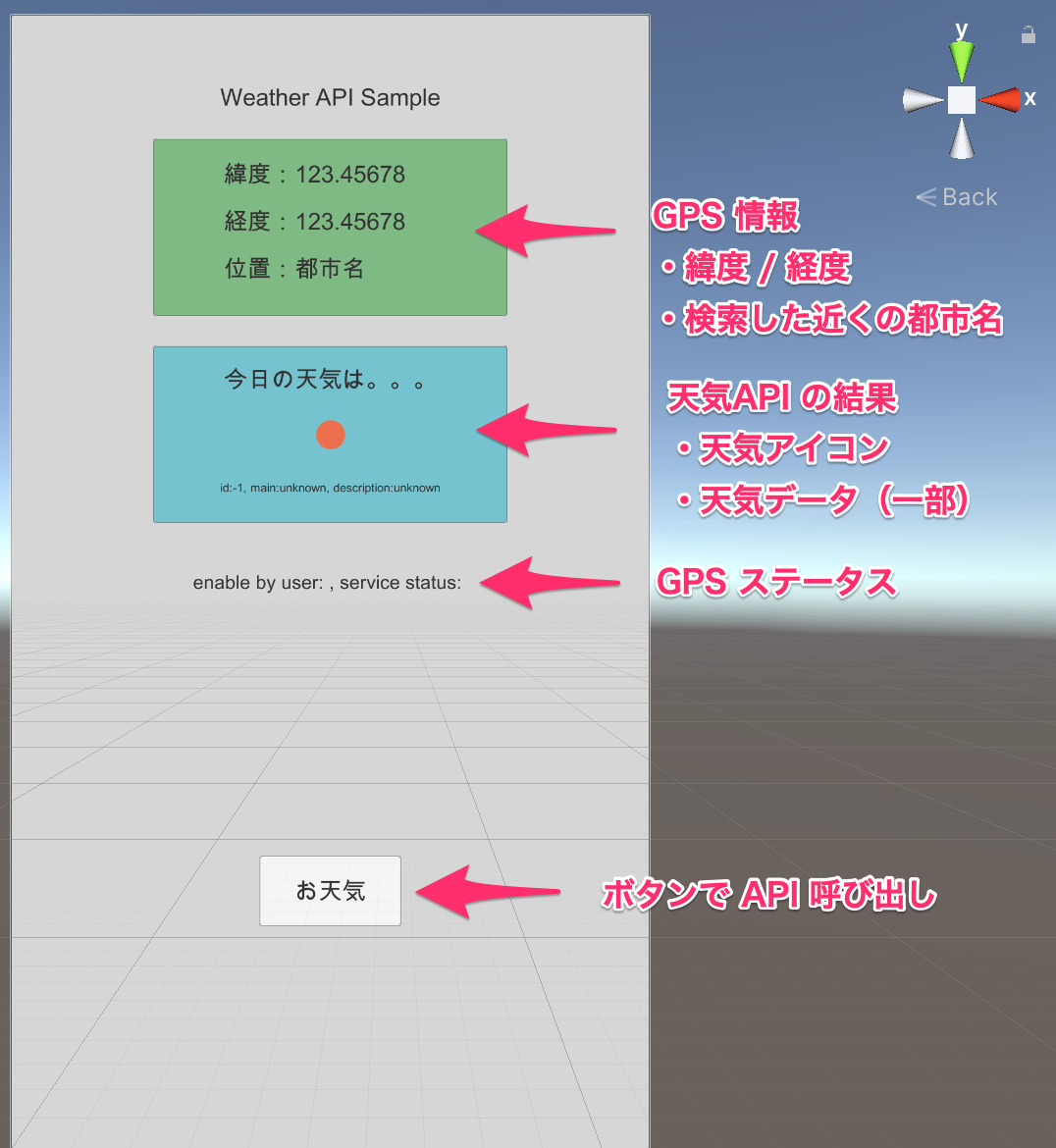
Displays latitude, longitude, city name, and weather icon on the screen
We'll configure the screen using Unity.
Here's a rough idea.
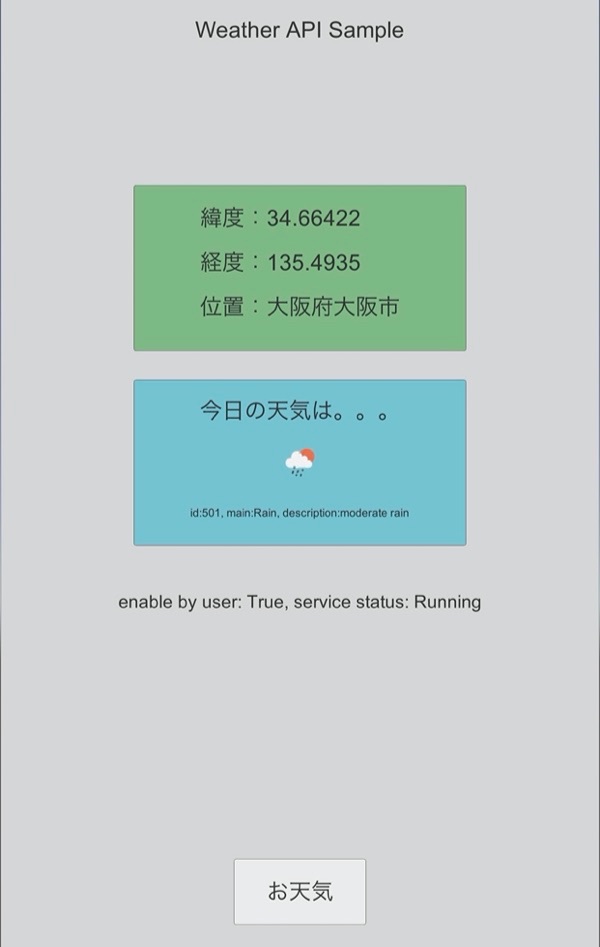
All that's left to do is display the information obtained via GPS and API, and here's the finished product
Weather ID and other information, as well as weather icons, can be found here.
Weather Data Details
summary
This was a quick overview, but I think it provides a basic example of displaying the weather.
While obtaining weather data itself can be implemented with a single API, linking (converting) registered cities to the current location is a bit time-consuming. I
've uploaded the sample project to GitHub.
I hope it will be of some use.
Unity Sample
Rakuten Rapid Api has other functions, so I would like to try using it on another occasion
lastly
I have launched "SEKARAKU Lab," a service site for the system development company I belong to.
Beyond offers a one-stop service for everything from server design and construction to operation, so please feel free to contact us if you have any problems with server-side development.
SEKARAKU Lab:[https://sekarakulab.beyondjapan.com/](https://sekarakulab.beyondjapan.com/)
Well, that's all for today




The person who wrote this article
About the author









