

[JMeter] Obtaining a CSRF token and making a POST request

Hello! This is Fukui from the System Development Department!
Recently, when creating a scenario using JMeter, I was receiving 403 errors several times when making POST requests from a CSRF-protected page, so I would like to introduce how to solve this problem!
This article will primarily
cover two points:
obtaining a CSRF token
and making a POST request using the obtained token !
*By the way, I have listed some important JMeter settings to remember at the end of this blog, which also serves as a personal memo. I hope that anyone who is planning to use JMeter will read it to the end
Obtaining a CSRF token
Let's get started by explaining how to obtain a CSRF token.
To obtain a CSRF token, we will use the "Regular Expression Extraction" function
■ Added "Regular Expression Extraction" function
To add regular expression extraction,
you can do so by adding it to the HTTP request sampler for the screen display that issues the CSRF token, under the settings 'Add' → 'Post-processing' → 'Regular expression extraction'
*For example, if there is a POST request for login processing and a CSRF token is required in the request parameters, you would add regular expression extraction to the preceding GET request for "Login screen display".
Once the addition is complete, the following screen will appear, allowing you to configure each item
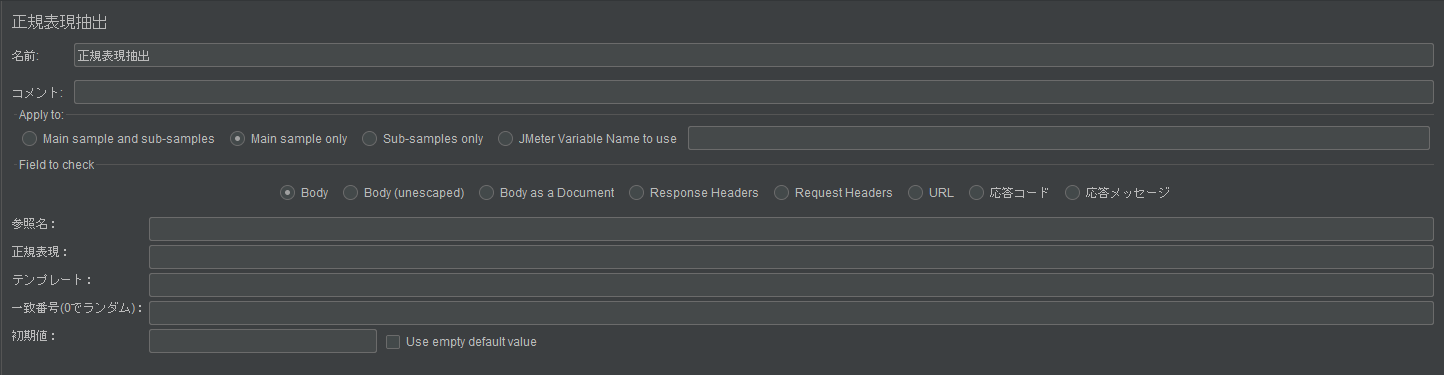
■ "Regular Expression Extraction" settings
As an example, we set up the following settings. We will explain the required settings
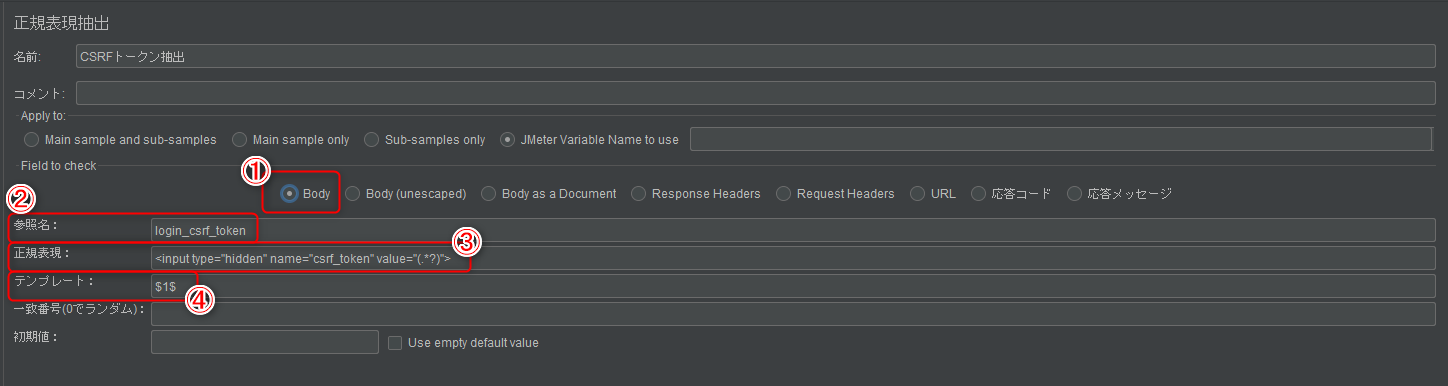
① Field to check
Select the target value you want to extract. In this case, please select "Body"
*This is because we will be using the response body of the GET request from the page from which the CSRF token will be extracted.
② Reference name
a variable to hold the extracted value (in this case, the CSRF token). This will be used later as the value for the CSRF parameter when sending a POST request. Enter any string you like.
③ Regular expression
Enter the input tag where the CSRF token will be placed . You can obtain the CSRF token value by writing the value of the value attribute using a regular expression
*The input content in the image above is just an example. Please modify it to match the format of the input tag that you will actually receive in the response displayed on the screen. If the format of the input tag is different, you will not be able to obtain the CSRF token value (e.g., presence or absence of the id attribute, or a mistake in the name attribute). This is a point where people often get stuck, so if possible, we recommend that you actually copy the input tag in the HTML using developer tools and modify the value of the value attribute before using it.
④ Template
Specify which of the extracted values to use. If no specific value is requested, enter "$1$" to use the first value obtained
This completes the regular expression extraction settings
POST request using the acquired token
Next, we will show you how to include the obtained CSRF token in the request parameter and send it via POST
Below is an example of how to set request parameters.
The setup is very simple; you can send the obtained CSRF token by setting the parameters in the format "${reference name set in regular expression extraction}" in the sampler of the target POST request
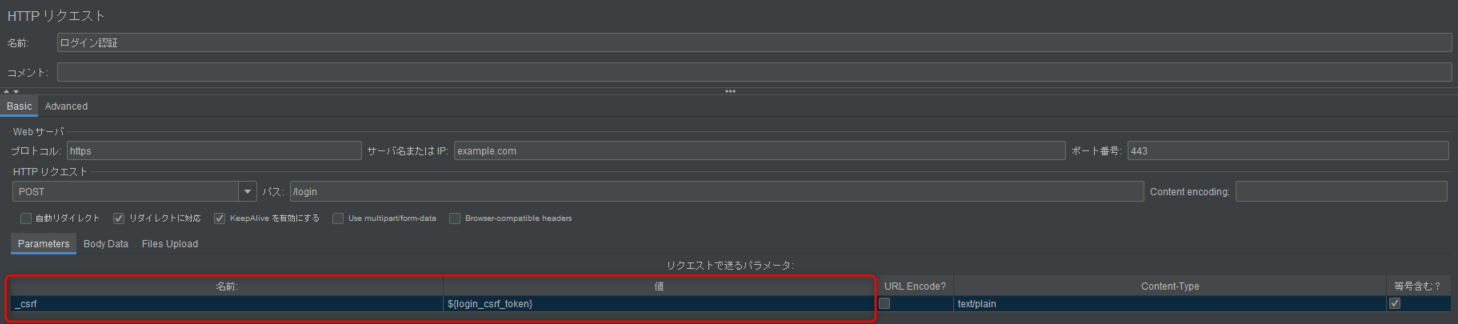
All that's left to do is set the request headers and other necessary parameters depending on the situation
Bonus (JMeter settings to remember)
As mentioned at the beginning, I would like to introduce two JMeter settings that you should remember
■ Basic authentication
When performing load testing, if Basic authentication is required, you can log in using the "HTTP Authentication Manager".
The HTTP Authentication Manager can be added to any "Thread Group", "Simple Controller", or "Initial HTTP Request Sampler" that requires Basic authentication. You can add it
by going to "Add" → "Configuration Element" → "HTTP Authentication Manager"
Once the HTTP Authentication Manager has been added, the screen shown above will appear, so enter the "Base URL", "Username", and "Password" to complete the setup.

■ HTTP Cookie Manager
Next, regarding scenarios where cookie retention is required, this can be achieved by configuring the "HTTP Cookie Manager." The
HTTP Cookie Manager can be added to any of the "Thread Group," "Simple Controller," or "Sampler" elements, and can be added"Add" → "Configuration Element" → "HTTP Cookie Manager.

Once added, the above screen will be displayed, but unless you have specific values you want to use for testing, you can use the HTTP Cookie Manager as is.
*Regarding the item "Discard cookies after each iteration?", checking this box will discard cookies after each loop.
*After adding the HTTP Cookie Manager, run the scenario and confirm that Cookie Data is sent in the request body to complete the configuration.
lastly
I have launched "SEKARAKU Lab," a service site for the system development company I belong to.
Beyond offers a one-stop service for everything from server design and construction to operation, so please feel free to contact us if you have any problems with server-side development.
SEKARAKU Lab:[https://sekarakulab.beyondjapan.com/](https://sekarakulab.beyondjapan.com/)
That's all for today!
Thank you for reading to the end!




The person who wrote this article
About the author









