

[Introduction] Building the Linux kernel

Hello, this
is Infrastructure Man from the System Solutions Department.
my last blog post, I experimented with a larger font size, butI overdid it, so I've learned my lesson and will write in a normal size this time.
Do you know what a kernel is?
In computers, the operating system (OS) acts as a bridge between hardware and software.
This OS is composed of multiple software components rather than a single one, and the core component of this is the kernel.
That was the extent of my prior knowledge of the kernel; I had only vaguely heard of it
After that, while I was busy with my daily work, I quietly pondered the mysterious "Colonel," but I
found traces of him in every aspect of my work.
"Adjust the kernel's swappiness to control swap usage."
"Tune connections using net.ipv4.tcp_max_syn_backlog."
"A kernel panic will occur if you make a mistake writing fstab."
As a casual infrastructure engineer, I occasionally pass this person in the hallway and feel a strong desire to get closer to him, and before I knew it, I had begun to feel the same way that I'm sure everyone else feels
Isn't it cool to understand the kernel?
So what exactly lies in the depths of the OS, a place I yearn for?
To unravel this mystery, our research team set out into the depths of the OS.
What is a build?
By the way, the kernel is open source, which is fantastic.
You can view the code. That's great.
However, since it is written in C (*), it cannot be used as is.
It needs to be converted to a binary before use.
Thiscalled buildingor compiling.
When building, you can add features that weren't originally included in the kernel, or conversely, remove unnecessary features to reduce memory consumption, or even tweak and modify the source code itself to create "the strongest kernel I can imagine."
Being the best is great, isn't it? I'm sure all the Linux distributions out there are created with that kind of mindset. Probably (of course, there are also distributions that were born out of various circumstances ...)
(*) Recently, there has been a growing trend to adopt the programming language "Rust," which is famous for its concept of "ownership," as a second language for kernel development, so we may see an increase in packages that are not written in C in the future
So, to deepen our understanding of what a kernel is,let's try building one.
That brings us back to the title. Practice makes perfect!
Prepare for the build
There are several ways to build, but this time we CentOS 7 will build on
In any field, installing from source and doing all sorts of things is a difficult path, including management issues, but it has the advantage of allowing you to install your preferred version and reducing the likelihood of problems dependent on a specific distribution during the process, so we have chosen this method this time.
Also, the following stepsa virtual environment using Vagrant's Bento Boxare performed in
First, let's download the kernel source code.
The kernel is available at the link below (or a mirror site of this website).
*This article uses longterm: 5.15.58.
The Linux Kernel Archives
https://www.kernel.org/
# Download the tar file [root@localhost]# cd /tmp [root@localhost tmp]# curl -O https://cdn.kernel.org/pub/linux/kernel/v5.x/linux-5.15.58.tar.xz
# Extract [root@localhost tmp]# tar xvf linux-5.15.58.tar.xz
The unzipped directory contains many related files.
Please refer to the following URL for details on its structure:
https://linuxjf.osdn.jp/JFdocs/The-Linux-Kernel-15.html
Next, we will add the necessary elements to the environment.
There are several necessary elements, but the most common ones are as follows:
- Compiler "GCC"
- Build tool "make"
- Header files required for libraries used to build tools around the kernel
- Other Libraries
These will be installed using the command:
# Install a set of tools for source build [root@localhost ~]# yum groupinstall "Development tools"
When you run the command, many tools will be installed.
Important tools such as "GCC" are included in a group package called "Development tools," and they are installed all at once using the "groupinstall" option.
However, this alone is not enough, so we will install a few more packages.
in the directory we just unzipped (hereafter referred to as the source directory) Documentation/process/changes.rst are listed in
# Install required packages [root@localhost ~]# yum install clang squashfs-tools pcmciautils quota ppp nfs-utils procps-ng kernel-devel udev mcelog python-sphinx openssl-devel dwarves elfutils-libelf-devel ncurses-devel
"ncurses-devel" is used for console screen control, and is included because it is required when executing the "make menuconfig" command that will be performed later
Let's change the build settings
Now that the tools are ready, we'd like to start tweaking the kernel settings, but there are several ways to change them.
You can change them by directly editing the ".config" file, but that's a lot of work, so this time we'll use a setting method called "menuconfig" that allows you to change settings by selecting from a menu.
Now, go to the source directory and run the necessary commands
[root@localhost linux-5.15.58]# make menuconfig ~~~ *** Compiler is too old. *** Your GCC version: 4.8.5 *** Minimum GCC version: 5.1.0
I got scolded. Sorry. They said
my GCC version was old.
I see, updating the current GCCbothersomeBecause it's difficult,softwarecollections We will use a newer GCC using the system provided by Red Hat
# Package installation [root@localhost linux-5.15.58]# yum install scl-utils centos-release-scl # Install the toolset containing gcc [root@localhost linux-5.15.58]# yum install devtoolset-8 # Configure to use gcc8 in the current shell [root@localhost linux-5.15.58]# source scl_source enable devtoolset-8 # Check the version [root@localhost linux-5.15.58]# gcc -v
Now it looks like I can finally use menuconfig, so let's try running it
[root@localhost linux-5.15.58]# make menuconfig
Here it comes!
Something like a settings window has appeared.
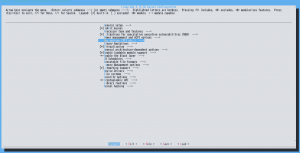
As it says at the top of the screen, to summarize the operation method and screen explanation:
- Select to select Exit to return Use the Tab key to switch between Select and Exit
- Y key enables the function N key disables the function M key modularizes the function (a state that is called only when necessary) Space key moves between these states
- Enabled features are marked with "<*>", disabled features are marked with "<>", and modular features are marked with "<M>"
I've finally reached the settings screen and want to configure it, but apparently there are nearly20,000. That's
an enormous number.
Open source is amazing.
There are so many items, so I'll omit them for now. (Hopefully I can learn more and write about it on my blog in the future. No, I will write about it, I promise!)
Documentationis available. My training has only just begun.
Now that the excuses are over, select "Exit" to leave the "make menuconfig" screen. You will be asked
if you want to save, so save and exit, and you should find a file named ".config" created in the first level of the source directory. If you
look inside, you will see that this is the kernel build configuration file.
As I mentioned above, it is also OK to edit this file directly without using "menuconfig" or other tools.
Let's build it
From here on, it's easy.
Navigate to the source directory and try building the kernel.
Depending on your system's specifications, this may take quite a while, so it's a good idea to run it in parallel.
# Check the number of processors [root@localhost linux-5.15.58]# nproc
In my virtual environment the result was "2"
# Use the number of processors confirmed with the nproc command as an optional argument and run the make command to build the kernel in parallel. [root@localhost linux-5.15.58]# make -j2
When you enter the command, some kind of grinding process will begin.
It takes quite a while, so let's have a snack while we wait.
After waiting for several hours, it was finished.
During the process, my PC got as hot as the hood of a car in the summer. I guess
it was a CPU benchmark?
If you check the source directory, you will see that various related files have been created, such as "vmlinux" and "modules.builtin".
At this point, the build is finally complete.
Let's install the built kernel
Since I have the chance, I will try installing it
Before that, while doing some research, I learned that there seems to be a convention to place Linux source directories under "/usr/src/". (Apparently, this is also covered in the LPIC exam. Huh? I have Level 1 though???)
So I quickly moved the directory.
The location of this directory varies depending on the distribution, so it would be interesting to investigate various options.
# Change directory [root@localhost]# mv /tmp/linux-5.15.58 /usr/src/ # Create symbolic link [root@localhost]# ln -s /usr/src/linux-5.15.58 /usr/src/linux
Compliance complete!
Now, let's proceed with installing the kernel.
# Install module files [root@localhost linux]# make modules_install # Check the current kernel version first [root@localhost linux]# uname -r 3.10.0-1160.71.1.el7.x86_64 # Install kernel and initialization disk image [root@localhost linux]# make install
So let's try rebooting once
[root@localhost linux]# reboot
So, when I start up VirtualBox again,
/sbin/mount.vboxsf: mounting failed with the error: No such device
Yeah...
I can't get up...
I don't know why I'm being yelled at, but I know I'm being scolded for something.
That kind of thing happens in real life too, right?
It seems that a kernel version change has caused a discrepancy between the version managed by VirtualBox and the version being used, resulting in the shared folder failing to mount. A
common problem with virtual environments: "Testing can't proceed due to virtual environment-dependent issues."
It seems like installing a plugin can handle that kind of thing nicely. Thanks to
the pioneers who came up with this, seriously.
# Install the plugin vagrant plugin install vagrant-vbguest # Run vagrant vbguest # Reload after everything is done vagrant reload
Let's ssh in and check the version
[root@localhost ~]# uname -r 3.10.0-1160.71.1.el7.x86_64
Hmm?
It hasn't changed.
Check the kernel versions available when booting the OS
[root@localhost ~]# sudo awk -F\' '$1=="menuentry " {print i++ " : " $2}' /etc/grub2.cfg 0 : CentOS Linux (5.15.58) 7 (Core) 1 : CentOS Linux 7 Rescue f9788dcfa7cdc542bad786c12fab4a3c (3.10.0-1160.71.1.el7.x86_64) 2 : CentOS Linux (3.10.0-1160.71.1.el7.x86_64) 7 (Core) 3 : CentOS Linux (3.10.0-1160.66.1.el7.x86_64) 7 (Core) 4 : CentOS Linux (0-rescue-62851673ae88124499bf281ce5a57918) 7 (Core)
There is
"0 : CentOS Linux (5.15.58) 7 (Core)" ← This is it; it seems the built version
didn't switch automatically. Is this also a VirtualBox specification? ? (Suspicious)
For now, let's use the ``grub2-set-default'' command to set booting from list number ``0'' as the default
[root@localhost ~]# grub2-set-default 0
Then reboot and try ssh again
[root@localhost ~]# uname -r 5.15.58
Wooooooaaaaa
it's the version I built this time!
That's good!
thoughts
Linux is incredibly complex.
I learned so much, including troubleshooting, as there was so much I didn't know.
If I were to create my own Linux distribution, I
suppose I'd have to install the kernel and packages myself, right? It sounds
like a lot of work, but also really interesting!
I feel like my haphazardness came through quite a bit in the writing, but
I'm satisfied because I was able to learn a little bit about Linux.
thank you very much!




The person who wrote this article
About the author









