

[Terraform] How to enable Amazon S3 ACL access with Terraform code

Hello, this is TK from the Canada office. This year's winter in Canada has been warm, and for the first time in my life living in Canada, it rained on Christmas (usually it snows)
Well, this time I would like to briefly summarize the errors I had trouble resolving while building an AWS server with Terraform and how I solved them
This article is intended for people who are already using Terraform, so I will not go into prerequisites such as introducing the tools
assignment
When I was configuring CloudFront and the S3 that stores its logs, no errors occurred when planning, but the following error occurred when applying
│ Error: creating CloudFront Distribution: InvalidArgument: The S3 bucket that you specified for CloudFront logs does not enable ACL access: XXX-log-bucket.s3.amazonaws.com │ status code: 400, request id: XXXXXXXXXXXXXX │ │ with XXXXX.aws_cloudfront_distribution.cf_distribution, │ on XXX/cloudfront.tf line XX, in resource "aws_cloudfront_distribution" "cf_distribution": │ .......
It appears that ACL access is not enabled for writing logs from CloudFront to the S3 bucket.
This is because, since April 2023, Amazon S3 has enabled S3 public access blocking (ACL disabled) as its new default security setting.
◎ Reference:https://zenn.dev/devcamp/articles/39ce7fd0272926
So, I tried enabling ACL directly on the target S3 bucket on the AWS console, and sure enough, the apply command passed without any problems, and logs began to be stored in the bucket
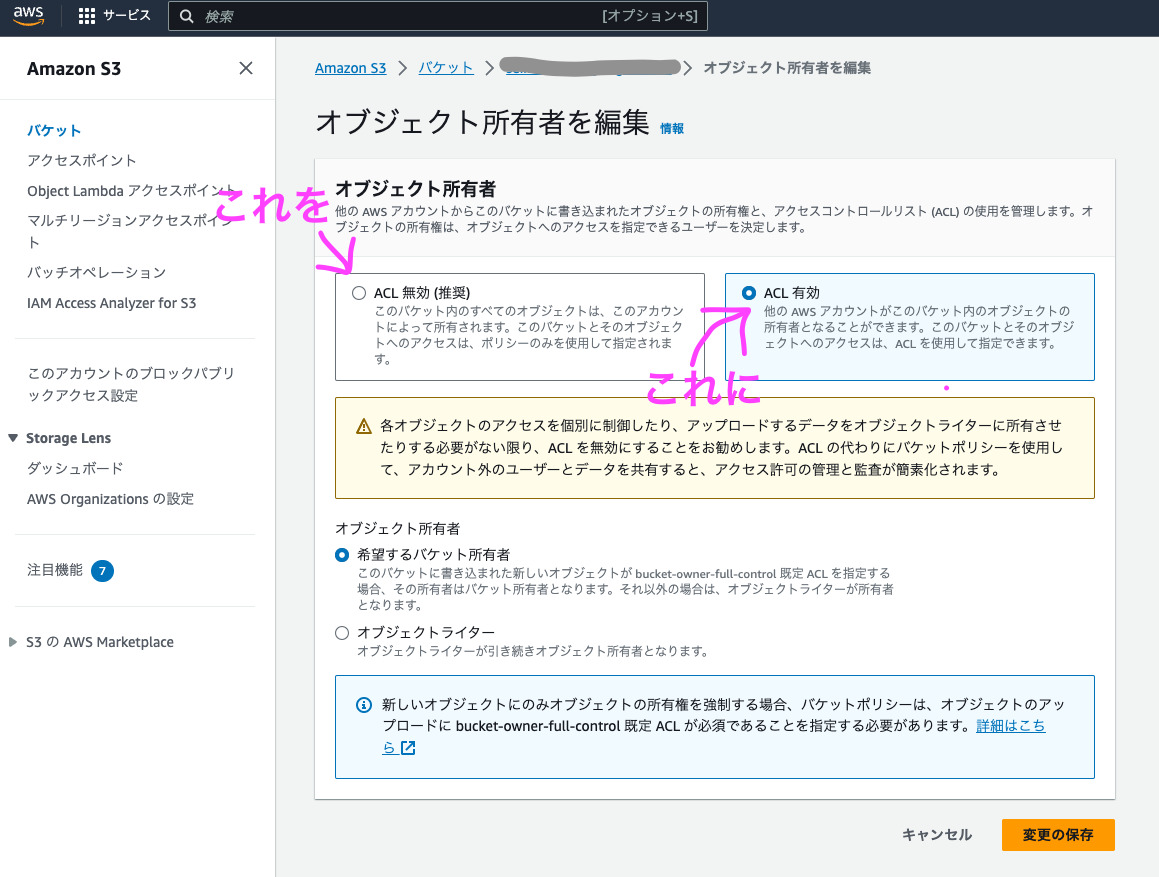
So, I wanted to do the same thing using Terraform code, but no matter how I looked into it, I couldn't find any information on how to write it in Terraform, and when I asked ChatGPT Sensei, I only got vague answers, so I was at a loss
Solution
While researching and experimenting, I looked for Terraform code that corresponds to the part in the link above that says " ObjectOwnership becomes BucketOwnerEnforced
◎ Reference: https://registry.terraform.io/providers/hashicorp/aws/latest/docs/resources/s3_bucket_ownership_controls
Let's add this to the S3 configuration file
// Log bucket object ownership settings ACL enabled resource "aws_s3_bucket_ownership_controls" "log_ownership_controls" { bucket = aws_s3_bucket.log.id rule { object_ownership = "BucketOwnerPreferred" } }
In terms of content, unless the object_ownership of the rule is specified, it will be "BucketOwnerEnforced (ACL disabled)", so this is explicitly specified as "BucketOwnerPreferred"
The apply command passed without any problems, the ACL for the target S3 bucket was enabled, and logs were now stored in the bucket
This is how to enable AWS ACL access with Terraform
It's a fairly simple thing to do, but it took me a while to find the right information, so I hope this article will be helpful to anyone who is in the same situation
You can find related articles about Terraform on this blog here .
Thank you for reading




The person who wrote this article
About the author









