

[AWS Beginners] A quick explanation of what Amazon VPC is!
Introduction
Hello
I'm Hota from the Systems Solutions Department, an
aspiring engineer in training
Have you ever heard of AWS's VPC service? This article
will explain it for those who have recently started using AWS, or those who have heard of it but don't fully understand it.
What is a VPC?
Engineers are often told to consult primary sources.
Now, in my third year, I'm really starting to feel that's true.
So let's take a look (suddenly)
With Amazon Virtual Private Cloud (Amazon VPC), you can launch AWS resources in a logically isolated virtual network that you've defined. This virtual network closely resembles a traditional network that you'd operate in your own data center, with the benefits of using the scalable infrastructure of AWS.
Source: AWS official documentation (https://docs.aws.amazon.com/vpc/latest/userguide/what-is-amazon-vpc.html)
Amazon Virtual Private Cloud (Amazon VPC) lets you launch AWS resources in a logically isolated virtual network that you define. A virtual network resembles a traditional network you operate in your own data center, with the benefits of using the scalable AWS infrastructure
〇 Source: AWS official documentation (https://docs.aws.amazon.com/ja_jp/vpc/latest/userguide/what-is-amazon-vpc.html)
Yes, I'm using some difficult words, but to summarise, it boils down to the following:
A virtual network where AWS resources can be built
What's good?
The major benefits include:
- Saves time and money
- Easy to customize
Saves time and money
In traditional on-premises environments, setting up servers, for example, involved a lot of effort, whether it was preparing a location within the company, installing them in a data center, or using a rental server.
Furthermore, setting up network connections and other infrastructure added significant time and cost to the process.
However, you can easily create a dedicated network by using Amazon VPC
Easy to customize
With on-premises systems, building a network and other infrastructure required thorough research into its intended use, followed by the procurement of components such as routers, which was a time-consuming process.
Furthermore, making changes after the system was operational was also a difficult task.
Of course, even if you use Amazon VPC, you will still need to investigate the scope of the impact and carry out the actual changes, but it's great that you don't need to touch any physical components and can operate it from the AWS console, etc.!
Important Words You Must Know!
Now that I think I've (hopefully) conveyed the benefits, I'd like to introduce some important terms you should know to better understand Amazon VPC
1. Region
As you all know, AWS is an American company, but companies all over the world use AWS.
Even with cloud services, physical distance can affect communication speeds and other factors, so AWS owns data centers all over the world, and each is physically isolated.
These separate regions around the world are called " regions ."
As of June 2024, Japan has Tokyo (ap-northeast-1) and Osaka (ap-northeast-3)
This is a digression from the main topic, but AWS recently announced its investment plans in Japan, so we might see an increase in the number of regions in the future.
https://aws.amazon.com/jp/about-aws/whats-new/2024/01/aws-commits-2trillion-yen-investment-into-japan-ai-and-digital-transformation-from-2023-to-2027/
2. Availability Zone (AZ)
Within each region, there are multiple independent locations.
These are called "availability zones."
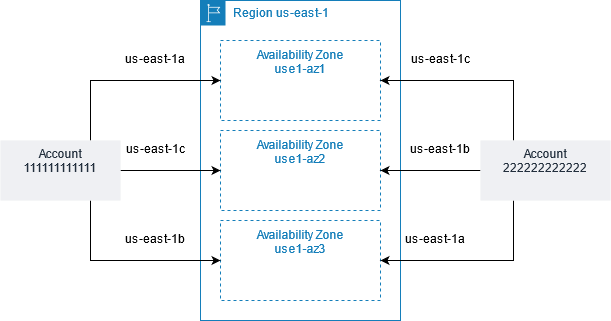
You can select an Availability Zone within each account, but even if the names are the same, the Availability Zone referred to will differ depending on the account.
The image below illustrates that the Availability Zones "us e 1-az1 / us e 1-az2 / us e 1-az3" within the us-east-1 region refer to different zones for Account 1111111111 and Account 22222222, respectively.
〇 Source: AWS official documentation (https://docs.aws.amazon.com/ja_jp/AWSEC2/latest/UserGuide/using-regions-availability-zones.html#availability-zones-describe)
3. Subnets
A subnet is a further segment of a virtual network created as a VPC, defined by a specific IP address range.
It's like creating another virtual network within a VPC.
Within this subnet, we will create what are called public subnets and private subnets.
A public subnet is a network that can communicate directly with the internet.
A private subnet is a network that cannot connect directly to external networks.
Each subnet must specify an Availability Zone; for example, you can place a public subnet and a private subnet in the ap-northeast-1a Availability Zone in the Tokyo region
Once the subnet has been successfully created, you can create EC2 and RDS resources there
4. Internet Gateway
It acts as a gateway that allows communication between a VPC created on your AWS account and the outside world, the Internet
Without it, resources within your VPC cannot access the outside world, the Internet
5. Route Table
The rules that determine network paths within a VPC are called "routes," and
the resources that record these routes are called "route tables."
For example, if you want to allow an EC2 instance created within a VPC to access the external Internet, you need to add a route from the IP address of the resource you want to allow to the Internet gateway in this route table
6. Security Groups
You can set rules that allow access to resources created within the same VPC
Specifically, you will need to specify the IP address, protocol, and port number of the access source.
For example, if you want to establish an SSH connection to an EC2 instance, you can do so by adding the following settings.
| Access source IP | protocol | Port number |
| XXX.XXX.XXX.XXX | SSH | 22 |
Finally...
So, what did you think?
I hope that at least you now have a vague idea of what a VPC is.




The person who wrote this article
About the author









