

How much free space can Dropbox's lossless JPEG compression tool, Lepton, free up?

Hello.
I'm Mandai, the Wild team member in charge of development.
I tried various things using lepton, a lossless compression tool for JPEG files developed by Dropbox, to see how much image size can actually be compressed
The OS used in this example is CentOS 7, which was created on VirtualBox.
Please see the following screenshot for Windows system information and VirtualBox allocation.
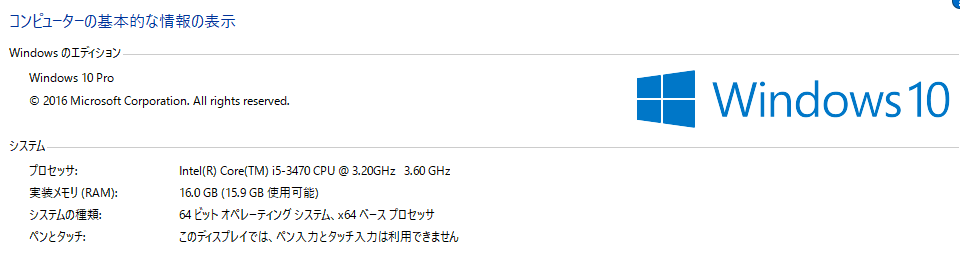

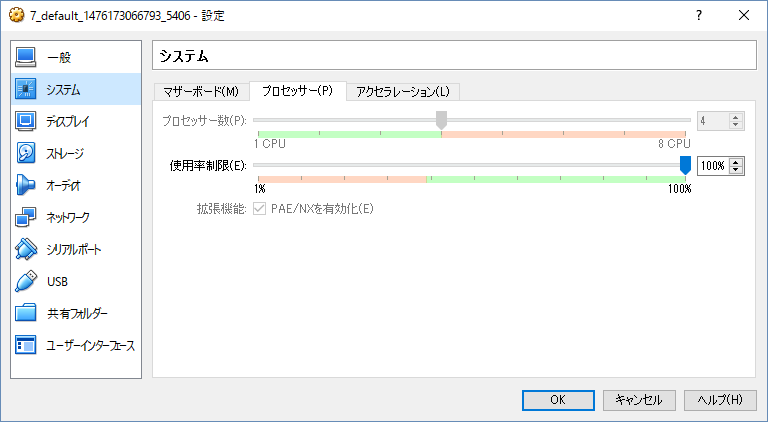
If you'd like to easily try it out in the same environment,thisarticle to build a virtual environment.
Since it's picky about the compilation environment, there's a high probability that it won't compile properly on CentOS 6 or earlier, so please be aware of that.
(In fact, I tried various methods, but I couldn't compile it on a CentOS 6.7 VM.)
Installing lepton
Installing lepton is very easy
As stated on GitHub, run the included autogen.sh to download the dependency modules used for building, and then use autoreconf to set up the build environment.
If autogen.sh fails, try installing automake and autoconf using yum.
git clone https://github.com/dropbox/lepton.git sh autogen.sh ./configure make -j4 sudo make install
Running `make` on a multi-core processor is significantly faster, so you should use the `-j` option when running `make`.
The command above shows the result of running `make` on a PC with a 4-core CPU.
The number of CPU cores can be obtained using the nproc command, so it's possible to do something like "make -j$(nproc)" (wild!)
How much reduction can be achieved?
Now it's time for the long-awaited conversion
Let 's start by cooking this
The file size is 5,816,548 bytes, or just over 5 MB. For a JPEG image, I think it's pretty large
The command to convert this to lepton format is as follows:
time lepton IMGP2319.JPG compressed.lep lepton v1.0-1.2.1-35-ge230990 14816784 bytes needed to decompress this file 4349164 5816548 74.77% 15946404 bytes needed to decompress this file 4349164 5816548 74.77% real 0m1.102s user 0m2.676s sys 0m0.053s
The `time` command was added simply to find out the execution time; in reality, "lepton IMGP2319.JPG compressed.lep" would suffice.
The result shows that the file was compressed to 74.77% of its original size.
The output of ls is as follows:
ls -al -rw-rw-r--. 1 vagrant vagrant 5816548 Oct 11 09:33 IMGP2319.JPG -rw-------. 1 vagrant vagrant 4349164 Oct 11 09:49 compressed.lep
I think it's generally handled without any problems
Now, let's put it back to the original
time lepton compressed.lep decompressed.jpg lepton v1.0-1.2.1-35-ge230990 15946404 bytes needed to decompress this file 4349164 5816548 74.77% real 0m0.370s user 0m1.235s sys 0m0.022s ls -al -rw-rw-r--. 1 vagrant vagrant 5816548 October 11 09:33 IMGP2319.JPG -rw-------. 1 vagrant vagrant 4349164 October 11 09:52 compressed.lep -rw-------. 1 vagrant vagrant 5816548 October 11 09:54 decompressed.jpg
The original image is IMGP2319.JPG, and after converting it to lepton format, the result is "decompressed.jpg" after reconverting it to jpeg
The file size is the same, and even if you run a diff, it turns out to be the exact same file
However, be aware that permissions have changed
Converting a large number of images (jpeg → lep format)
We converted a large number of images to investigate how much file size could be reduced on average
First, from jpeg to lep format
Lepton processed 159 files with a total size of 807MB.
The total time it took Lepton to convert these files was 569.686 seconds, with an average time of 3.582931 seconds.
The total file size was 826,028 bytes for JPEG files, which were converted to 627,912 bytes for LEP format files.
The average compression ratio was 23.98%, which is in line with the advertised 22%.
The best-compressed file achieved a compression of 29.58%,
while the worst-compressed file achieved 21.23%.
The median is 23.82%, so it's safe to say that on average, more than 22% compression was achieved (right?).
By the way, the CPU load seems to be distributed across each core, so there was no situation where only one CPU was highly utilized
Converting a large number of images (lep format → jpeg)
Next, try converting from lep format to jpeg
Let's try converting the LEP format file we just converted back to JPEG.
The total time taken for this conversion was 232.158 seconds, with an average of 1.460113 seconds.
This also varied depending on the file, with some taking a maximum of 1.992 seconds and others
a minimum of 1.246 seconds.
The median execution time was 1.436 seconds.
Conclusion
For services that save a large volume of JPEG images, converting them before saving them to AWS S3 or similar services could save resources.
However, the processing power required for compression and decompression is considerable.
The time it takes depends heavily on CPU performance and memory usage, so you'll need to adjust it to suit your machine.
Memory, process, and thread settings can be controlled through options.
However, one notable feature is that it seems you can also use it to retrieve files via Unix domain sockets or by specifying the port to listen on. It might even be
intended for use with a separate Lepton conversion server, where you can continuously perform conversions. It could really shine depending on your ideas.
Lepton is already being used internally by Dropbox and appears to be yielding positive results.
If you're having trouble with the file size of your JPEG images, why not give it a try?
That's all




The person who wrote this article
About the author









