

Don't ignore it: The scary "vulnerability" seen in older iPhones

This is Yamada from the Systems Department.
Lately, a whole bunch of Linux-related vulnerabilities have been announced,
keeping my server team extremely busy.
Apache, MySQL, glibc, openssl...
This time, I'll be talking about a "vulnerability" that may seem unrelated to you, but is actually very relevant. This is
a must-read for anyone who frequently uses smartphones or computers.
What is vulnerability???
Vulnerability. It's a rather difficult word, isn't it?
When you hear "vulnerability in XX," it sounds technical and complicated, but
essentially, it refers to a security "flaw" in the software that runs a computer.
So, whether it's your smartphone or PC, or
even the recently popular smart home appliances,
all complex electronic devices contain some kind of "software."
Since that "software" is basically created by humans,
it's natural that unexpected "defects" such as bugs and design flaws can exist.
That's why manufacturers provide corrective software
when they notice a "defect
You often see notifications like "Windows Update" or "iOS Update," and when
you look inside, it says something like "Addressing a vulnerability related to XXX."
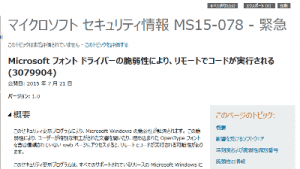
Something like this
However, I suspect that quite a few people are ignoring this notification because they find it "too much trouble" or "don't understand it."
That's not good.
Fragile Folktales
This happened just a few years ago, around the time the iPhone 4 was released, but
the iOS 4.3.3 operating system that ran on the iPhone 4 had an extremely dangerous vulnerability.
Basically, iPhones have strict restrictions on what ordinary users like us can operate,
ensuring security by preventing anything malicious from getting in.
However, it's also true that iPhones have long had a system known as "jailbreaking,"
which allows users to bypass restrictions placed on them and
access important system settings and files that they wouldn't normally be able to access.
This "jailbreaking" process basically requires connecting the iPhone to another computer and
modifying the iPhone from the computer, but
"iOS 4.3.3" made jailbreaking easier than any previous device.
Incredibly, iOS 4.3.3
has a vulnerability that allows it to execute programs that are normally protected by security
. By exploiting this, it's possible to "jailbreak" a device simply by viewing a PDF from a website.
And it only takes a few dozen seconds.

This vulnerability was exploited by some individuals who would "jailbreak" unlocked iPhones and
try to control them remotely.
Furthermore, this "flaw" meant there was a significant risk of viruses being injected while browsing websites.
At the time, anyone with an iPhone could easily have their phone hijacked just by visiting a slightly suspicious website. Terrifying.
Apple promptly addressed this "flaw" by distributing a corrected version of the software, but
ignoring such issues leaves you vulnerable indefinitely.
Furthermore, this isn't some old story;
a very similar jailbreaking method was reportedly used in iOS 9.3.2 just a few months ago.
This was back in 2016.
What to do about vulnerability?
So what should you do? Well, whether it's Windows, iPhone, Android, Java, or iTunes, you
should basically never ignore update notifications.
Even if it's a hassle, you should carefully read the content, do your research, and take appropriate action.
Otherwise, you'll be held responsible if something serious happens.
However, you need to be careful as there are also fraudulent viruses that disguise themselves as security notifications
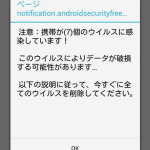
Be careful of this. It's a scam!
Incidentally, the reason I chose this topic is because
when I went to check on a friend's PC for maintenance the other day,
they were completely ignoring the "Java Update" notification, so I thought I'd use it as a topic to draw attention to it.
It's been getting colder lately, so please be careful not to damage your body or your PC!
If you have concerns about server security, please contact ushere.




The person who wrote this article
About the author









