

What to do when the mount menu disappears from Windows 10

It's hard to believe, but a year and a half has already passed since Windows 10 was released.
There's talk of a Creators Update being released in April, but
even the initial Windows 10 upgrade included many convenient features.
I remember being overjoyed when the "ISO image mounting function" was included as a standard feature in the OS.
It was great that Windows 8 allowed ISO burning as a standard feature, but the
fact that it could also mount ISOs meant I no longer needed the virtual drive software I had been using for years.
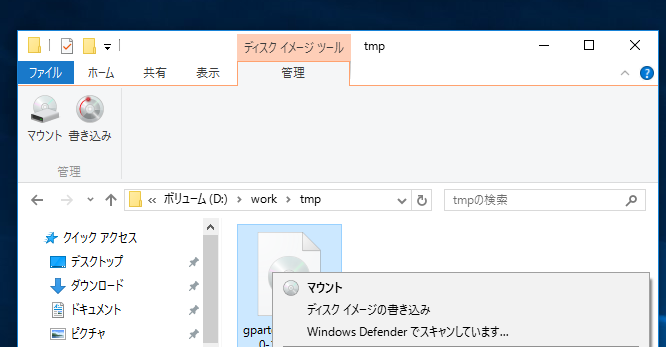
A very useful disk image tool
However, some people might find this feature suddenly disappearing one day, right?
Yes, you there, did you recently install any disc burning software???
Surprisingly, the mounting function in Windows 10 disappears the moment an ISO file is associated with other software.
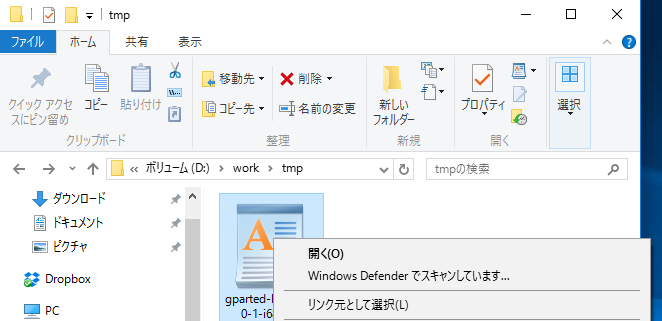
Huh?! Where did my disk imaging tool go?!
Looking closely, the icon has changed. The image shows an example of it being associated with WordPad.
How to fix it
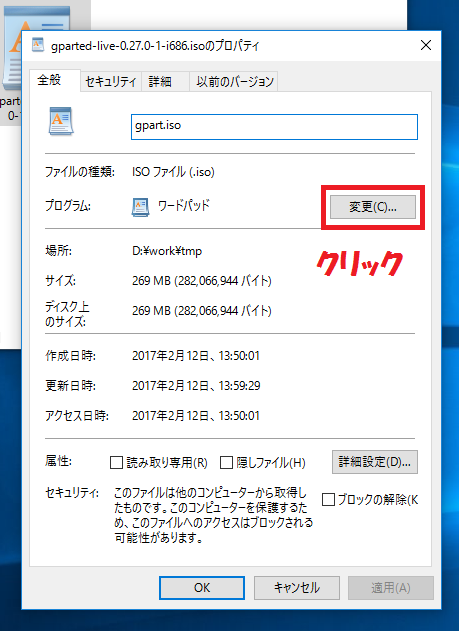
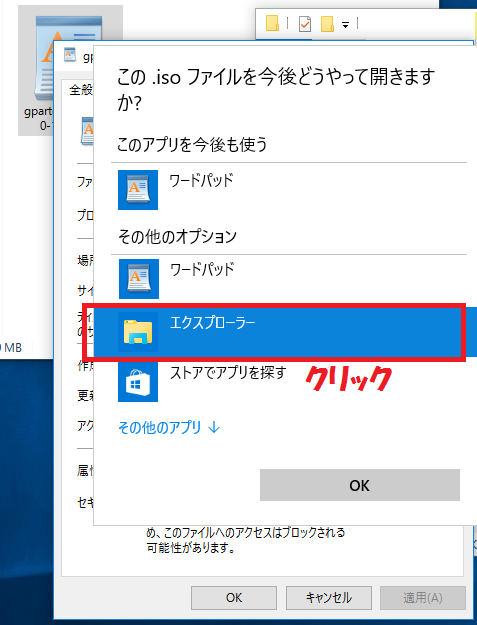
The fix is simple: just unassociate the file type.
Since it can mount and write to files by default, you only need to launch third-party software when necessary.
Right-click on the ISO file, open "Properties", and click the "Change" button
Then click "Explorer"
It should be back to normal now! How did it go?
If it's fixed for you, please check out my other blog posts too!




The person who wrote this article
About the author









