

About the ls command that you may be too embarrassed to ask about
2017.06.08





Hello, this is Okazaki from the System Solutions Department
When managing a server,
the command "ls" is probably one of the most frequently used commands for checking file and directory information.
It's
also likely a command everyone used when they were new to servers or when they first encountered them
I'd like to introduce the "ls" command,
one of the commands that server administrators frequently use
What is the ls command?
The `ls` command is used to display information about directories and files.
By adding options when displaying the information,
you can also display various other pieces of information about the files and directories.
How to use
The basic usage is as follows:
$ ls [options] [file or directory]
(Example 1)

If you want to get the file/directory access permissions, owner size, and last update date, add the "-l" option as follows
$ ls -l [file or directory]
(Example 2)
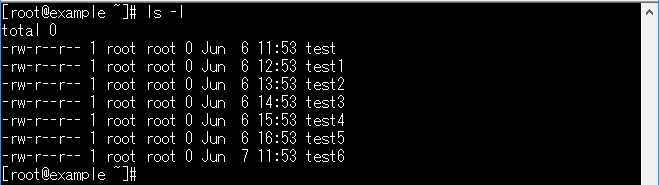
If you want to see hidden files that start with ".", add the "-a" option
$ ls -a [file or directory]
(Example 3)

If you want the display order to be in the order of the last update time, add "-t", and if you want to display the order in reverse, add "-r"
$ ls -t [file or directory]
$ ls -r [file or directory]
(Example 4)
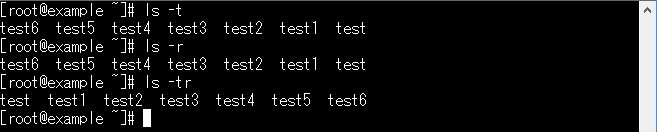
You can also combine all the commands you've seen so far
$ ls -altr [file or directory]
(Example 5)
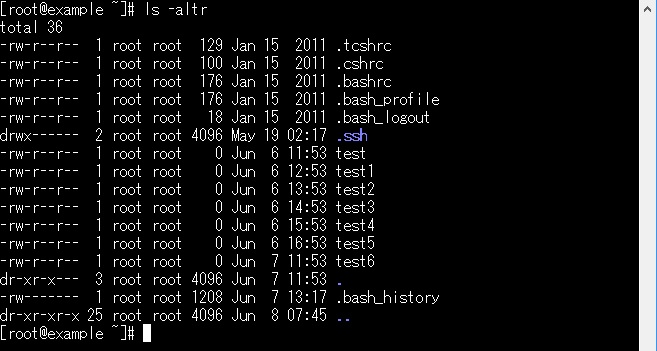
summary
Commands are frequently used in daily operations and management, but
we often forget them and have to search for them. Even with commands we use regularly,
we might only use specific options, and upon closer inspection, we
might discover surprisingly useful options.
This time, I introduced some options for the "ls" command, but
there are many more options, and I would like to introduce more in the future.
The person who wrote this article
About the author









