

Let's create a VPC environment with CloudFormation (Execution)
2019.03.28





Hello everyone,
I'm Okazaki from the SRE team in the System Solutions Department.
last time, I'd like to introduce a simple way to use CloudFormation.
This time, we'll actually build a VPC using the template file we filled out last time.
Create a stack
First, log in to your development server and register the API key for the user who will run CloudFormation as shown below
[root@localhost ~]# aws configure AWS Access Key ID [****************XXXX]: AWS Secret Access Key [****************XXXX]: Default region name [ap-northeast-1]: Default output format [XXXX]:
If you don't have the aws command, install it as follows:
[root@localhost ~]# yum install epel-release [root@localhost ~]# yum install python-pip [root@localhost ~]# pip install awscli
Make sure you have the vpc.yml you created last time, then run the following command to create a VPC
[root@localhost ~]# ls -l total 4 -rw-r--r--. 1 root root 1713 Mar 22 06:20 vpc.yml [root@localhost ~]# aws cloudformation create-stack \ > --stack-name vpc \ > --region ap-northeast-1 \ > --template-body file://./vpc.yml
After execution, if the following message is displayed without any errors, the creation process will proceed
arn:aws:cloudformation:ap-northeast-1:189461266018:stack/vpc/7b29dce0-4c70-11e9-8b3c-0ee87e6fb924
You can check the status using the following command.
If the display shows "CREATE_COMPLETE", the resource has been completed.
aws cloudformation describe-stacks --stack-name vpc STACKS 2019-03-28T02:12:32.683Z False False arn:aws:cloudformation:ap-northeast-1:189461266018:stack/vpc/f23007a0-50fe-11e9-88b0-0e819627e6da vpc CREATE_COMPLETE DRIFTINFORMATION NOT_CHECKED PARAMETERS PublicSubnetCider 10.31.0.0/24 PARAMETERS ProjectCode test PARAMETERS VPCCider 10.31.0.0/16
Let's check whether the construction of each resource has been completed
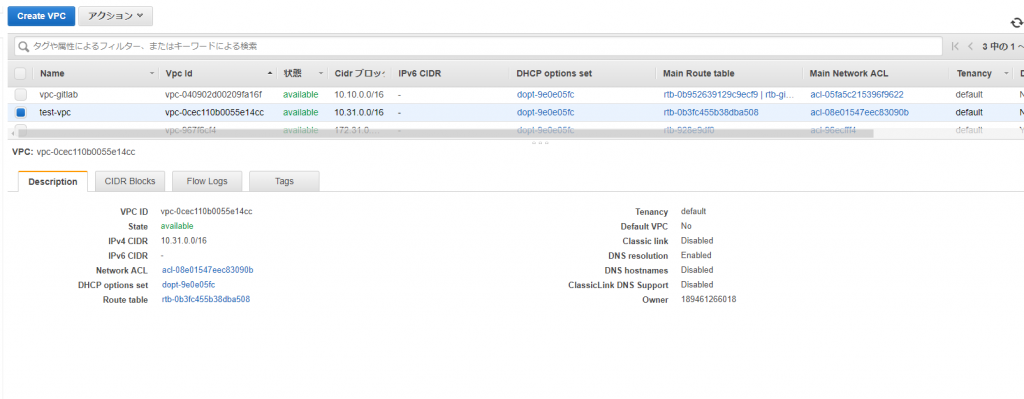
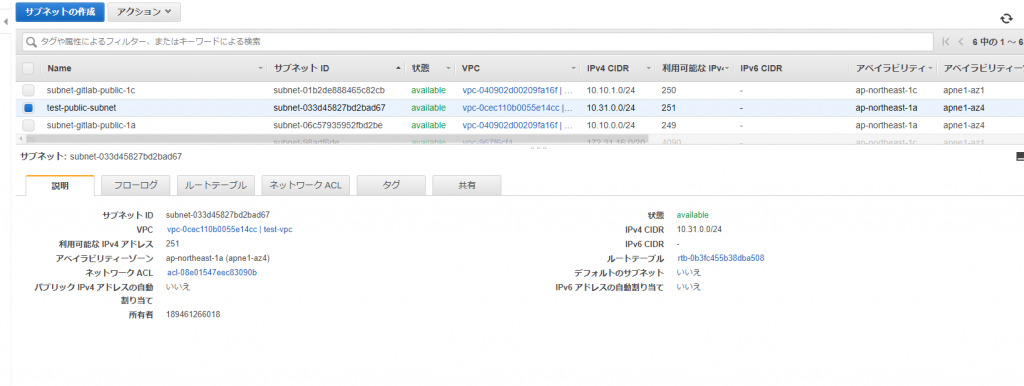
The VPC and subnet with the specified identifier were created without any problems
Delete resources
Now, let's delete all the resources we created at once.
Manually deleting them would require navigating to each resource's screen and deleting them individually, but
resources created with CloudFormation can be deleted from a single console.
Return to your development server and issue the following command.
[root@localhost ~]# aws cloudformation delete-stack --stack-name vpc
Now let's check the deletion progress.
Run the following command, and if it shows "DELETE_IN_PROGRESS", it means the deletion is in progress.
[root@localhost ~]# aws cloudformation describe-stacks --stack-name vpc STACKS 2019-03-28T02:12:32.683Z 2019-03-28T02:20:53.902Z False False arn:aws:cloudformation:ap-northeast-1:189461266018:stack/vpc/f23007a0-50fe-11e9-88b0-0e819627e6da vpc DELETE_IN_PROGRESS DRIFTINFORMATION NOT_CHECKED PARAMETERS PublicSubnetCider 10.31.0.0/24 PARAMETERS ProjectCode test PARAMETERS VPCCider 10.31.0.0/16
Once the stack deletion is complete, you will see the following error message:
[root@localhost ~]# aws cloudformation describe-stacks --stack-name vpc An error occurred (ValidationError) when calling the DescribeStacks operation: Stack with id vpc does not exist
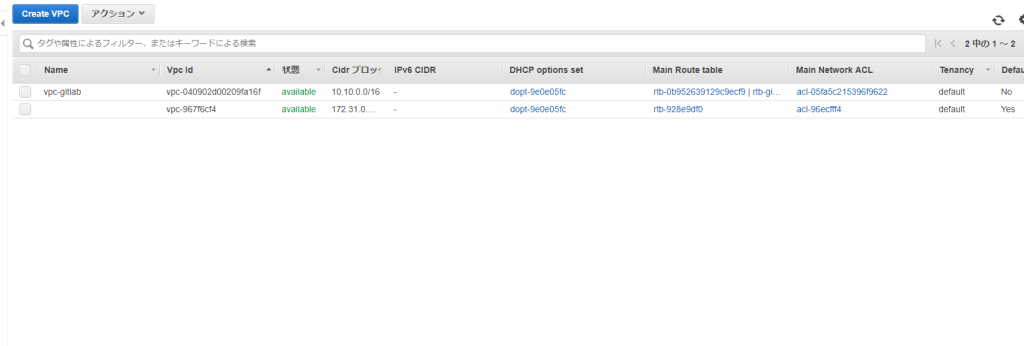
Now let's check if the deletion was actually completed.
We can confirm that the VPC has disappeared.
Commentary
Here's a step-by-step explanation of each command:
# aws cloudformation create-stack \ ↑ Declare that you will use cloudformation with aws cloudformation Use create-stack to create a stack, or use delete-stack to delete it > --stack-name vpc \ ↑ stack-name [name] Set the name of the stack > --region ap-northeast-1 \ ↑ --region [region] Set the region where you want to create resources > --template-body file://./vpc.yml ↑ --template-body [file URL] Specify the URL of the template file
As you can see, you can create a VPC with minimal commands.
Additionally, if you want to change the values of the parameters you previously set, you can write it like this:
# aws cloudformation create-stack \ > --stack-name vpc \ > --region ap-northeast-1 \ > --template-body file://./vpc.yml > --parameters \ > ParameterKey=ProjectCode,ParameterValue=test-beyondjapan \ > ParameterKey=VPCCider,ParameterValue="10.23.0.0/16" \ > ParameterKey=PublicSubnetCider,ParameterValue="10.23.0.0/24"
You can declare the use of each parameter in parameters, specify the parameter ID in ParameterKey, and specify the value in ParameterValue
summary
This time, we were able to create and delete stacks and individual resources from the console.
As you can see, CloudFormation makes it easy to create and delete AWS resources.
In the previous and current posts, we only covered VPC creation, but next time we will introduce more practical content such as EC2 creation, so please try it out.
The person who wrote this article
About the author









