

Modifying DataTables pagination buttons
Hello, this is Hase from the Web Systems Department
Last time, I wrote about how to speed up the display of DataTables , but this time I'd like to write about how to change the display of pagination buttons
Introduction
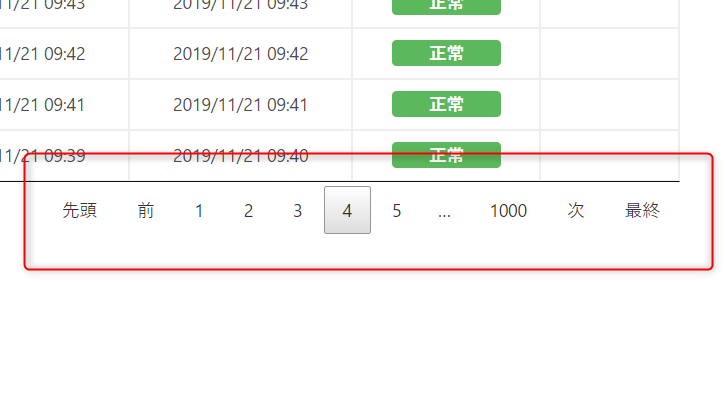
By default, DataTables displays pagination buttons as shown in the image below
You can actually change the display of these pagination buttons
indeedmentioned, it is written in English, and there are surprisingly few articles introducing it in Japanese, so I thought I'd take this opportunity to introduce it here.
method
The method is very simple
`pagingType` as an option and specify the argument.
■ jQuery
jQuery(function($){ $("table.datatable").DataTable({ // Display pagination buttons "pagingType": "simple_numbers" }); });
In the code above,the `simple_numbers`part.
By changing this, you can change the display of the pagination buttons in various ways.
The arguments that can be specified are listed below
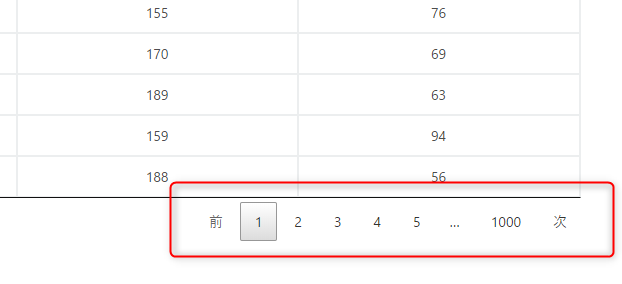
simple_numbers
It consists of "Previous" and "Next" buttons, and page numbers
the pagingTypeoption is not set, this setting will be used automatically.
■ jQuery
jQuery(function($){ $("table.datatable").DataTable({ // Display pagination buttons "pagingType": "simple_numbers" }); });
■ Display
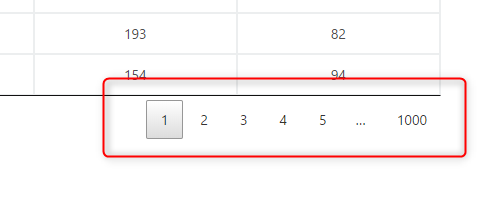
numbers
It consists only of page number buttons
■ jQuery
jQuery(function($){ $("table.datatable").DataTable({ // Display pagination buttons "pagingType": "numbers" }); });
■ Display
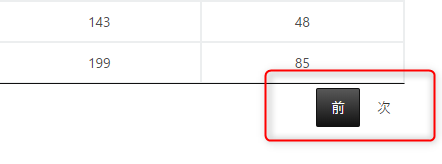
simple
It consists only of "Previous" and "Next" buttons
■ jQuery
jQuery(function($){ $("table.datatable").DataTable({ // Display pagination buttons "pagingType": "simple" }); });
■ Display
full
It consists of "First," "Previous," "Next," and "Last" buttons
■ jQuery
jQuery(function($){ $("table.datatable").DataTable({ // Display pagination buttons "pagingType": "full" }); });
■ Display
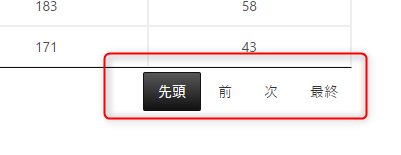
full_numbers
It consists of "First," "Previous," "Next," and "Last" buttons, and page numbers
■ jQuery
jQuery(function($){ $("table.datatable").DataTable({ // Display pagination buttons "pagingType": "full_numbers" }); });
■ Display

first_last_numbers
It consists of "First" and "Last" buttons, and page numbers
■ jQuery
jQuery(function($){ $("table.datatable").DataTable({ // Display pagination buttons "pagingType": "first_last_numbers" }); });
■ Display
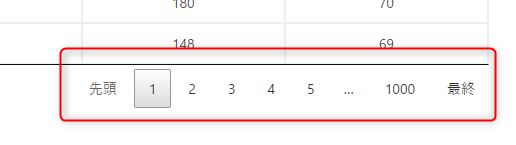
There are six of these
Additionally, you can configure settings other than those mentioned above by adding plugins.
This time, we'll introduce a selection of potentially useful ones.
input
It consists of "First," "Previous," "Next," and "Last" buttons, and page selection using input tags
■ Plug-ins
<script type="text/javascript" src="//cdn.datatables.net/plug-ins/1.10.20/pagination/input.js"></script>
■ jQuery
jQuery(function($){ $("table.datatable").DataTable({ // Display pagination buttons "pagingType": "input" }); });
■ Display

listbox
Page selectionis done using a select box.
■ Plug-ins
<script type="text/javascript" src="//cdn.datatables.net/plug-ins/1.10.20/pagination/select.js"></script>
■ jQuery
jQuery(function($){ $("table.datatable").DataTable({ // Display pagination buttons "pagingType": "listbox" }); });
■ Display
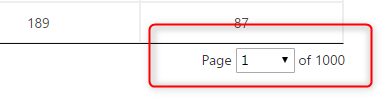
There are many other plugins available, so please refer to the official documentation:
https://datatables.net/plug-ins/pagination/
summary
This is how easily you can change the display of the pagination buttons.
If you have a large number of pages, `full_numbers`will make page switching easier, making it more convenient.
Please give it a try.
lastly
I have launched "SEKARAKU Lab," a service site for the system development company I belong to.
Beyond offers a one-stop service for everything from server design and construction to operation, so please feel free to contact us if you have any problems with server-side development.
SEKARAKU Lab:[https://sekarakulab.beyondjapan.com/](https://sekarakulab.beyondjapan.com/)
That's all




The person who wrote this article
About the author









