

Building a Fargate deployment flow using Github + CodeBuild + CodePipeline with Terraform
2020.04.27




I'm Teraoka, an infrastructure engineer.
Today, I'll be talking about deploying applications to Fargate.
While they're sometimes referred to as the "Code brothers,"
AWS offers several convenient services for deploying to various services.
This time, I've created a Terraform pipeline
using CodeBuild and CodePipeline to deploy to Fargate, so I'm sharing the code
The Terraform version is "v0.12.24".
Please be aware of this if you are using this as a reference.
What we built this time
It looks like this:
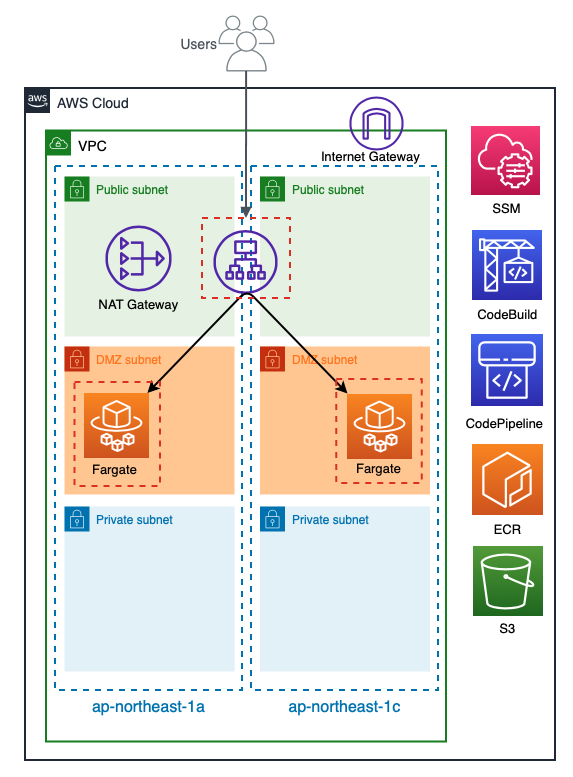
The VPC has a three-tier structure: Public, DMZ, and Private.
The Public subnet has an ALB and a NAT Gateway
, while the DMZ subnet has a Fargate task running and is linked to the ALB's target group.
Let's take a closer look at CodeBuild and CodePipeline, which are the core of the deployment pipeline. A
simplified diagram would look like this:
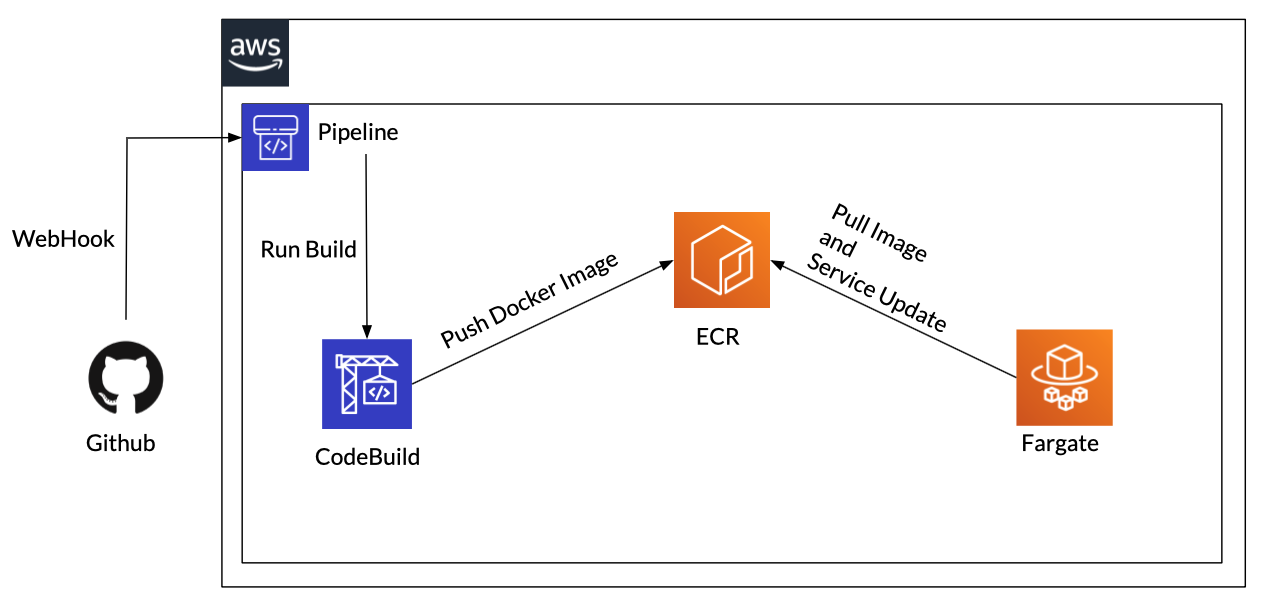
The flow is very simple
- Link with Github via WebHook to detect push events to Git and automatically execute CodePipeline
- Get source code from Github, build a Docker image with CodeBuild, and push it to ECR
- Pull the image pushed to ECR from Fargate and launch a new task
- Register the launched task with the ALB target group
- Exclude the old task from the target group
- Delete old tasks
So,
when the deployment is executed, the old and new Fargate tasks will be swapped.
Now let's take a look at the Terraform code.
Directory structure
$ tree . ├── alb.tf ├── buildspec.yml ├── codebuild.tf ├── codepipeline.tf ├── docker │ ├── nginx │ │ ├── Dockerfile │ │ └── conf │ │ ├── default.conf │ │ └── nginx.conf │ └── sites │ └── index.html ├── docker-compose.yml ├── fargate.tf ├── github.tf ├── iam.tf ├── provider.tf ├── roles │ ├── codebuild_assume_role.json │ ├── codebuild_build_policy.json │ ├── codepipeline_assume_role.json │ ├── codepipeline_pipeline_policy.json │ ├── fargate_task_assume_role.json │ └── fargate_task_execution_policy.json ├── s3.tf ├── secrets │ └── github_personal_access_token ├── securitygroup.tf ├── ssm.tf ├── tasks │ └── container_definitions.json ├── terraform.tfstate ├── terraform.tfstate.backup ├── variables.tf └── vpc.tf 7 directories, 28 files
Providers and Variables
I will write down the Terraform provider and variable
provider.tf
provider "aws" { access_key = var.access_key secret_key = var.secret_key region = var.region assume_role { role_arn = var.role_arn } } provider "github" { token = aws_ssm_parameter.github_personal_access_token.value organization = "Teraoka-Org" }
variables.tf
#################### # Provider ################### variable "access_key" { description = "AWS Access Key" } variable "secret_key" { description = "AWS Secret Key" } variable "role_arn" { description = "AWS Role Arn" } variable "region" { default = "ap-northeast-1" }
VPC
Create a VPC
vpc.tf
#################### # VPC ################### resource "aws_vpc" "vpc" { cidr_block = "10.0.0.0/16" enable_dns_support = true enable_dns_hostnames = true tags = { Name = "vpc-fargate-deploy" } } #################### # Subnet ################### resource "aws_subnet" "public_1a" { vpc_id = aws_vpc.vpc.id availability_zone = "${var.region}a" cidr_block = "10.0.10.0/24" map_public_ip_on_launch = true tags = { Name = "subnet-fargate-deploy-public-1a" } } resource "aws_subnet" "public_1c" { vpc_id = aws_vpc.vpc.id availability_zone = "${var.region}c" cidr_block = "10.0.11.0/24" map_public_ip_on_launch = true tags = { Name = "subnet-fargate-deploy-public-1c" } } resource "aws_subnet" "dmz_1a" { vpc_id = aws_vpc.vpc.id availability_zone = "${var.region}a" cidr_block = "10.0.20.0/24" map_public_ip_on_launch = true tags = { Name = "subnet-fargate-deploy-dmz-1a" } } resource "aws_subnet" "dmz_1c" { vpc_id = aws_vpc.vpc.id availability_zone = "${var.region}c" cidr_block = "10.0.21.0/24" map_public_ip_on_launch = true tags = { Name = "subnet-fargate-deploy-dmz-1c" } } resource "aws_subnet" "private_1a" { vpc_id = aws_vpc.vpc.id availability_zone = "${var.region}a" cidr_block = "10.0.30.0/24" map_public_ip_on_launch = true tags = { Name = "subnet-fargate-deploy-private-1a" } } resource "aws_subnet" "private_1c" { vpc_id = aws_vpc.vpc.id availability_zone = "${var.region}c" cidr_block = "10.0.31.0/24" map_public_ip_on_launch = true tags = { Name = "subnet-fargate-deploy-private-1c" } } #################### # Route Table ################### resource "aws_route_table" "public" { vpc_id = aws_vpc.vpc.id tags = { Name = "route-fargate-deploy-public" } } resource "aws_route_table" "dmz" { vpc_id = aws_vpc.vpc.id tags = { Name = "route-fargate-deploy-dmz" } } resource "aws_route_table" "private" { vpc_id = aws_vpc.vpc.id tags = { Name = "route-fargate-deploy-private" } } #################### # IGW #################### resource "aws_internet_gateway" "igw" { vpc_id = aws_vpc.vpc.id tags = { Name = "igw-fargate-deploy" } } ################### # NATGW ################### resource "aws_eip" "natgw" { vpc = true tags = { Name = "natgw-fargate-deploy" } } resource "aws_nat_gateway" "natgw" { allocation_id = aws_eip.natgw.id subnet_id = aws_subnet.public_1a.id tags = { Name = "natgw-fargate-deploy" } depends_on = [aws_internet_gateway.igw] } #################### # Route #################### resource "aws_route" "public" { route_table_id = aws_route_table.public.id destination_cidr_block = "0.0.0.0/0" gateway_id = aws_internet_gateway.igw.id depends_on = [aws_route_table.public] } resource "aws_route" "dmz" { route_table_id = aws_route_table.dmz.id destination_cidr_block = "0.0.0.0/0" nat_gateway_id = aws_nat_gateway.natgw.id depends_on = [aws_route_table.dmz] } ################## # Route Association ################### resource "aws_route_table_association" "public_1a" { subnet_id = aws_subnet.public_1a.id route_table_id = aws_route_table.public.id } resource "aws_route_table_association" "public_1c" { subnet_id = aws_subnet.public_1c.id route_table_id = aws_route_table.public.id } resource "aws_route_table_association" "dmz_1a" { subnet_id = aws_subnet.dmz_1a.id route_table_id = aws_route_table.dmz.id } resource "aws_route_table_association" "dmz_1c" { subnet_id = aws_subnet.dmz_1c.id route_table_id = aws_route_table.dmz.id } resource "aws_route_table_association" "private_1a" { subnet_id = aws_subnet.private_1a.id route_table_id = aws_route_table.private.id } resource "aws_route_table_association" "private_1c" { subnet_id = aws_subnet.private_1c.id route_table_id = aws_route_table.private.id }
Security Group
Create a security group
securitygroup.tf
#################### # Security Group ################### resource "aws_security_group" "alb" { name = "alb-sg" description = "for ALB" vpc_id = aws_vpc.vpc.id } resource "aws_security_group" "fargate" { name = "fargate-sg" description = "for Fargate" vpc_id = aws_vpc.vpc.id } ##################### # Security Group Rule #################### resource "aws_security_group_rule" "allow_http_for_alb" { security_group_id = aws_security_group.alb.id type = "ingress" protocol = "tcp" from_port = 80 to_port = 80 cidr_blocks = ["0.0.0.0/0"] description = "allow_http_for_alb" } resource "aws_security_group_rule" "from_alb_to_fargate" { security_group_id = aws_security_group.fargate.id type = "ingress" protocol = "tcp" from_port = 80 to_port = 80 source_security_group_id = aws_security_group.alb.id description = "from_alb_to_fargate" } resource "aws_security_group_rule" "egress_alb" { security_group_id = aws_security_group.alb.id type = "egress" protocol = "-1" from_port = 0 to_port = 0 cidr_blocks = ["0.0.0.0/0"] description = "Outbound ALL" } resource "aws_security_group_rule" "egress_fargate" { security_group_id = aws_security_group.fargate.id type = "egress" protocol = "-1" from_port = 0 to_port = 0 cidr_blocks = ["0.0.0.0/0"] description = "Outbound ALL" }
ALB
Create an ALB
alb.tf
#################### # ALB ################### resource "aws_lb" "alb" { name = "alb-fargate-deploy" internal = false load_balancer_type = "application" security_groups = [ aws_security_group.alb.id ] subnets = [ aws_subnet.public_1a.id, aws_subnet.public_1c.id ] } ################### # Target Group ################### resource "aws_lb_target_group" "alb" { name = "fargate-deploy-tg" port = "80" protocol = "HTTP" target_type = "ip" vpc_id = aws_vpc.vpc.id deregistration_delay = "60" health_check { interval = "10" path = "/" port = "traffic-port" protocol = "HTTP" timeout = "4" healthy_threshold = "2" unhealthy_threshold = "10" matcher = "200-302" } } ################### # Listener #################### resource "aws_lb_listener" "alb" { load_balancer_arn = aws_lb.alb.arn port = "80" protocol = "HTTP" default_action { type = "forward" target_group_arn = aws_lb_target_group.alb.arn } }
Preparing the Docker container
Before we begin building the Fargate container, let's create a Dockerfile for the container we'll deploy.
We should also manually push it to ECR beforehand to verify that the task starts correctly.
Dockerfile
FROM nginx:alpine COPY ./docker/nginx/conf/default.conf /etc/nginx/conf.d/ ADD ./docker/nginx/conf/nginx.conf /etc/nginx/ COPY ./docker/sites/index.html /var/www/html/ EXPOSE 80
default.conf
server { listen 80 default_server; server_name localhost; index index.php index.html index.htm; location / { root /var/www/html; } }
nginx.conf
user nginx; worker_processes auto; pid /run/nginx.pid; error_log /dev/stdout warn; events { worker_connections 1024; } http { log_format main '$remote_addr - $remote_user [$time_local] "$request" ' '$status $body_bytes_sent "$http_referer" ' '"$http_user_agent"'; server_tokens off; sendfile on; tcp_nopush on; tcp_nodelay on; include /etc/nginx/mime.types; default_type application/octet-stream; access_log /dev/stdout main; include /etc/nginx/conf.d/*.conf; open_file_cache off; charset UTF-8; }
index.html
<html><body><p>terraform-fargate-deploy</p></body></html>
docker-compose.yml
version: "3" services: nginx: build: context: . dockerfile: ./docker/nginx/Dockerfile image: fargate-deploy-nginx ports: - "80:80"
IAM
Prepare an IAM role to be used for code-related services in Fargate
iam.tf
#################### # IAM Role ################### resource "aws_iam_role" "fargate_task_execution" { name = "role-fargate-task-execution" assume_role_policy = file("./roles/fargate_task_assume_role.json") } resource "aws_iam_role" "codebuild_service_role" { name = "role-codebuild-service-role" assume_role_policy = file("./roles/codebuild_assume_role.json") } resource "aws_iam_role" "codepipeline_service_role" { name = "role-codepipeline-service-role" assume_role_policy = file("./roles/codepipeline_assume_role.json") } #################### # IAM Role Policy ################### resource "aws_iam_role_policy" "fargate_task_execution" { name = "execution-policy" role = aws_iam_role.fargate_task_execution.name policy = file("./roles/fargate_task_execution_policy.json") } resource "aws_iam_role_policy" "codebuild_service_role" { name = "build-policy" role = aws_iam_role.codebuild_service_role.name policy = file("./roles/codebuild_build_policy.json") } resource "aws_iam_role_policy" "codepipeline_service_role" { name = "pipeline-policy" role = aws_iam_role.codepipeline_service_role.name policy = file("./roles/codepipeline_pipeline_policy.json") }
codebuild_assume_role.json
{ "Version": "2012-10-17", "Statement": [ { "Effect": "Allow", "Principal": { "Service": "codebuild.amazonaws.com" }, "Action": "sts:AssumeRole" } ] }
codebuild_build_policy.json
{ "Version": "2012-10-17", "Statement": [ { "Action": [ "ecr:BatchCheckLayerAvailability", "ecr:CompleteLayerUpload", "ecr:GetAuthorizationToken", "ecr:InitiateLayerUpload", "ecr:PutImage", "ecr:UploadLayerPart", "ecr:GetDownloadUrlForLayer", "ecr:BatchGetImage" ], "Resource": "*", "Effect": "Allow" }, { "Effect": "Allow", "Resource": [ "*" ], "Action": [ "logs:CreateLogGroup", "logs:CreateLogStream", "logs:PutLogEvents" ] }, { "Effect": "Allow", "Resource": [ "*" ], "Action": [ "s3:PutObject", "s3:GetObject", "s3:GetObjectVersion" ] }, { "Effect": "Allow", "Action": "ssm:GetParameters", "Resource": "*" }, { "Effect": "Allow", "Action": [ "ec2:CreateNetworkInterface", "ec2:DescribeDhcpOptions", "ec2:DescribeNetworkInterfaces", "ec2:DeleteNetworkInterface", "ec2:DescribeSubnets", "ec2:DescribeSecurityGroups", "ec2:DescribeVpcs", "ec2:CreateNetworkInterfacePermission" ], "Resource": "*" } ] }
codepipeline_assume_role.json
{ "Version": "2012-10-17", "Statement": [ { "Effect": "Allow", "Principal": { "Service": "codepipeline.amazonaws.com" }, "Action": "sts:AssumeRole" } ] }
codepipeline_pipeline_policy.json
{ "Statement": [ { "Action": [ "iam:PassRole" ], "Resource": "*", "Effect": "Allow", "Condition": { "StringEqualsIfExists": { "iam:PassedToService": [ "cloudformation.amazonaws.com", "elasticbeanstalk.amazonaws.com", "ec2.amazonaws.com", "ecs-tasks.amazonaws.com" ] } } }, { "Action": [ "codecommit:CancelUploadArchive", "codecommit:GetBranch", "codecommit:GetCommit", "codecommit:GetUploadArchiveStatus", "codecommit:UploadArchive" ], "Resource": "*", "Effect": "Allow" }, { "Action": [ "codedeploy:CreateDeployment", "codedeploy:GetApplication", "codedeploy:GetApplicationRevision", "codedeploy:GetDeployment", "codedeploy:GetDeploymentConfig", "codedeploy:RegisterApplicationRevision" ], "Resource": "*", "Effect": "Allow" }, { "Action": [ "elasticbeanstalk:*", "ec2:*", "elasticloadbalancing:*", "autoscaling:*", "cloudwatch:*", "s3:*", "sns:*", "cloudformation:*", "rds:*", "sqs:*", "ecs:*" ], "Resource": "*", "Effect": "Allow" }, { "Action": [ "lambda:InvokeFunction", "lambda:ListFunctions" ], "Resource": "*", "Effect": "Allow" }, { "Action": [ "opsworks:CreateDeployment", "opsworks:DescribeApps", "opsworks:DescribeCommands", "opsworks:DescribeDeployments", "opsworks:DescribeInstances", "opsworks:DescribeStacks", "opsworks:UpdateApp", "opsworks:UpdateStack" ], "Resource": "*", "Effect": "Allow" }, { "Action": [ "cloudformation:CreateStack", "cloudformation:DeleteStack", "cloudformation:DescribeStacks", "cloudformation:UpdateStack", "cloudformation:CreateChangeSet", "cloudformation:DeleteChangeSet", "cloudformation:DescribeChangeSet", "cloudformation:ExecuteChangeSet", "cloudformation:SetStackPolicy", "cloudformation:ValidateTemplate" ], "Resource": "*", "Effect": "Allow" }, { "Action": [ "codebuild:BatchGetBuilds", "codebuild:StartBuild" ], "Resource": "*", "Effect": "Allow" }, { "Effect": "Allow", "Action": [ "devicefarm:ListProjects", "devicefarm:ListDevicePools", "devicefarm:GetRun", "devicefarm:GetUpload", "devicefarm:CreateUpload", "devicefarm:ScheduleRun" ], "Resource": "*" }, { "Effect": "Allow", "Action": [ "servicecatalog:ListProvisioningArtifacts", "servicecatalog:CreateProvisioningArtifact", "servicecatalog:DescribeProvisioningArtifact", "servicecatalog:DeleteProvisioningArtifact", "servicecatalog:UpdateProduct" ], "Resource": "*" }, { "Effect": "Allow", "Action": [ "cloudformation:ValidateTemplate" ], "Resource": "*" }, { "Effect": "Allow", "Action": [ "ecr:DescribeImages" ], "Resource": "*" } ], "Version": "2012-10-17" }
fargate_task_assume_role.json
{ "Version": "2012-10-17", "Statement": [ { "Effect": "Allow", "Principal": { "Service": "ecs-tasks.amazonaws.com" }, "Action": "sts:AssumeRole" } ] }
fargate_task_execution_policy.json
{ "Version": "2012-10-17", "Statement": [ { "Effect": "Allow", "Action": [ "ecr:GetAuthorizationToken", "ecr:BatchCheckLayerAvailability", "ecr:GetDownloadUrlForLayer", "ecr:BatchGetImage", "logs:CreateLogStream", "logs:PutLogEvents" ], "Resource": "*" } ] }
Fargate
Build Fargate
fargate.tf
#################### # ECR ################### resource "aws_ecr_repository" "nginx" { name = "fargate-deploy-nginx" } #################### # Cluster #################### resource "aws_ecs_cluster" "cluster" { name = "cluster-fargate-deploy" setting { name = "containerInsights" value = "disabled" } } #################### # Task Definition #################### resource "aws_ecs_task_definition" "task" { family = "task-fargate-nginx" container_definitions = file("tasks/container_definitions.json") cpu = "256" memory = "512" network_mode = "awsvpc" execution_role_arn = aws_iam_role.fargate_task_execution.arn requires_compatibilities = [ "FARGATE" ] } ################### # Service #################### resource "aws_ecs_service" "service" { name = "service-fargate-deploy" cluster = aws_ecs_cluster.cluster.arn task_definition = aws_ecs_task_definition.task.arn desired_count = 1 launch_type = "FARGATE" load_balancer { target_group_arn = aws_lb_target_group.alb.arn container_name = "nginx" container_port = "80" } network_configuration { subnets = [ aws_subnet.dmz_1a.id, aws_subnet.dmz_1c.id ] security_groups = [ aws_security_group.fargate.id ] assign_public_ip = false } }
container_definitions.json
[ { "name": "nginx", "image": "485076298277.dkr.ecr.ap-northeast-1.amazonaws.com/fargate-deploy-nginx:latest", "essential": true, "portMappings": [ { "containerPort": 80, "hostPort": 80 } ] } ]
CodeBuild
Build CodeBuild
codebuild.tf
resource "aws_codebuild_project" "project" { name = "project-fargate-deploy" description = "project-fargate-deploy" service_role = aws_iam_role.codebuild_service_role.arn artifacts { type = "NO_ARTIFACTS" } environment { compute_type = "BUILD_GENERAL1_SMALL" image = "aws/codebuild/standard:2.0" type = "LINUX_CONTAINER" image_pull_credentials_type = "CODEBUILD" privileged_mode = true environment_variable { name = "AWS_DEFAULT_REGION" value = "ap-northeast-1" } environment_variable { name = "AWS_ACCOUNT_ID" value = "485076298277" } environment_variable { name = "IMAGE_REPO_NAME_NGINX" value = "fargate-deploy-nginx" } environment_variable { name = "IMAGE_TAG" value = "latest" } } source { type = "GITHUB" location = "https://github.com/beyond-teraoka/fargate-deploy-test.git" git_clone_depth = 1 buildspec = "buildspec.yml" } vpc_config { vpc_id = aws_vpc.vpc.id subnets = [ aws_subnet.dmz_1a.id, aws_subnet.dmz_1c.id ] security_group_ids = [ aws_security_group.fargate.id, ] } }
S3
Create an S3 bucket to store CodePipeline artifacts
s3.tf
resource "aws_s3_bucket" "pipeline" { bucket = "s3-fargate-deploy" acl = "private" }
SSM
CodePipeline uses a personal GitHub access token
when retrieving source code from a GitHub repository
Because this information is confidential, it is managed in SSM's Parameter Store.
ssm.tf
#################### # Parameter ################### resource "aws_ssm_parameter" "github_personal_access_token" { name = "github-personal-access-token" description = "github-personal-access-token" type = "String" value = file("./secrets/github_personal_access_token") }
The value part reads the contents of the file under ./secrets
github_personal_access_token
XXXXXXXXXXXXXXXXXXXXXXXXXXXXXXXXXXXXXXX
CodePipeline
Build the CodePipeline
codepipeline.tf
resource "aws_codepipeline" "pipeline" { name = "pipeline-fargate-deploy" role_arn = aws_iam_role.codepipeline_service_role.arn artifact_store { location = aws_s3_bucket.pipeline.bucket type = "S3" } stage { name = "Source" action { name = "Source" category = "Source" owner = "ThirdParty" provider = "GitHub" version = "1" output_artifacts = ["source_output"] configuration = { Owner = "Teraoka-Org" Repo = "fargate-deploy-test" Branch = "master" OAuthToken = aws_ssm_parameter.github_personal_access_token.value PollForSourceChanges = "false" } } } stage { name = "Build" action { name = "Build" category = "Build" owner = "AWS" provider = "CodeBuild" input_artifacts = ["source_output"] output_artifacts = ["build_output"] version = "1" configuration = { ProjectName = aws_codebuild_project.project.name } } } stage { name = "Deploy" action { name = "Deploy" category = "Deploy" owner = "AWS" provider = "ECS" input_artifacts = ["build_output"] version = "1" configuration = { ClusterName = aws_ecs_cluster.cluster.arn ServiceName = aws_ecs_service.service.name FileName = "imagedef.json" } } } } resource "aws_codepipeline_webhook" "webhook" { name = "webhook-fargate-deploy" authentication = "GITHUB_HMAC" target_action = "Source" target_pipeline = aws_codepipeline.pipeline.name authentication_configuration { secret_token = aws_ssm_parameter.github_personal_access_token.value } filter { json_path = "$.ref" match_equals = "refs/heads/{Branch}" } }
Github
Add WebHook settings to the Github side
github.tf
resource "github_repository_webhook" "webhook" { repository = "fargate-deploy-test" configuration { url = aws_codepipeline_webhook.webhook.url content_type = "json" insecure_ssl = true secret = aws_ssm_parameter.github_personal_access_token.value } events = ["push"] }
buildspec
That's all the necessary files.
The build process to be executed by CodeBuild is written in buildspec.yml.
In this case, we'll write the code to build a Docker image and push it to ECR.
This file also needs to be saved in the root directory of your Git repository.
buildspec.yml
--- version: 0.2 phases: pre_build: commands: - IMAGE_URI_NGINX=$AWS_ACCOUNT_ID.dkr.ecr.$AWS_DEFAULT_REGION.amazonaws.com/$IMAGE_REPO_NAME_NGINX - IMAGE_URI_PHPFPM=$AWS_ACCOUNT_ID.dkr.ecr.$AWS_DEFAULT_REGION.amazonaws.com/$IMAGE_REPO_NAME_PHPFPM - $(aws ecr get-login --no-include-email --region $AWS_DEFAULT_REGION) build: commands: - docker-compose build - docker tag fargate-deploy-nginx:$IMAGE_TAG $IMAGE_URI_NGINX post_build: commands: - docker push $IMAGE_URI_NGINX:$IMAGE_TAG - echo '[{"name":"nginx","imageUri":"__URI_NGINX__"}]' > imagedef.json - sed -ie "s@__URI_NGINX__@${IMAGE_URI_NGINX}:${IMAGE_TAG}@" imagedef.json artifacts: files: - imagedef.json
What happens when you run Terraform?
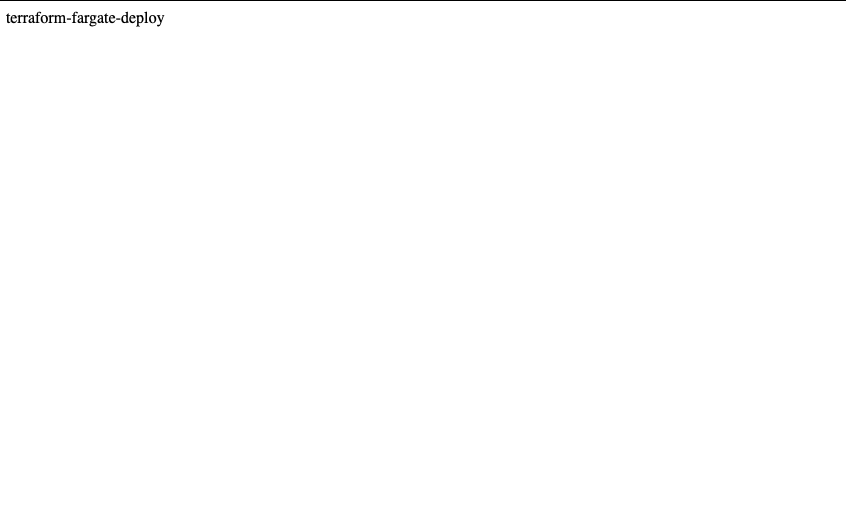
Once the necessary resources are created and you access the ALB endpoint in your browser,
a page like the following will be displayed.
Try to run the deployment
Replace the contents of index.html with "terraform-fargate-deploy-test" and push it to Git.
Then, CodePipeline will be automatically executed via Webhook as shown below.
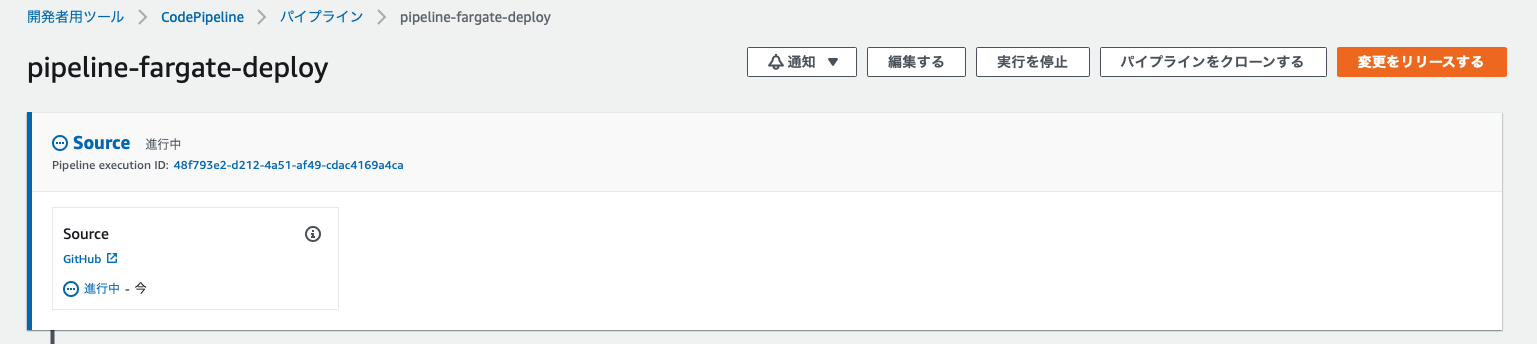
I'm trying to get the source code from GitHub
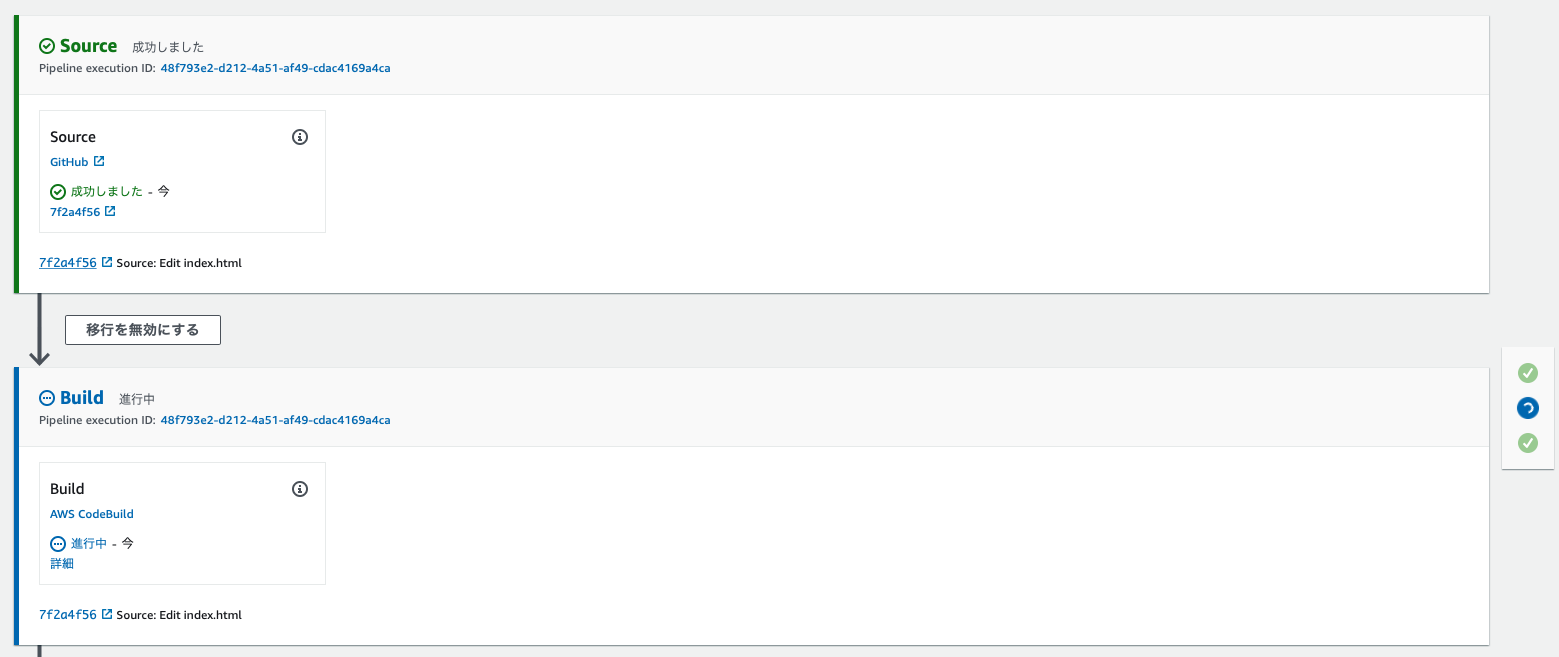
Once complete, CodeBuild will begin processing
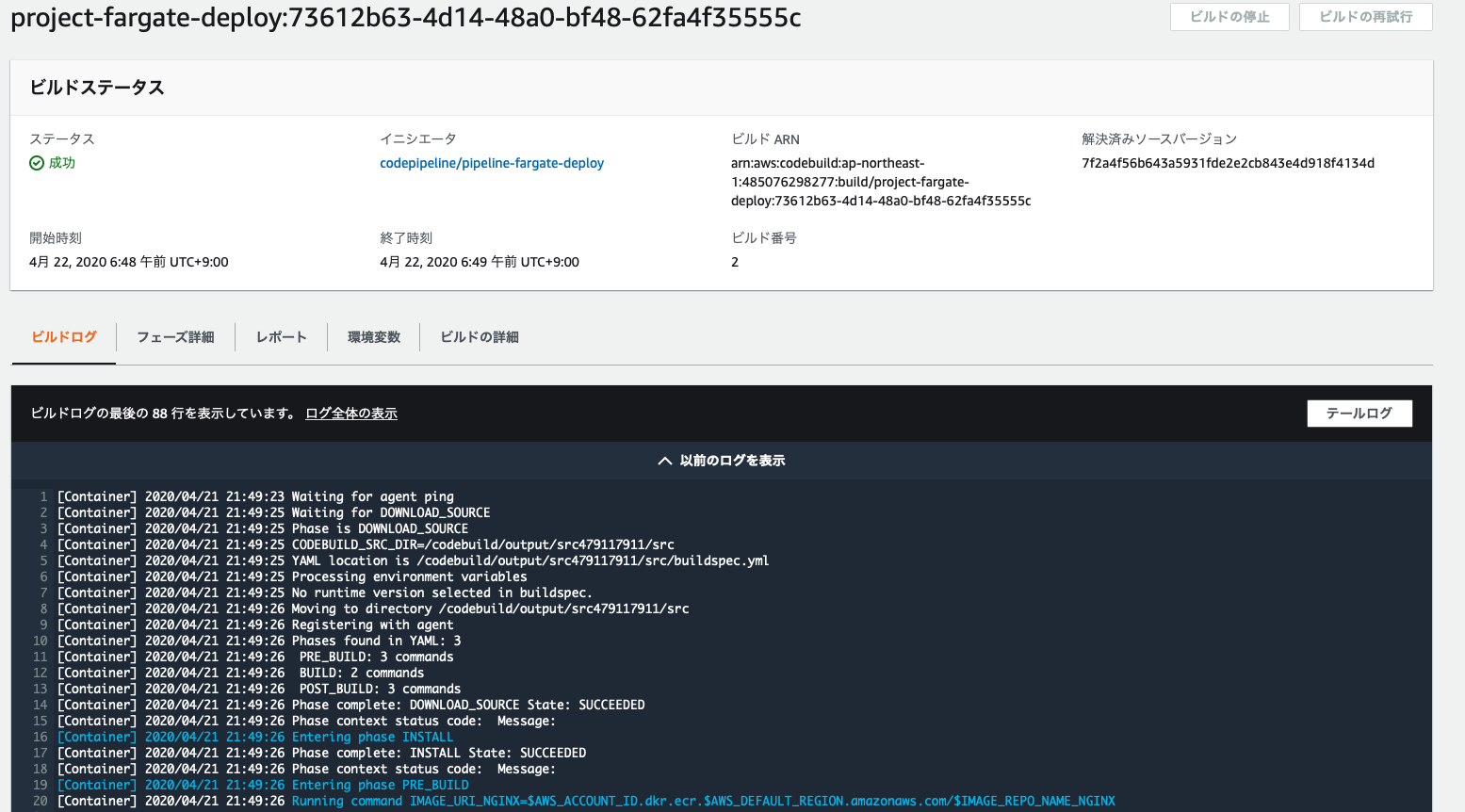
It's running correctly.
Once execution is complete, you can confirm that the Docker image has been saved to ECR, as shown below.
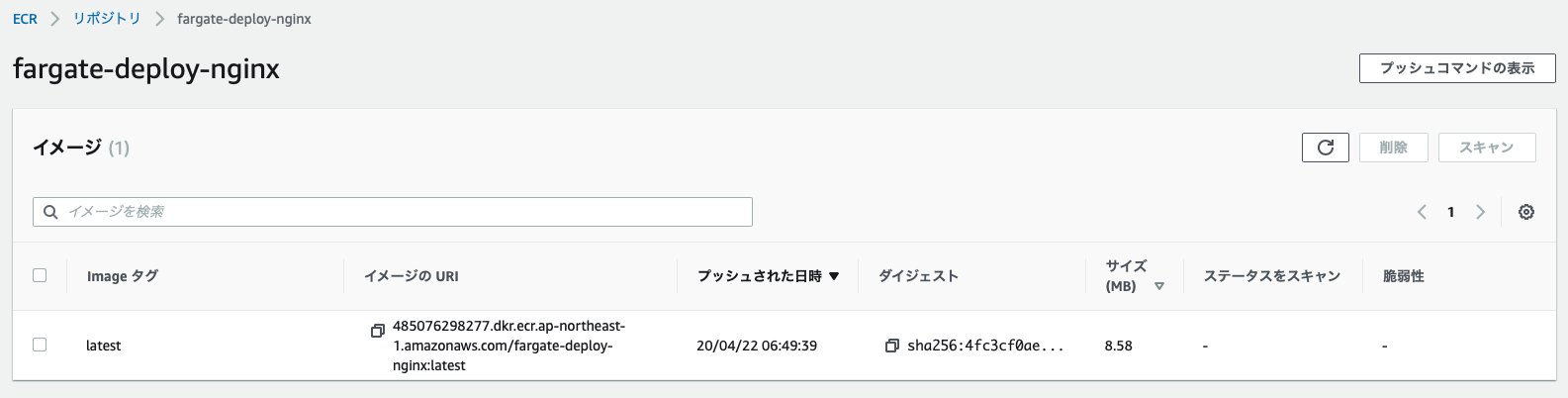
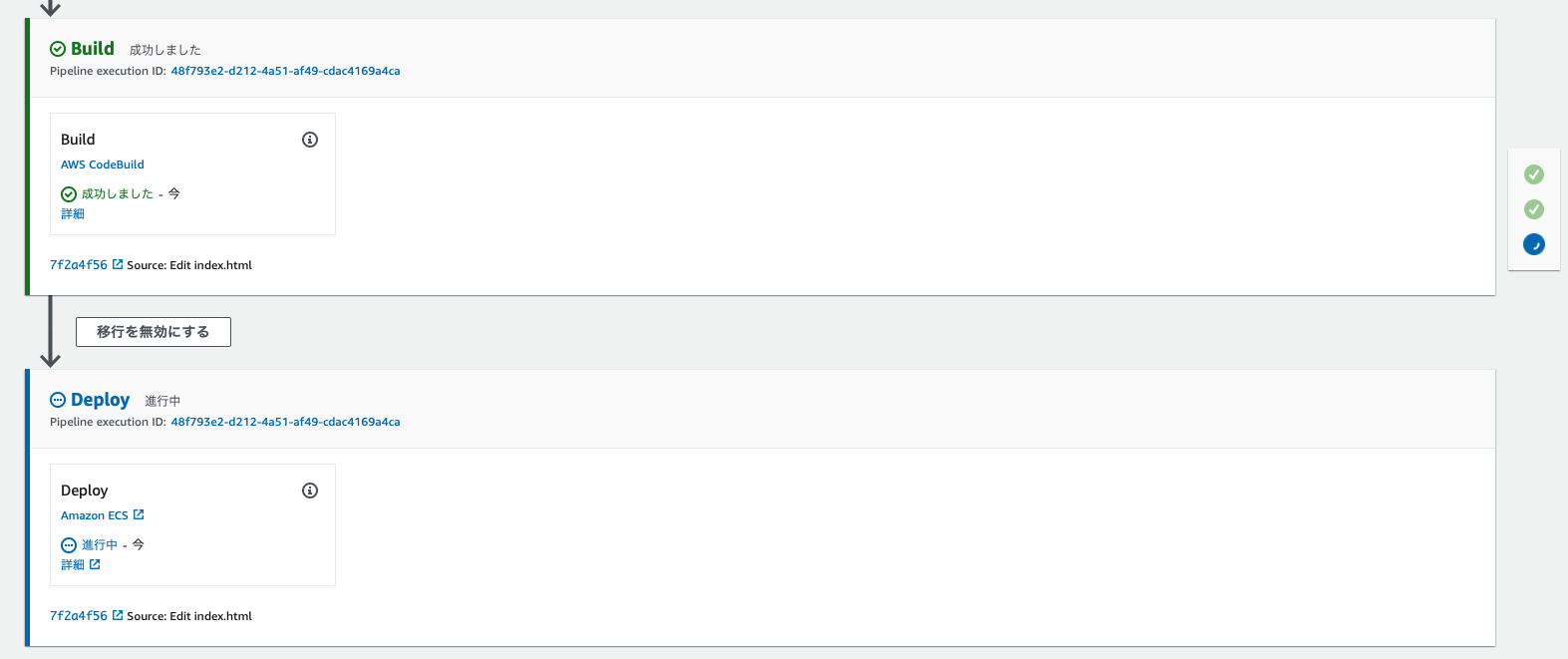
Once CodeBuild is finished, deployment to Fargate will begin
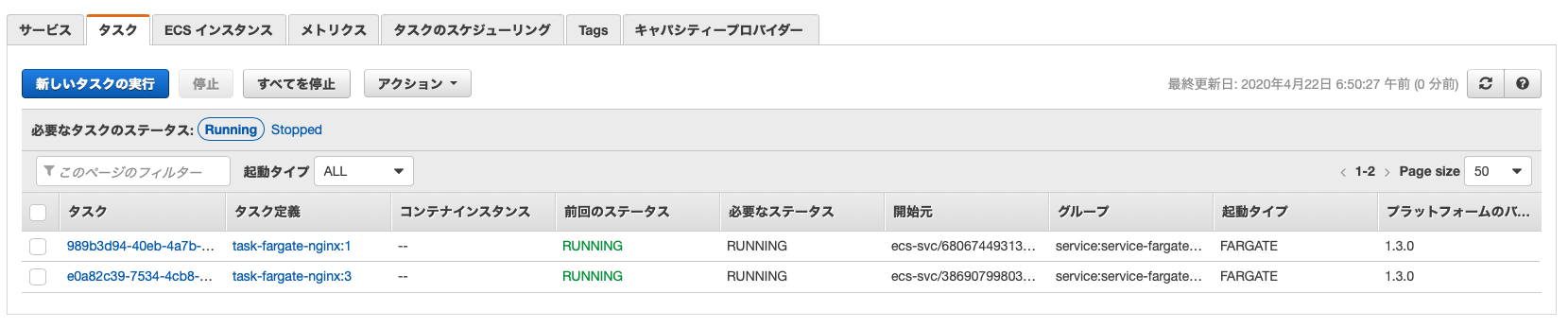
Looking at the number of Fargate tasks, one has increased to a total of two
Let's look at the status of the target group

It looks like you have two tasks linked together and you're trying to detach the older one.
Let's try accessing it again via ALB after it's been detached.
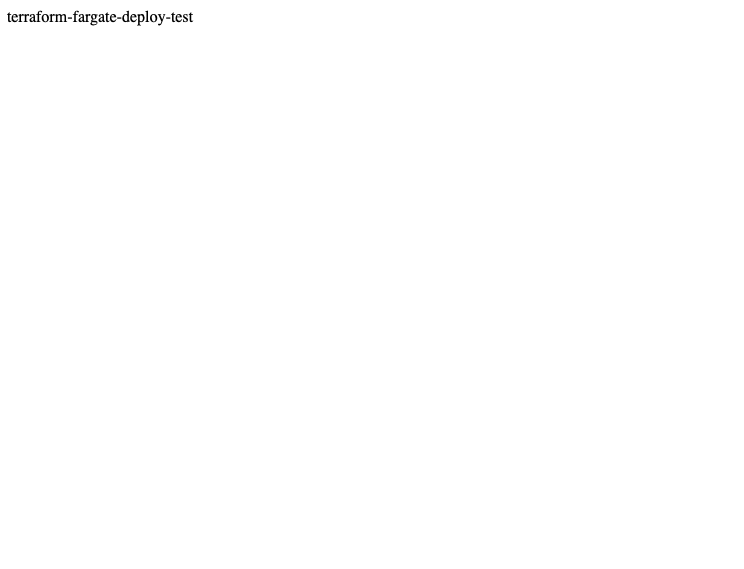
It's been properly updated
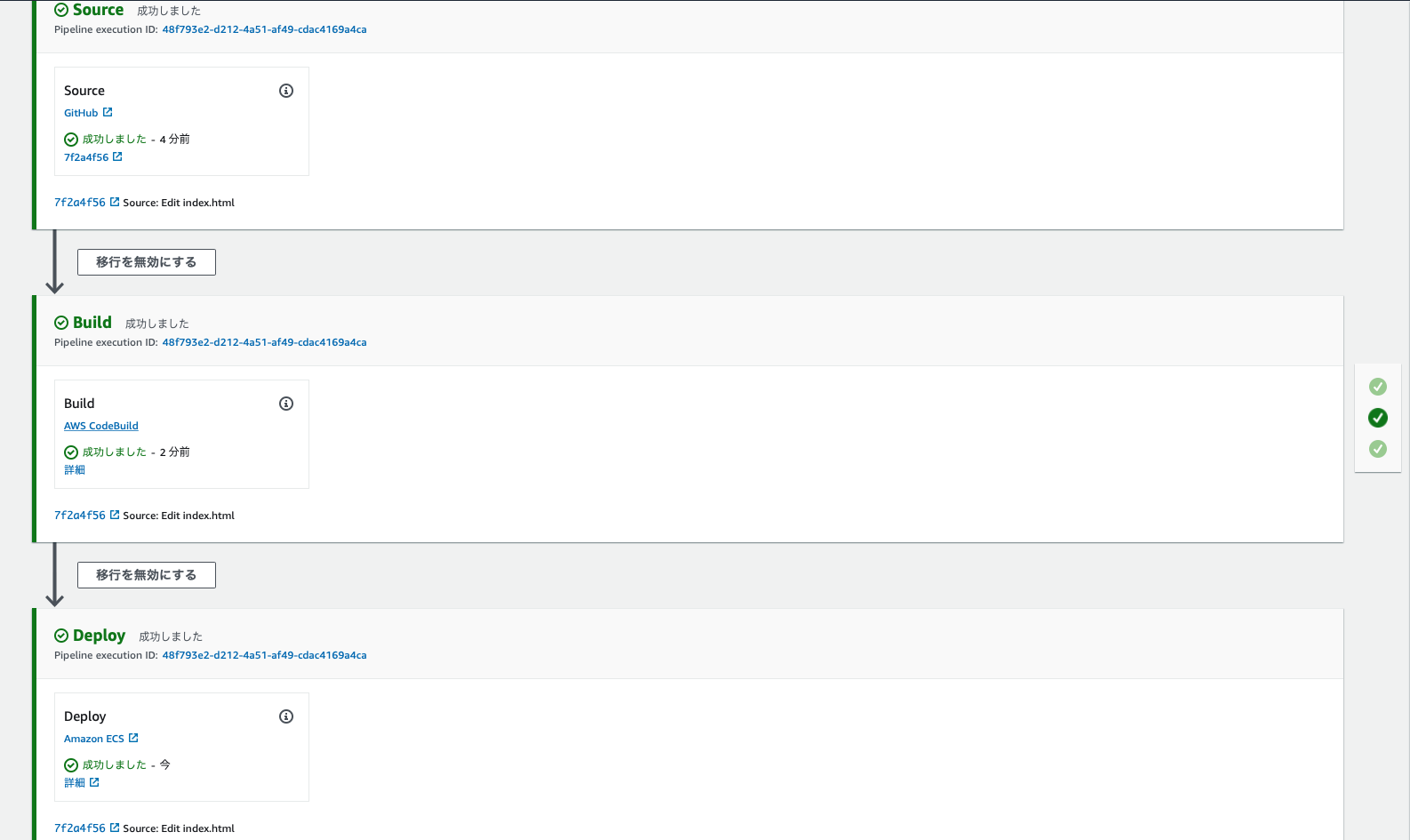
The CodePipeline also completed successfully from start to finish
summary
So, what did you think?
When using containers in a production environment, including Fargate,
it's crucial to consider how you'll deploy them, as is commonly known as CI/CD.
This time, we integrated several AWS Code services, and
they are very easy to use, so I encourage you all to try them out.
The person who wrote this article
About the author









