

[For beginners] Laravel: Trying to import a CSV file!

Hello! This is Fukui from the Systems Development Department!
This time, I'd like to introduce how to import a CSV file using the Goodby CSV library in Laravel!
*This is my first blog post, so I'm writing it with great anticipation...!
Incidentally, this time I worked on a Laravel project created in a Homestead environment.
The environment is as follows:
PHP 7.4.5
, Laravel 7.14.1
, MySQL 5.7
table of contents
• Preparation
• Installing the Goodby CSV library
• Creating a CSV import method
• Testing the functionality
• Summary
• Bonus
Advance preparation
This time, I will create a simple table that only registers the book's "title" and "price."
| Table Name | books |
|---|---|
| column | id, title, price |
Schema::create('books', function (Blueprint $table) { $table->increments('id'); $table->string('title'); $table->integer('price'); $table->timestamps(); });
Here is the view I prepared.
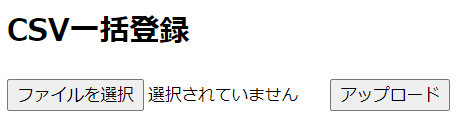
(Yes, it's simple! Sorry!)
With the routing, CSV import method, and model in place, the next step is to install the Goodby CSV library
Installing the Goodby CSV Library
Run the following command to install the Goodby CSV library:
composer require goodbye/csv
Wait until it completes
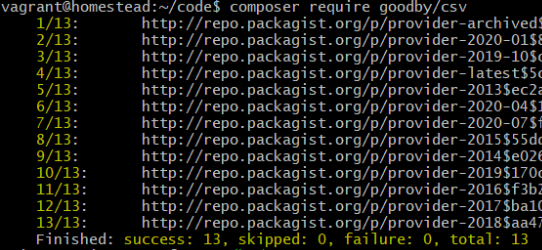
Once the installation is complete, follow the instructions in the README on the Goodby CSV GitHub repository and add the following use declaration to the relevant controller.
(Goodby CSV GitHub)
use Goodby\CSV\Import\Standard\LexerConfig; use Goodby\CSV\Import\Standard\Lexer; use Goodby\CSV\Import\Standard\Interpreter;
Creating a CSV Import Method
The code for the CSV import section is written as follows.
Before saving to the database, I configure Goodbye CSV and perform a charset conversion.
public function importCsv(Request $request) { // Save CSV file $tmpName = mt_rand().".".$request->file('csv')->guessExtension(); // TMP file name $request->file('csv')->move(public_path()."/csv/tmp",$tmpName); $tmpPath = public_path()."/csv/tmp/".$tmpName; // Goodbye CSV config settings $config = new LexerConfig(); $interpreter = new Interpreter(); $lexer = new Lexer($config); // Convert Charset to UTF-8, ignore CSV header line $config->setToCharset("UTF-8"); $config->setFromCharset("sjis-win"); $config->setIgnoreHeaderLine(true); $dataList = []; // Assign values to the $dataList array as a new Observer $interpreter->addObserver(function (array $row) use (&$dataList){ // Get data for each column $dataList[] = $row; }); // Parse CSV data $lexer->parse($tmpPath, $interpreter); // Delete TMP file unlink($tmpPath); // Registration process $count = 0; foreach($dataList as $row){ Book::insert(['title' => $row[0], 'price' => $row[1]]); $count++; } return redirect()->action('ItemsController@book')->with('flash_message', $count . 'Books registered!'); }
Operation check
This time, I will save the following three lines of data as a CSV file. (I love music.)
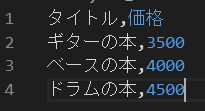
I selected the CSV file and clicked upload...
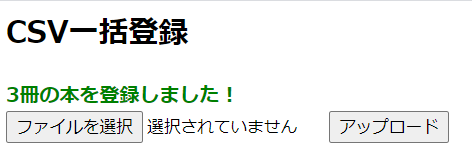
and it seems the process went through successfully and I was redirected. Now
I'll check the database.
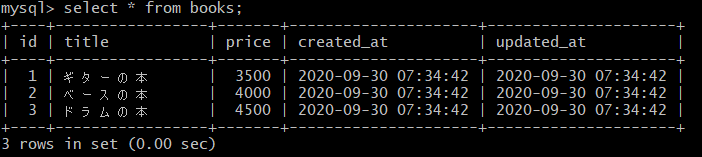
We were able to confirm that the data written in CSV was saved in the database!
summary
I'm glad that I was able to successfully save the information I wrote to the CSV file to the database. I
was a little apprehensive before starting the process, but I found it very convenient because the library installation and registration process could be done in a relatively short time.
In reality, validation checks and exception handling are necessary, but I would like to use it as needed, especially when I need to register a large amount of data.
bonus
■ Download the CSV template file
By adding the following method, I was able to download the CSV template file
public function downloadCsv(): object { // Prepare output data $csvHeader = ["Title", "Price"]; // Set output data separated by commas $downloadData = implode(',', $csvHeader); // Excel compatible $downloadData = mb_convert_encoding($downloadData, "SJIS", "UTF-8"); // Create a temporary csv file if (! file_exists(storage_path('csv'))) { $bool = mkdir(storage_path('csv')); // Throw an exception if directory creation fails if (! $bool) { throw new \Exception("Unable to create directory."); } } $name = 'book.csv'; $pathToFile = storage_path('csv/' . $name); // Create a CSV file if (! file_put_contents($pathToFile, $downloadData)) { throw new \Exception("Failed to write file."); } // Download response return response()->download($pathToFile, $name)->deleteFileAfterSend(true); }
■ Edit csv (VScode plugin)
I added this during this project. It makes CSV files much easier to view in VScode

lastly
I have launched "SEKARAKU Lab," a service site for the system development company I belong to.
Beyond offers a one-stop service for everything from server design and construction to operation, so please feel free to contact us if you have any problems with server-side development.
SEKARAKU Lab:[https://sekarakulab.beyondjapan.com/](https://sekarakulab.beyondjapan.com/)
That's all for today!
Thank you for reading to the end!




The person who wrote this article
About the author









