

A thorough explanation of the advantages and disadvantages of migrating to cloud servers, including a comparison table with physical servers
Many people in charge of cloud servers struggle with the decision of whether to migrate to cloud servers or stick with physical servers. While cloud servers are being adopted by many companies due to their low initial costs and ease of operation, physical servers still have their own unique advantages, and it's not possible to definitively say which is superior
This article is for those considering migrating to a cloud server. We'll summarize the advantages and disadvantages with a comparison table and explain key points to consider when making your selection. The content is easy to understand even for non-engineers, so please read to the end
What exactly is "cloud"?
Cloud computing is a concept that refers to a form of IT resource access that allows users to utilize servers, storage, applications, and other IT resources via the internet
Traditionally, using software required installation on a PC, and operating a server necessitated providing and managing the hardware oneself. There were also physical limitations on where it could be used
However, with the advent of cloud computing, it has become possible to access necessary IT resources regardless of location, as long as there is an internet connection
Cloud-based services (SaaS/PaaS/IaaS)
Cloud services can be broadly categorized into three types, in order of increasing level of abstraction : SaaS → PaaS → IaaS
●SaaS (Software as a Service)
This service provides software and application functionality via the internet. It can be used through a browser without installation, and maintenance is handled by the service provider
Typical examples include Microsoft 365, Google Workspace (Gmail), Salesforce, Slack, and Chatwork
● PaaS (Platform as a Service)
This service provides a platform for building and running applications. Because middleware, databases, and execution environments are pre-configured, users can focus on development without spending time on infrastructure setup
Typical examples include AWS Elastic Beanstalk/App Runner, Microsoft Azure App Service, and Google App Engine
*In recent years, container execution services and serverless computing (AWS Lambda, Cloud Functions) are also discussed within the context of PaaS
● Infrastructure as a Service
This service provides infrastructure layers such as servers, networks, and operating systems. It allows you to freely build your preferred middleware and applications on virtual servers, offering flexibility similar to physical servers
Typical examples include Amazon EC2, Microsoft Azure Virtual Machines, Google Cloud Compute Engine, and Oracle Cloud Infrastructure (OCI) Compute
What is a cloud server?
A cloud server refers to a virtual server that runs on a physical server located within a provider's data center, utilizing virtualization technology, and is accessible via the internet
Since users secure resources by contracting with a service provider and leasing servers, they do not need to prepare their own hardware, which significantly reduces initial costs
While the term "cloud" might give the impression of something intangible, there are always data centers with physical servers located somewhere in the world. It's important to remember that it's not "nowhere to be found."
How cloud servers became popular in Japan
It is said that the surge in interest in cloud computing in Japan was triggered by the Great East Japan Earthquake of 2011. The earthquake caused many companies and local governments to lose their on-premises data centers and servers, making it difficult to continue operations
* For information on business continuity in disaster-stricken areas following the earthquake, please click here
Cloud computing was utilized to overcome this situation. When the earthquake struck, local government websites experienced a surge in access attempts to gather information, making them difficult to connect to. However, various cloud service providers offered their cloud services free of charge across a wide area, from the disaster-stricken regions to the Tokyo metropolitan area, making a significant contribution to disaster recovery
This prompted the Japanese government to recognize the importance of the cloud and promote its use from the perspective of data protection and business continuity during disasters. Since then, cloud usage has rapidly expanded in Japan. In recent years, the spread of generative AI has led to an explosive increase in demand for GPU infrastructure, further enhancing the significance of the cloud
Comparison of physical servers and cloud servers
The characteristics of both can be summarized from six perspectives as follows:
| Comparison items | Physical Server | Cloud Server |
|---|---|---|
| Initial cost | Expensive (hundreds of thousands to several million yen per unit) | Low.Can start from zero |
| Running costs | Constant (decreases after depreciation) | Pay-as-you-go pricing. Varies depending on usage |
| Scalability | Expanding the facility requires equipment procurement and physical construction work (several weeks to several months) | Can scale out in minutes to hours |
| Customizability | Expensive (hardware configuration is also flexible) | There are restrictions within the scope provided by the service provider |
| Troubleshooting and Redundancy | Designed and operated in-house | Easily implement a multi-AZ region configuration |
| maintenance | Implemented in-house (requires manpower and expertise) | The service provider will handle it (user is responsible for anything beyond the OS) |
Physical servers have contrasting characteristics: " high initial costs but stable operating costs and flexible hardware configurations ," while cloud servers have " low initial costs but variable usage-based billing and overwhelmingly high scalability ."
Benefits of using cloud servers
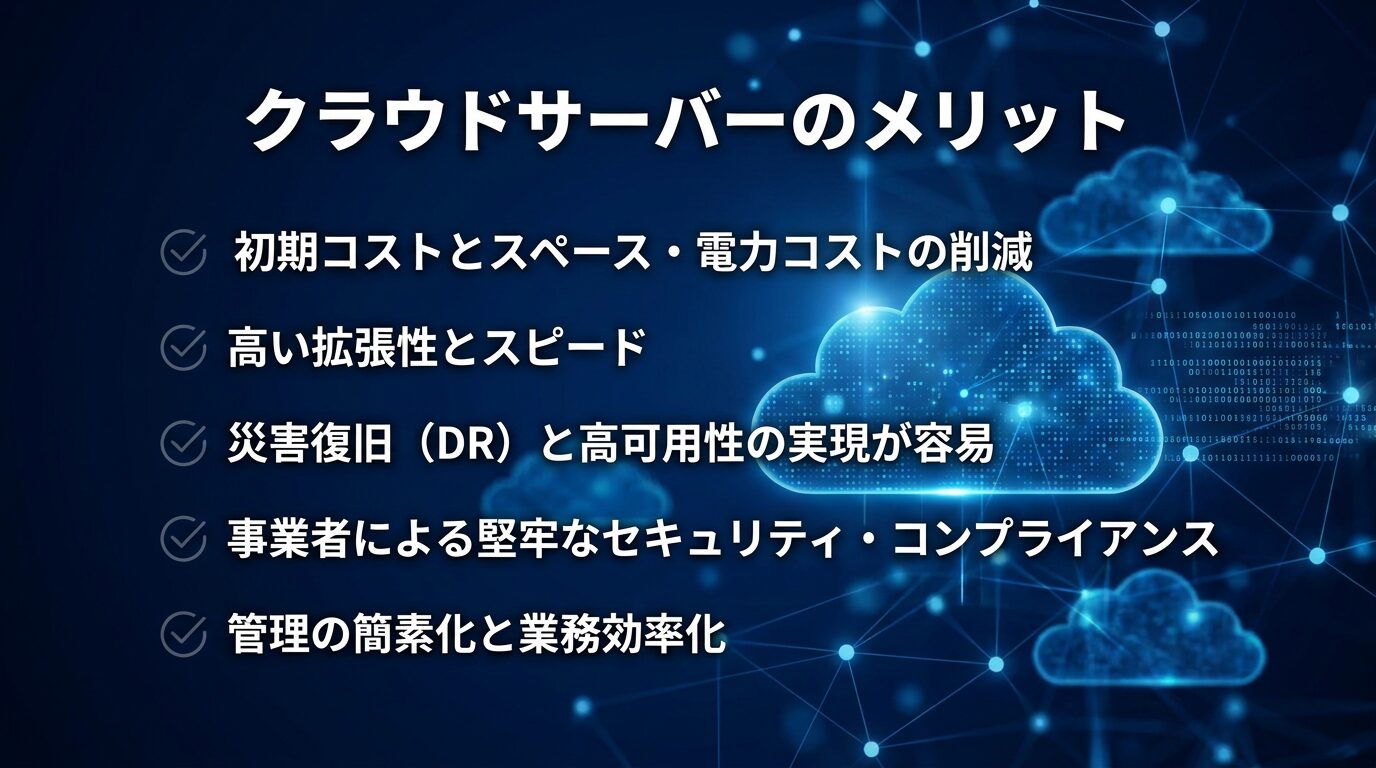
Reduction of initial costs and space/power costs
Compared to owning physical servers, you can reduce not only hardware purchase costs but also indirect costs such as installation space, electricity, and air conditioning
For example, operating physical servers in-house requires an initial investment of several hundred thousand to several million yen per server, but with the cloud, it's possible to start small with just a few thousand yen per month
High expandability and speed
You can increase or decrease resources as needed, when necessary, to match increased traffic and business changes
While expanding physical servers can take weeks to months, with the cloud, scaling out and scaling up can be completed in minutes to hours
Disaster recovery (DR) and high availability are easily achieved
Because the cloud allows for easy distribution of resources across multiple availability zones and regions, disaster recovery (DR) configurations, automated backups, and snapshot operations can be implemented at a low cost
Load balancing is also provided as a standard service, making it easy to improve availability
Robust security compliance by the business operator
Major cloud providers include standard features such as physical security for data centers, encryption, audit logs, and identity management, and have obtained international certifications such as ISO/IEC 27017, SOC 2, and PCI DSS
A major advantage is that you can utilize a high level of security at a much lower cost than building an equivalent security environment in-house
Simplifying management and improving operational efficiency
Cloud providers handle some or all of the hardware maintenance, OS and middleware updates, and security patch application. This reduces the burden of infrastructure operation, allowing companies to focus resources on more strategic tasks such as application development, data utilization, and service improvement
Disadvantages of using cloud servers
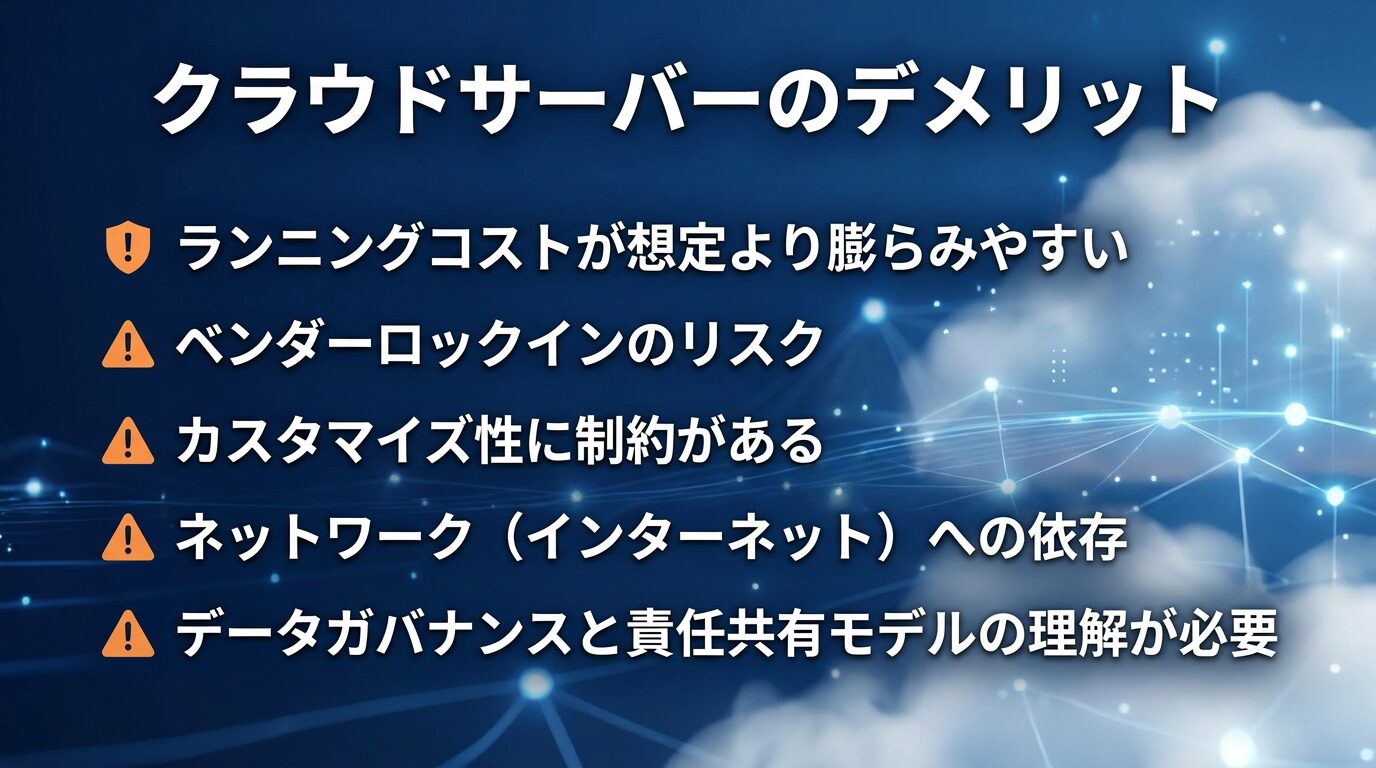
Running costs tend to be higher than expected
While cloud servers have low initial costs, they typically operate on a monthly pay-as-you-go model. Costs are incurred based on data transfer volume, uptime, and storage usage, so it's not uncommon for running costs to exceed initial expectations. This is especially true in cases of sudden spikes in access or design flaws (such as leaving unnecessary instances running or excessive log transfers)
a FinOpsperspective is essential.
Vendor lock-in risk
Configuring your system to be optimized for a specific cloud provider can lead to vendor lock-in, making it difficult to migrate to other clouds or your own environment
This trend intensifies with increased use of managed services, impacting future cost negotiation power and system flexibility. Leveraging multi-cloud and standard technologies (containers, Kubernetes, etc.) allows for risk-mitigating design
There are limitations on customization
With cloud services, the fine-tuning of hardware configurations, specialized network equipment, and specific OS versions that could be freely done on physical servers is limited to what the service provider offers. In some cases, legacy systems or systems for specialized uses may not be able to meet the requirements
Dependence on the network (internet)
Because cloud servers are accessed via the internet, network failures and insufficient bandwidth directly impact business operations. For mission-critical applications, the use of highly available lines and redundant routing (such as AWS Direct Connect, Azure ExpressRoute, and Dedicated Interconnect) is essential
Understanding data governance and shared responsibility models is necessary
While cloud providers offer robust physical security, their shared responsibility model assumes that users are responsible for areas beyond the OS (IAM, data encryption, access rights, application security, etc.)
Furthermore, data breaches due to misconfigurations continue to occur, requiring users to possess a certain level of security expertise. In addition, consideration must be given to the country where data is stored, applicable laws (data residency), and compliance with laws such as the Personal Information Protection Act and GDPR
summary
While cloud servers offer significant advantages such as low initial costs, high scalability, and ease of disaster recovery, there are also considerations required of users, such as managing running costs, avoiding vendor lock-in, and understanding shared responsibility models
- Understanding the differences in cost structure: Initial costs may be lower, but running costs depend on the design and operation.
- Many of the disadvantages can be solved through design: most risks can be mitigated with multi-cloud, cost monitoring, and proper permission design.
- Choosing the right solution for your purpose is crucial: Cloud is ideal for small-scale starts and scaling; physical or hybrid solutions are strong contenders for specific requirements and cost-fixed environments.
Please consider the above three points and choose the optimal server environment
For cloud server construction and migration, choose Beyond
Implementing cloud servers is a crucial measure to support a company's sustainable growth and innovation. However, to achieve its full potential, expertise in areas such as pre-implementation assessment, cost estimation, migration planning, and operational design is essential. If a company lacks sufficient in-house knowledge and resources, outsourcing to a reliable IT partner becomes a practical option
Since its founding, Beyond has been a managed service provider (MSP) with extensive experience in designing, building, and migrating to major cloud services including AWS, Google Cloud, Microsoft Azure, and Oracle Cloud. We offer customized cloud server environments tailored to our clients' system requirements and business characteristics
We can accommodate a wide range of requests, such as "We'd like you to estimate the migration costs," "We'd like you to diagnose our current configuration," and "We'd like you to handle 24/7/365 operational monitoring." Please feel free to contact us for a consultation
● Cloud server design and construction
● Cloud server migration
● Cloud server operation, maintenance, and monitoring (24 hours a day, 365 days a year)
▶ For free consultation and quotes, please usethe inquiry form.
▶ Download service materials here:Request Materials Page
Thank you for reading to the end! If you found this article helpful, please give it a like .




The person who wrote this article
About the author









