

Why not try collecting information using RSS and an RSS reader?
Happy New Year everyone!
This is Iosa from the Systems Development Department, and it's getting tough to ride my motorcycle now that winter has arrived!
As the title suggests, do you all know what RSS is?
Even if you don't know what RSS is, you've probably seen the icon below. (It's handwritten, though...)

This time, I would like to talk about RSS and RSS readers, which make it easier to gather information!
What is RSS?
What is RSS?
RSS is a system for distributing updates and the latest information from websites, blogs, and other sources .
Specifically,the data format in XML, or simply put, the way of writing in XML.
The way it is written is fixed, so you can tell that this tag contains this information
An XML file written using RSS is called an ( RSS) feed
For your reference, our company blog also has an RSS feed . (Please check it out!)
The feed contains information such as the title , summary , and URL of websites and articles
Therefore, RSS is an excellent system for gathering information!
We'll be digging deeper into RSS later, but if you're not interested, you can just skip to the part about RSS readers!
RSS Version
There are currently two versions of RSS in use: 1.0 and 2.0
This doesn't mean 2.0 was created as a successor to 1.0; the two are not compatible .
Both versions originated from the *0.9 series, and their differing approaches and adopted data formats led to a split, resulting in two slightly different specifications.
*RSS 1.0 originates from RSS 0.9, and RSS 2.0 originates from RSS 0.9x
. Think of it like a popular Chinese restaurant chain known for its dumplings.
About Atom
Atomis an XML data format used to distribute updates and the latest information, just like RSS.
While Atom inherits the concepts of RSS and has similar syntax, it is a different data format and was developed as an alternative to RSS.
The background to this is that RSS has had conflicting versions, and the desire to break away from these constraints and create a data format that is simpler and easier to understand than RSS was what led to its development
Ultimately, while Atom did gain popularity, it never completely replaced RSS as a data format, resulting in the existence of three different formats: RSS 1.0, RSS 2.0, and Atom
RSS Reader
As you can see from the (RSS) feed of our blog mentioned earlier, XML itself is a markup language for transferring data between systems, so it is difficult for humans to read
However, all of these problems can be solved by using an RSS reader!
What is an RSS reader?
An RSS reader is software that uses RSS feeds to obtain the latest and updated information distributed by sites and displays it in a format that is easy for humans to view
The two most popular RSS readers are:
Feedly and
Inoreader .
Previously, Google offered a service called Google Reader, but it was discontinued in 2013. (This must have been the opportunity for many people to stop using RSS readers...)
To use it, you can find the (RSS) feed URL of the website you want to get information from and register that URL to get the latest and updated information
Below is the actual Feedly screen I use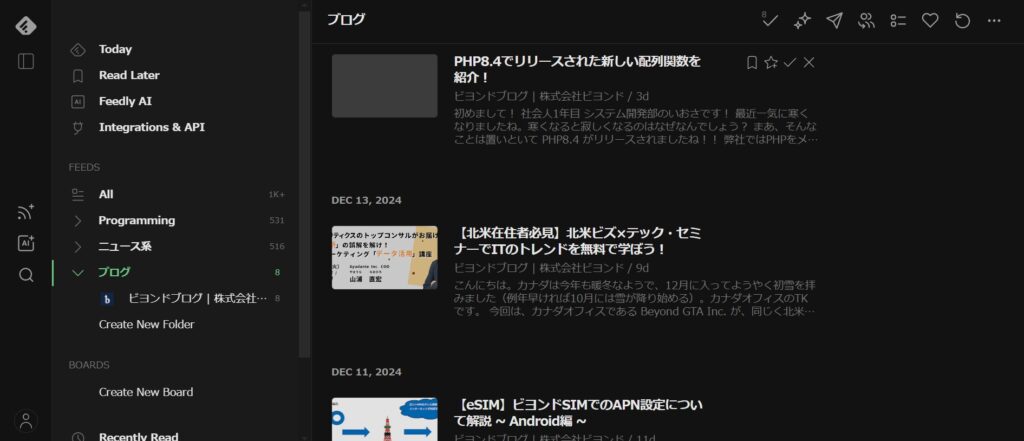
Advantages of RSS Readers
There are three benefits to using an RSS reader
・You can centrally manage the latest and updated information from various sites
When you gather information, you probably use multiple sites, not just one.
For example, there are IT information sharing services like Zenn and Qiita, and blog sites that focus on specific IT technologies.
By centrally managing the latest and updated information from those sites, you can save time and effort in gathering information and make the process more efficient !
You can get only the information you need
These days, we can gather information through social media and other means, but we also pick up noise (information we don't need).
RSS readers, on the other hand, allow you to register only the sites that publish the information you need, soyou only receive the information you want.
・You don't have to worry about different RSS versions
As mentioned in the section on RSS, there are multiple versions of RSS.
Each has different specifications, so if you want to retrieve information using an RSS feed, you need to be aware of the differences between versions.
However, RSS readers can retrieve information regardless of the differences between versions, as well as the newly created data format, Atom!
Recommended use and usage methods
・Separate folders for each technology!
The two RSS readers mentioned above allow you to categorize RSS feeds using folders.
For example, by gathering blogs that only publish PHP-related information into a single folder, you can collect information with less noise!
・You don't need to read the article for all the information!
In reality, registering with multiple websites to read all the information and articles would take so much time that it would be nearly impossible.
Furthermore, deciding to read every single piece of information and article raises the bar too high, making information gathering a chore.
Therefore, I recommend just skimming the titles of the information and articles, and only reading the information and articles that catch your eye or interest you!
This way, you can incorporate information gathering into even just 5 minutes of spare time!
lastly
What did you think?
I hope this helps you understand what RSS and RSS readers are, and the advantages of using them for information gathering!
There are some things you can only understand by actually using them, so if you're interested, please give them a try!




The person who wrote this article
About the author









