

[IDS] Installing Tripwire and notifying Chatwork of file difference detection results (Ubuntu 22.0.4)

Hello.
This is Kawai from the System Solutions Department, where I
have zero trust from my subordinates
Happy New Year!
I will continue to do my best this year as well.
This time, I'd like to use the open-source hosted IDS "Tripwire" to automatically notify Chatwork of file tampering detections. It's
often difficult to notice changes to files and directories on the server that aren't frequently touched, so this could be surprisingly useful. Full-scale operation would be challenging, but the initial setup isn't that difficult.
What is Tripwire?
Tripwireis an IDS (Intrusion Detection System), or rather, a file tampering detection tool, that monitors files in predefined directories and allows you to check and receive notifications about the results. It is
a product of Tripwire Inc., and both a free open-source version and a paid version are available. This time, we will use the open-source version (it does not have IPS functionality).
man page:https://linux.die.net/man/8/tripwire
install
■ Verification environment
Ubuntu 24.04 LTS Tripwire 2.4.3.7.0 Python 3.12.3 # Used for notifications
■Installation and initial settings
$ sudo apt update $ sudo apt install tripwire
That's all there is to the installation.
You'll be prompted several times during installation, so select the appropriate settings and proceed.
*This guide assumes a completely localhost environment.
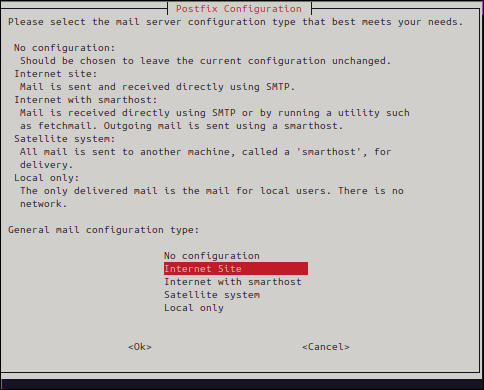
▼ Select the purpose. In this example, we selected Local Only , but if your site is publicly accessible, select Internet Site
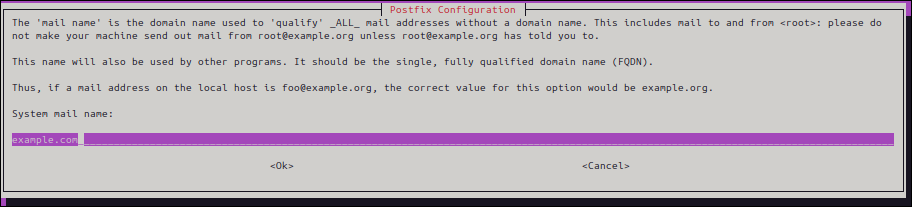
▼ Domain for the email address used for notifications. If you don't have a specific one in mind,example.comis fine. We won't be using it this time.
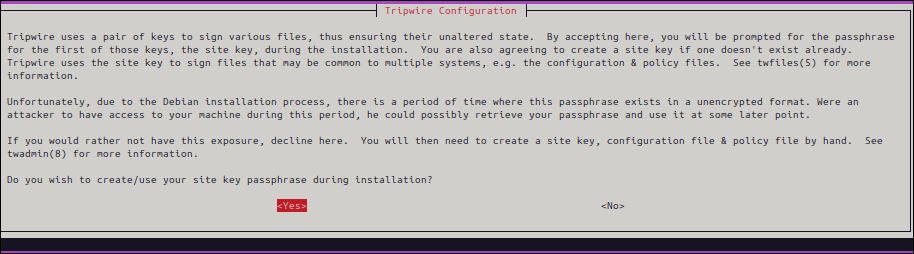
▼ For security reasons, a key pair will be created for Tripwire. Select the default"Yes".
(See twfiles(5) for details:https://linux.die.net/man/5/twfiles)
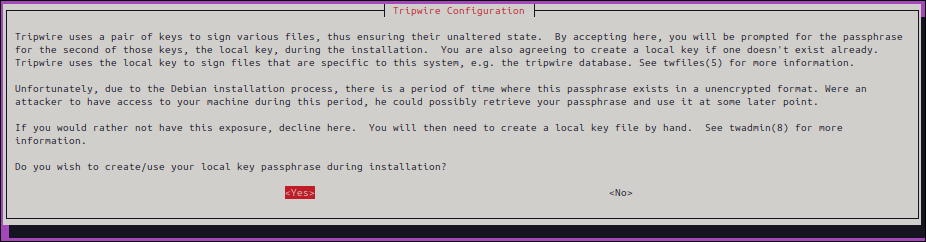
▼ Initial configuration,Yes
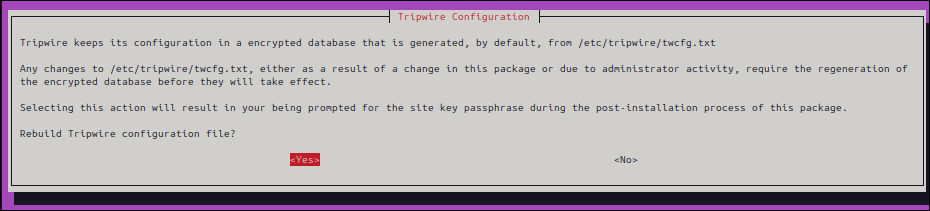
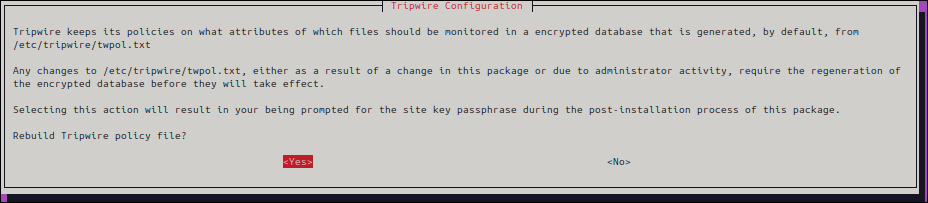
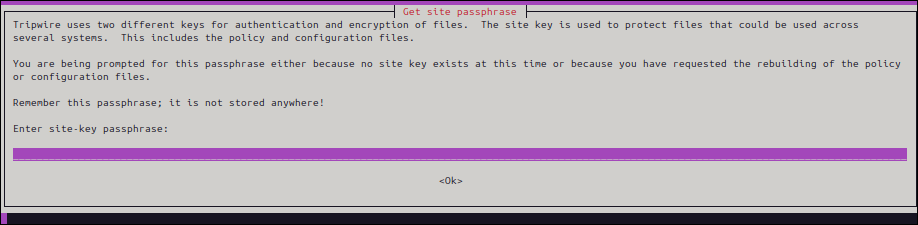
▼ Enter your passphrase (note-taking recommended). Enter it twice for confirmation.
▼ Installation complete

. Proceed to policy file settings.
Policy settings
"twpol.txt," so we will edit this file.
Just to be safe, we will create a backup beforehand.
$sudo cp /etc/tripwire/twpol.txt /etc/tripwire/twpol_org.txt $sudo nano /etc/tripwire/twpol.txt
Since the detection details would be quite long , this time we will only target "/var/www/html and its subdirectories"
*If you want to use the same content as this article, please copy and paste the following.
# Global Variable Definitions @@section GLOBAL TWBIN = /usr/sbin; TWETC = /etc/tripwire; TWVAR = /var/lib/tripwire; # File System Definitions @@section FS # Tripwire Binaries ( rulename = "Tripwire Binaries", severity = 100 ) { $(TWBIN)/siggen -> $(ReadOnly) ; $(TWBIN)/tripwire -> $(ReadOnly) ; $(TWBIN)/twadmin -> $(ReadOnly) ; $(TWBIN)/twprint -> $(ReadOnly) ; } # Apache Document Root ( rulename = "Apache Document Root", severity = 100 ) { /var/www/html/ -> $(IgnoreNone)-SHa; } # End of Policy File
Once you have finished editing the policy, apply and initialize it.
Enter the passphrase you set in the initial setup prompt mentioned earlier.
If the output is as shown below, it's OK.
$ sudo twadmin --create-polfile /etc/tripwire/twpol.txt Please enter your site passphrase: Wrote policy file: /etc/tripwire/tw.pol $ sudo tripwire --init Please enter your local passphrase: Parsing policy file: /etc/tripwire/tw.pol Generating the database... *** Processing Unix File System *** Wrote database file: /var/lib/tripwire/hamchan.twd The database was successfully generated.
The basic setup is now complete.
Let's try checking it.
$ sudo tripwire --check Parsing policy file: /etc/tripwire/tw.pol *** Processing Unix File System *** Performing integrity check... Wrote report file: /var/lib/tripwire/report/hamcha-20241025-135438.twr Open Source Tripwire(R) 2.4.3.7 Integrity Check Report Report generated by: root Report created on: Fri 25 Oct 2024 01:54:38 PM JST Database last updated on: Never ================================================================================ Report Summary: ================================================================================= Host name: hamchan Host IP address: 127.0.1.1 Host ID: None Policy file used: /etc/tripwire/tw.pol Configuration file used: /etc/tripwire/tw.cfg Database file used: /var/lib/tripwire/hamchan.twd Command line used: tripwire --check ================================================================================= Rule Summary: ==================================================================================================================== ------------------------------------------------------------------------------- Section: Unix File System ------------------------------------------------------------------------------- Rule Name Severity Level Added Removed Modified --------- -------------- ----- ------- -------- Tripwire Binaries 100 0 0 0 Apache Document Root 100 0 0 0 (/var/www/html) Total objects scanned: 7 Total violations found: 0 ================================================================================ Object Summary: ================================================================================ ------------------------------------------------------------------------------ # Section: Unix File System ------------------------------------------------------------------------------ No violations. ================================================================================ Error Report: ================================================================================ No Errors ------------------------------------------------------------------------------ *** End of report *** Open Source Tripwire 2.4 Portions copyright 2000-2018 Tripwire, Inc. Tripwire is a registered trademark of Tripwire, Inc. This software comes with ABSOLUTELY NO WARRANTY; for details use --version. This is free software which may be redistributed or modified only under certain conditions; see COPYING for details. All rights reserved. Integrity check complete.
A report summarizing the number of scanned objects and other information was generated.
Next, let's try detecting file differences.
Detecting differences
To start with, write "test" in the HTML file below and edit it
sudo nano /var/www/html/test.html
When I ran the scan again, the "Modified" section displayed a summary of the directories and files that had been changed.
# Excerpt ================================================================================= Rule Summary: ==================================================================================================================== ------------------------------------------------------------------------------- Section: Unix File System ------------------------------------------------------------------------------- Rule Name Severity Level Added Removed Modified --------- -------------- ----- ------- -------- Tripwire Binaries 100 0 0 0 * Apache Document Root 100 0 0 2 (/var/www/html) Total objects scanned: 7 Total violations found: 2 ========================================================================== Object Summary: ================================================================================ --------------------------------------------------------------------------- # Section: Unix File System ------------------------------------------------------------------------------ ------------------------------------------------------------------------------ Rule Name: Apache Document Root (/var/www/html) Severity Level: 100 ------------------------------------------------------------------------------- Modified: "/var/www/html" "/var/www/html/test.html"
In this case,/var/www/htmlundertest.htmla change was made towe can see that
Incidentally, changes to the file owner or permissions will also be detected.
Next, let's create a new file
sudo touch /var/www/html/ransom.sh
Run the scan again
--------------------------------------------------------------------------------- Section: Unix File System --------------------------------------------------------------------------------- Rule Name Severity Level Added Removed Modified -------- -------------- ----- ------- ------- Tripwire Binaries 100 0 0 0 * Apache Document Root 100 1 0 2 (/var/www/html) Total objects scanned: 8 Total violations found: 3 ================================================================================ Object Summary: ================================================================================ --------------------------------------------------------------------------- # Section: Unix File System ------------------------------------------------------------------------------ ------------------------------------------------------------------------------ Rule Name: Apache Document Root (/var/www/html) Severity Level: 100 ------------------------------------------------------------------------------- Added: "/var/www/html/ransom.sh" Modified: "/var/www/html" "/var/www/html/test.html"
"Added" column shows "1,"/var/www/html/ransom.sh" was createdindicating that
Checking the report makes it immediately clear that an unintended file was placed there. Very convenient.
Scheduled execution and report notifications
Tripwire has an email notification function, but this time I would like to show you how to notify Chatwork
First, we'll set up a cron job.
Since the standard check outputs the report in binary format, we'll configure it to save it as a text file to a desired path.
The execution interval can be adjusted to suit your environment and purpose.
sudo crontab -e 0 0 * * * /usr/sbin/tripwire --check > /home/hamchan/$(date +\%Y\%m\%d)_report.txt # *The date (yyyymmdd) is added when output. $ echo $(date) Fri Oct 25 02:47:26 PM JST 2024 $ echo $(date +\%Y\%m\%d) 20241025
Next, we will create the Python code for Chatwork notifications
import requests import subprocess import os from glob import glob # Chatwork API settings API_TOKEN = 'xxxxxxxx' # Chatwork API token ROOM_ID = 'xxxxxxxx' # Destination group ID ENDPOINT = f'https://api.chatwork.com/v2/rooms/{ROOM_ID}/messages' HEADERS = { 'X-ChatworkToken': API_TOKEN, } # Function to return the path to the latest Tripwire report file def get_latest_tripwire_report(): report_files = glob('/home/hamchan/*_report.txt') if report_files: return max(report_files, key=os.path.getmtime) # Get the latest file return None # Function to read a file and return it as text def get_report_content(report_path): with open(report_path, 'r', encoding='utf-8') as file: return file.read() # Returns the file contents as text # Sends the file name and path to Chatwork def send_chatwork_message(message): payload = {'body': message} response = requests.post(ENDPOINT, headers=HEADERS, data=payload) if response.status_code == 200: print('Notification sent to Chatwork.') else: print(f'Notification failed: {response.status_code}, {response.text}') if __name__ == '__main__': latest_report_path = get_latest_tripwire_report() if latest_report_path: report_content = get_report_content(latest_report_path) # Get report content send_chatwork_message( f"[info][title]Tripwire report saved to[/title]\n" f"{latest_report_path}[/info]\n\n" f"\n{report_content}" ) else: send_chatwork_message("No recent Tripwire reports found.")
I'll set it up as a cron job.
As a test, I've set it to send a notification 2 minutes after the Tripwire report is generated.
sudo crontab -e 2 0 * * * /usr/bin/python3 /home/hamchan/tripwire_test/chatwork_notification.py
▼ This is what the notification
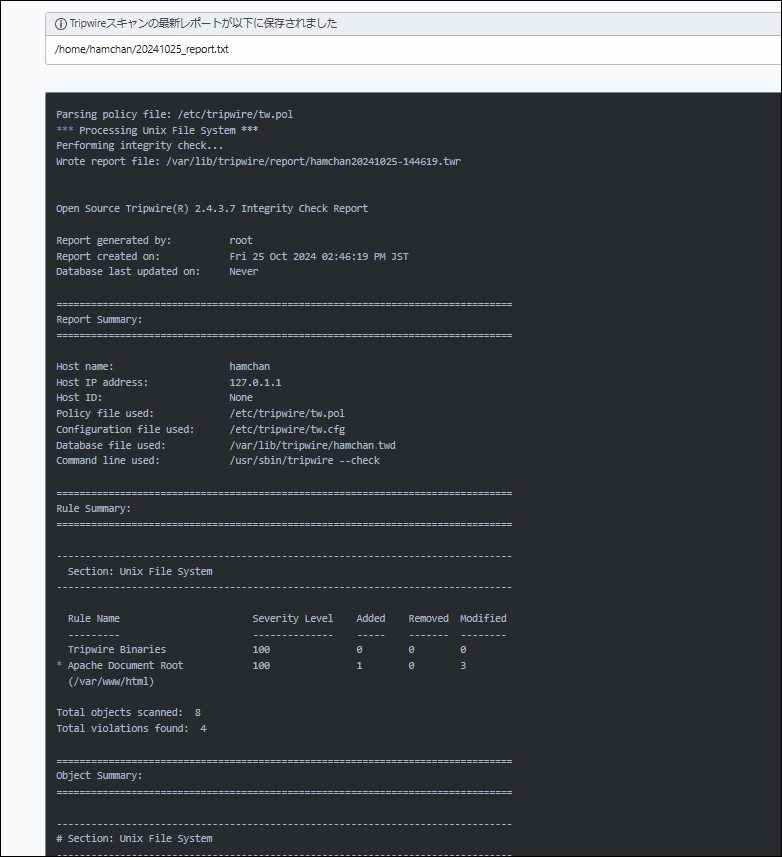
said.
Now you can notice if a suspicious file has been placed on your computer. I think this is a significant improvement in security compared to not putting anything in at all.
Give it a try!
complete




The person who wrote this article
About the author









