

Eliminate the frustration of Android! I tried three ways to disable Google Now

This is Yamada from the development team
Actually, I recently switched from my iPhone, which I'd been using for a long time, to Android.
There were several reasons, but the main one was that I really wanted to use mobile payment services.
However... I've come to realize just how refined and easy to use the iPhone really is. Maybe it's
just because I'm not used to the Android interface, but there are some things I just can't get used to.
One of them is the "Google Now" feature.
Basically, it's a feature that lets you quickly access Google Search and Now Cards by swiping up on the home key.
On iPhones, this action brings up the Control Center.
Personally, I don't see the need for this feature because I rarely find myself in situations where I "quickly need to bring up the search screen!", and the fact that
the browser app launches in a separate process after the search results are displayed is a bit annoying...
And most importantly! I accidentally type so many times while typing!!!

I meant to type "What's wrong?" but this is what happened
So, I've put together a guide on how to disable ``Google Now.''
Solution 1. Disable your Now card ⇒ ✖
When I looked up how to disable it, this was the first thing that came up:
how to stop the Now Cards feature from "Google Settings".
• Here's how to set it up:
Turn Google Now on or off.
However, this would bring up Google Search instead of Google Now, which is not good for preventing accidental clicks.
I don't want to disable the convenient Now Card just to prevent accidental clicks from swiping up.
I won't go into detail here as it doesn't suit my purpose
Solution 2. Disable the Google app ⇒ 〇
The next method is to disable the Google app entirely.
Certainly, you can use a browser like Chrome for searching, so
this might be effective...
•
How to disable Google search, which appears when you swipe up from the bottom on Android.
Indeed, swiping up on the home key no longer does anything!
However, this method disables all Google app features, including voice input.
This is fine if you don't use any Google app features at all, but
for those who find this inconvenient, I'll introduce another method.
Solution 3. Install an alternative app ⇒ ◎
The last thing I tried was this:
I tried disabling the home key by assigning a different app to the up swipe gesture.
This is the app we introduced this time
It's easy to use: after installing it from the store, you can launch "GN's Replacement" by swiping up on the home key.
Then, simply select "Do nothing" and tap "Always."
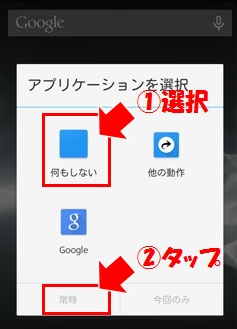
This will free you from that annoying problem of accidental firing!
By the way, selecting "Other actions" allows you to launch any app you like.
For a while, I had assigned the music app to this action, but I ended up unassigning it because I was accidentally triggering it too often while typing.
I want to use the Google app's features, but I don't need the search function that appears when you swipe! This is probably the best option for people like you
summary
Android smartphones have become significantly more powerful and feature-rich compared to a few years ago, but there still seems to be room for improvement.
I bought an Xperia Z5, and I've noticed differences in other details such as the presence or absence of a home button, the position of the volume switches, and the accuracy of the fingerprint sensor.
Even on Android, swiping down on the notification bar brings up a highly customizable launcher, but
doing this with one hand is difficult on recent large-screen phones (because I have small hands).
The iPhone, with its highly accessible features grouped together for everyday use,
felt like it had a significantly more refined user experience.
But!! Even so, Osaifu-Keitai is still convenient!!!
If you want to talk to a cloud professional
Since our founding, Beyond has used the technical capabilities we have cultivated as a multi-cloud integrator and managed service provider (MSP) to design, build, and migrate systems using a variety of cloud/server platforms, including AWS, GCP, Azure, and Oracle Cloud
We provide a custom-made cloud/server environment optimized for our customers based on the specifications and functions of the systems and applications they require, so if you are interested in the cloud, please feel free to contact us
● Cloud/Server design and construction
● Cloud/Server migration
● Cloud/Server operation, maintenance, and monitoring (24 hours a day, 365 days a year)




The person who wrote this article
About the author