

Points I got stuck on when using passive FTP on EC2
2016.04.25





I'm Ito from the infrastructure team
I recently had the opportunity to use FTP (vsftpd) passively on an EC2 instance, and I had trouble getting the FTP communication to work properly, so
I'd like to share some key points to keep in mind.
vsftpd stands for Very Secure FTP Daemon
It's not just security groups
I think most people use security groups to control ec2 firewalls
The process involves using security groups to allow only the IP addresses that use FTP.
Additionally, if you're using passive FTP, you'll need to open the passive port in the security group as well.
Something like this
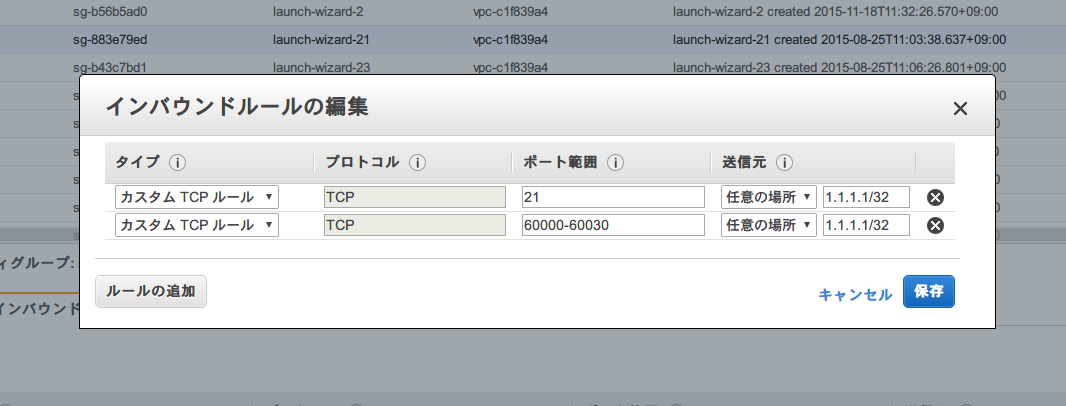
Next, we configure the vsftpd side as well.
This involves setting it to use passive mode and configuring the port to be used for passive mode.
# vim /etc/vsftpd/vsftpd.conf pasv_enable=YES pasv_min_port=60000 pasv_max_port=60030
However, this alone won't connect..
Communication when vsftpd is passive on ec2
EC2 instances don't inherently know the public IP address, do they?
If you run `ifconfig`, it only returns the local IP address.
This means that passive communication will be performed using the "EC2 instance's local IP address". This
"FTP communication is possible, but passive communication is not, so a directory listing cannot be displayed," and the FTP connection fails.
To solve this, you just need to configure vsftpd with the IP address that should be used for passive communication.
Like this.
# vim /etc/vsftpd/vsftpd.conf pasv_address=<public IP>
FTP is now fine!!
The person who wrote this article
About the author









