

How to find which template you want to edit on your site using MovableType
2016.09.20




This is Goto from the web team
MovableType, abbreviated as MT
when you just write articles for a while without making any changes to the design, or when someone else has customized the design and
you're asked to edit it even though you don't really know much about it.
This article is aimed atpeople who "know which part of the site they want to edit, but don't know which part to actually modify."
So, what should you modify?the "templates.
MT stores the site layout as templates for each component, and combines these templates on the server to output HTML.
In the MT administration screen, go to [Design] => [Templates] to see a list of templates.
Then, simply order one or edit it according to your own preferences, and you're done.
Please refer to the official documentation regarding MT tags when editing
It's difficult to read in black and white. I wish it had syntax highlighting.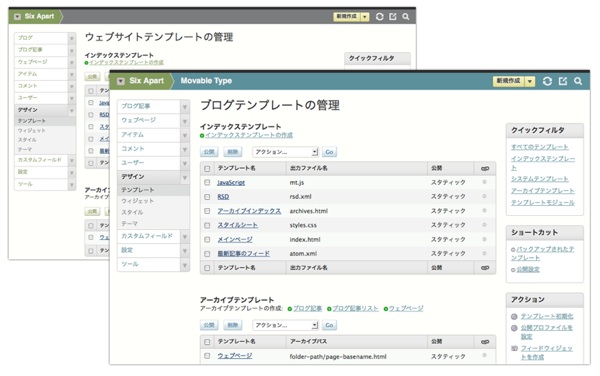
Now, to the main topic of this article,
if you're having trouble deciding which template to use because there are so many options, you can identify it using the method below.
MT is the guy who puts all the data into the database, so let's search for it in the database
manner
select template_id, template_name from mt_template where template_text like "% {Copy and paste the source you want to edit here} %";

This will tell you the ID and name of the template or widget you want to edit. It's quick and easy.
Then, in the admin panel, go
to [Design] => [Templates], find the template with the matching ID, and edit it.
That's all
The person who wrote this article
About the author