

Windows Server 2016 Licensing Guide

This is Ohara from the Technical Sales Department
This document describes the licensing structure for Windows Server 2016 server licenses.
*Please note that this article is current as of June 2017, and pricing and specifications may change in the future.
From "processor license" to "core license"
When purchasing Windows Server licenses,
billing was based on "processor licenses" up to Windows Server 2012R2.
This "processor license" refers to the number of CPUs (sockets) in the server.
The Windows Server license was charged
based on the number of CPUs installed in the server
In Windows Server 2016, the purchasing system has been changed
from "per CPU" to "per core"
License charging rules
First, the prerequisites for purchasing a license are as follows:
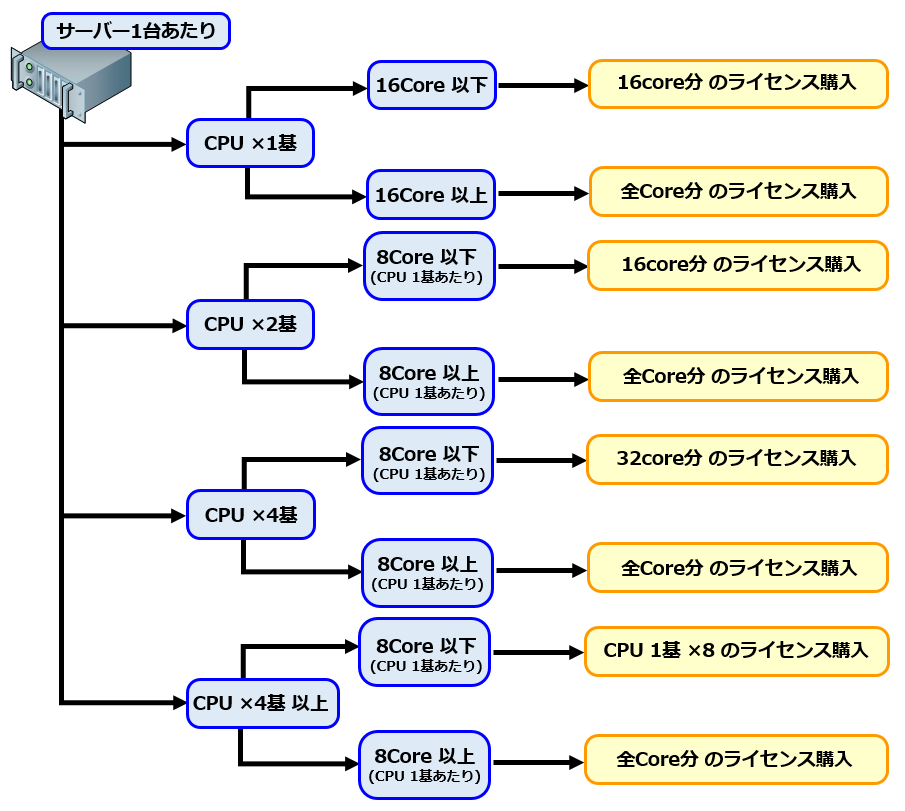
Based on the licensing structure described above,
the question is, "How many licenses should I purchase per core?"
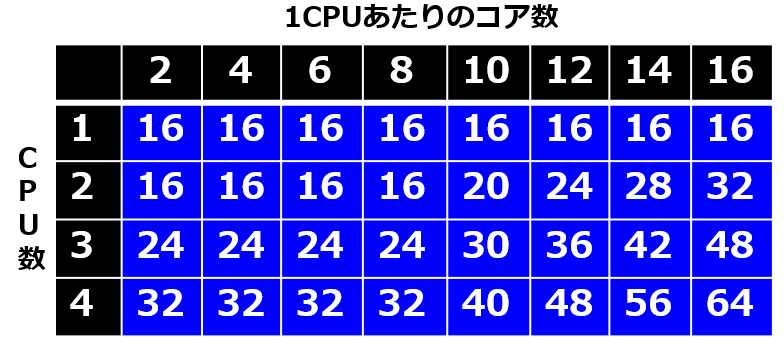
The calculation formula is as follows
■ Minimum number of cores to purchase: 16 cores
■ Per license: 2 cores (1 license purchase includes 2 cores)
Therefore, if you purchase the minimum number of 16 cores, the minimum number of licenses you need to purchase is 8
others
■ It is possible to downgrade Windows Server 2016 to 2012 and use it
■ Windows Server 2016 also requires a CAL (User or Device). (Excluding the SPLA version)
*While Windows Server 2016 CALs can be used with Windows Server 2012,
Windows Server 2012 CALs cannot be used with Windows Server 2016.
If you wish to continue using Windows Server 2012 CALs that you have already purchased,
you can downgrade Windows Server 2016 to Windows Server 2012.
*Incidentally, the "Microsoft SQL Server 2016" DB license
can also be downgraded to Microsoft SQL Server 2012.
summary
If you've forgotten the licensing structure and billing method
when purchasing a Windows Server 2016 license , I hope this article will be helpful




The person who wrote this article
About the author









